
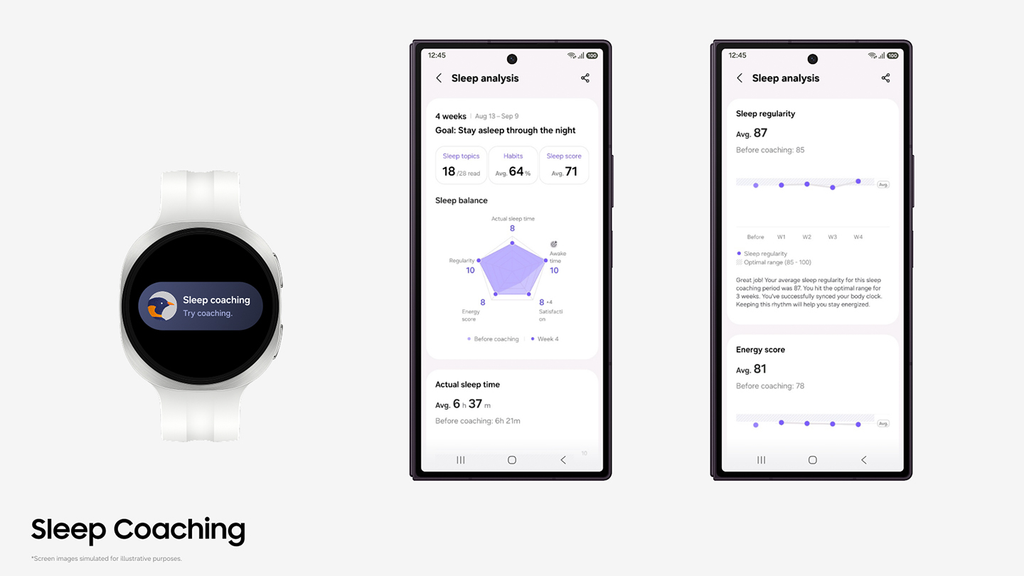
Samsung Electronics has officially rolled out a massive overhaul to the Samsung Health app, completely reinventing how its smartwatches and fitness trackers handle your nightly rest. If you wear a Galaxy Watch, Galaxy Ring, or Galaxy Fit to bed, the way your device analyzes your sleep habits just changed dramatically.
The headline update is simple: you no longer have to wait weeks just to find out why you wake up exhausted. Samsung slashed the onboarding barrier for Sleep Coaching, introduced an adaptive weekly guidance engine that alters its tips based on how your week is going, and added a five-point balance graphic to help you see exactly where your sleep is slipping.
Alongside the sleep revamp, Samsung also upgraded its Running Coach to 12 training tiers, added deep route integration with fitness giant Strava, and debuted an AI meal-scanning beta tool.
Here is a full breakdown of what changed, why it matters for your health, and how to use these new tools to wake up feeling like a functional human being.
Why Old-School Sleep Tracking Used to Be So Frustrating
Smartwatches have tracked sleep stages for nearly a decade. They can tell you when you were in light sleep, when you slipped into deep sleep, and when you were dreaming in REM. Yet for millions of people, that information sat unused inside the app.
The $0 Secret To Launching Your Entire Online Empire
Why pay hundreds every month for separate software? Build funnels, send emails, and make sales with Systeme.io completely free.
Get Started For $0Free Forever • No Credit Card Needed • Beginner-Friendly
Seeing a graph that says you spent 42 minutes in deep sleep does not help you get through a morning meeting. It describes what happened, but it gives you zero guidance on how to fix it.
Worse, setting up personalized coaching in older versions of Samsung Health required a full week of sleep logs spread across an entire month before the software would even talk to you. If you forgot to charge your watch one night, or if you took the watch off because your wrist felt sweaty, the countdown stalled. Many people simply gave up before they ever unlocked their coaching profile.
Samsung recognized this bottleneck. Sleep tracking should not feel like homework. When someone buys a smartwatch or wearable ring to improve their health, they want immediate insights, realistic advice, and clear steps they can take before bedtime tonight.
The 3-Day Rule: Sleep Coaching Starts Almost Immediately
The biggest shift in this new update is the drastically lowered entry requirement. Instead of demanding seven days of recorded data across a thirty-day window, Samsung Health now only requires three days of tracked sleep within a seven-to-14-day window.
Old Requirement: 7 full days of data over a 30-day period New Requirement: 3 days of data over a 7- to 14-day window
This simple change makes the entire coaching feature accessible to ordinary people. If you track your sleep on Friday, Saturday, and Sunday night, the app can start building your personalized routine by Monday morning.
Lowering the bar to three days does not mean Samsung is guessing, either. The app combines those initial three nights of biometric data with an onboarding questionnaire to fill in the blanks, ensuring the program understands your actual lifestyle from day one.
The Onboarding Quiz: Telling Your Watch What Sensors Cannot See
Sensors can track your heart rate, skin temperature, and wrist movement, but they do not know what you had for dinner or how stressed you felt before lying down.
To bridge that gap, the new update prompts you with an intake questionnaire during the setup process. This survey asks about:
- Sleep Regularity: Do you go to bed at roughly the same time every day, or does your schedule bounce around wildly between weekdays and weekends?
- Nighttime Interruptions: How often do you find yourself waking up to use the bathroom, check your phone, or toss and turn?
- Caffeine and Alcohol Habits: Do you drink coffee late in the afternoon? Do you have an evening drink with dinner?
- Subjective Sleep Satisfaction: How refreshed do you actually feel when your alarm goes off?
By pairing your honest answers with the physical data measured by your Galaxy Watch or Galaxy Ring, the algorithm builds a realistic baseline. It avoids giving you generic advice that clashes with your real-world routine.
Meet Your Sleep Animal: How the Matchmaking Algorithm Works
Once your three nights of data and questionnaire answers are in, Samsung Health assigns you a Sleep Animal symbol.
This is not just a gimmick. Samsung developed these animal profiles in partnership with sleep scientists to turn complex biometric data into an archetype that people can instantly understand. Each animal represents a specific pattern of sleep behavior, strengths, and trouble spots:
- The Unconcerned Lion: You fall asleep quickly, stay asleep through the night, and wake up energized. Your sleep duration and consistency are in top-tier shape.
- The Sensitive Hedgehog: You get a decent amount of sleep on paper, but you wake up frequently during the night. You are easily disturbed by room temperature, noise, or late meals.
- The Nervous Penguin: You stay alert even when you try to rest. You struggle to unwind before bed, take a long time to fall asleep, and check the clock often.
- The Sun-Averse Mole: You tend to be a night owl. You prefer sleeping late into the morning or afternoon, which puts your schedule out of sync with typical daytime routines.
- The Cautious Deer: You wake up easily and sleep in short, shallow bursts. Even small disruptions keep you from reaching restorative deep sleep.
- The Easygoing Walrus: You can sleep anywhere and everywhere, but you often sleep far longer than necessary and still wake up feeling sluggish.
- The Alligator on the Hunt: You sleep lightly, wake up frequently, and operate in a state of high vigilance, often because of high stress levels or irregular work hours.
- The Exhausted Shark: You run on an severe sleep deficit. You stay up late, wake up early, and run on pure willpower during the day.
Knowing your Sleep Animal gives you a clear starting point. Instead of worrying about raw percentages of light versus REM sleep, you can focus on the specific problem your animal profile highlights.
The New Sleep Balance Pentagon Graph
To make tracking your progress visual and simple, Samsung Health added a pentagon-shaped Sleep Balance graph to the sleep dashboard.
Instead of hiding your stats inside separate menus, this single chart brings together five critical indicators of healthy rest:
Send, Spend & Hold Money Worldwide Without Hidden Fees
Transfer money internationally at the real exchange rate and hold 40+ currencies in one account.
Open a Wise AccountMid-market rate • Fast transfers • 40+ currencies
- Total Sleep Time: The actual hours and minutes you spent asleep, excluding time spent tossing and turning.
- Sleep Regularity: How closely your bedtime and wake time match up from day to day.
- Awake Time During the Night: The cumulative minutes you spent awake after initially falling asleep.
- Sleep Satisfaction: How rested and refreshed you personally rate your sleep each morning.
- Energy Score: Samsung’s holistic daily readiness score that blends sleep data with physical activity and heart rate variability from the previous day.
When all five points on the pentagon are balanced, your chart looks symmetrical and wide. If one area is struggling—say, your total sleep time is great but your awake time is high—the pentagon pulls inward in that specific corner.
You can look at your watch screen for three seconds and immediately understand what needs attention that evening.
How the 4- to 8-Week Coaching Program Adapts Every Week
Older sleep trackers offered fixed advice that repeated itself endlessly. If an app tells you to “stop using screens an hour before bed,” and you have already heard that fifty times, you tune it out.
Samsung Health’s revamped coaching runs on a dynamic four- to eight-week cycle. As you log nights, the program actively changes its guidance based on how your habits evolve:
Week 1 and 2: Finding Your Rhythms
The opening two weeks focus on consistency. The app tracks your sleep-wake schedule and provides small daily missions, such as stepping into natural sunlight within 30 minutes of waking or keeping your bedtime within a 30-minute window.
Week 3 and 4: Targeted Fixes
Once your schedule stabilizes, the program targets your personal weak spots. If your data shows frequent midnight wakeups, the app suggests behavioral adjustments: cutting down fluids two hours before bed, adjusting room temperature, or dialing back afternoon caffeine.
Week 5 and Beyond: Long-Term Habit Building
As your Sleep Balance pentagon widens, the guidance shifts from problem-solving to maintenance. The app checks your morning ratings against your sensor data to see if your energy levels are climbing. If you suffer a rough weekend with poor rest, the coaching engine does not scold you; it recalibrates your targets for the upcoming workweek to help you bounce back gradually.
Morning Insights and Weekly Trend Reports
Tracking your sleep is only useful if you see how your habits connect to your daily energy. The updated app delivers two key check-ins to keep you informed:
Morning Insights
Every morning when your watch detects that you are awake, it serves a brief debrief. You will see your sleep duration, your sleep stage breakdown, your Energy Score, and a quick note about how last night compared to your typical baseline. It also asks for your subjective feedback, allowing you to confirm whether you feel refreshed.
Weekly and Final Reports
At the end of every seven days, Samsung Health generates a detailed summary. It highlights your consistency trends, points out which days had the best recovery, and adjusts your goals for the following week. At the end of your full coaching program, you receive a graduation report showing how much your overall sleep health has improved.
The $0 Secret To Launching Your Entire Online Empire
Why pay hundreds every month for separate software? Build funnels, send emails, and make sales with Systeme.io completely free.
Get Started For $0Free Forever • No Credit Card Needed • Beginner-Friendly
Beyond Sleep: Running Coach and Strava Upgrades
While the sleep features took center stage in the official Samsung Global Newsroom announcement, Samsung packed several other big wellness upgrades into this release:
12 Running Coach Levels
The built-in Running Coach previously offered 10 training levels. The new update expands that to 12 distinct tiers.
This expansion bridges the gap for runners of all skill levels. Beginners get gentler walk-to-run progressions that prevent shin splints and early burnout, while advanced runners get specialized intervals and tempo workouts to help shave minutes off their race times.
Deep Strava Routes Integration
In a welcome move for outdoor fitness enthusiasts, Samsung expanded its partnership with Strava.
You can now import your saved Strava Routes directly into the Samsung Health app. Whether you are heading out for a 5-mile road run, a weekend gravel bike ride, or a backcountry trail run, your saved routes sync straight to your wrist for turn-by-turn navigation.
Scan Meal Beta and Diet Score
Samsung is also introducing a new nutritional tracking tool called Scan Meal, currently rolling out as a beta feature for users in the United States.
Instead of manually searching for every single ingredient in a database, you take a photo of your plate. The on-device intelligence identifies the food, estimates portion sizes, and provides an estimated calorie and nutrient breakdown. Samsung Health then compiles this information into a personalized Diet Score to give you an overview of your nutritional habits.
Which Devices Support the New Features?
Before diving into your settings, ensure your hardware and software are compatible:
- Sleep Coaching and Balance Graph: Available on the Samsung Galaxy Watch 4 series, Watch 5 series, Watch 6 series, Watch 7, Galaxy Watch Ultra, Galaxy Fit 3, and the Samsung Galaxy Ring. Your phone needs to run Android 11 or higher with Samsung Health version 6.24 or later.
- Running Coach: Requires a compatible Galaxy Watch paired with an Android phone running Android 10 or higher with Samsung Health version 6.30.2 or newer.
- Scan Meal Beta: Available initially to users in the United States aged 19 and older using compatible Galaxy flagship phones, including the Galaxy S24, S25, and S26 series, as well as recent Galaxy Z Fold and Z Flip devices.
5 Practical Steps to Maximize Your Samsung Sleep Data
Upgraded software works best when you set your hardware up for success. To get the most accurate readings from your Galaxy wearable, keep these practical tips in mind:
1. Snug the Strap One Notch Tighter Before Bed
A watch strap that feels comfortable during desk work may slide around when you roll over at night. If the optical heart rate sensor loses contact with your skin, you will see gaps in your sleep stage data. Fasten your band one notch tighter about twenty minutes before you lay down.
2. Enable Blood Oxygen and Skin Temperature Tracking
Head into your Samsung Health settings on your watch and verify that continuous blood oxygen tracking and skin temperature measurement are turned on. Skin temperature variations help the algorithm pinpoint when you enter deep sleep and REM cycles.
3. Set a Scheduled Sleep Mode on Your Phone
Do not let late-night notifications buzz your wrist. Link your phone’s Sleep Mode to your watch. This turns on “Do Not Disturb,” turns off the raise-to-wake display, and switches the watch face to an ultra-dim night clock so your bedroom stays dark.
4. Answer the Morning Survey Honestly
When Samsung Health pops up asking how you slept, take two seconds to answer truthfully. If the watch detected 8 hours of sleep but you spent the night waking up feeling restless, tell the app. That subjective feedback is a direct input for your weekly guidance adjustments.
5. Keep a Consistent Charging Routine
Do not let your watch battery drop below 25 percent before bed. Get into the habit of dropping your watch on its magnetic charger while you shower and eat dinner. That 30-minute top-up guarantees your wearable will track the entire night without powering down at 4:00 AM.
Frequently Asked Questions (FAQs)
How many nights of sleep do I need to track before Sleep Coaching starts?
You only need three nights of tracked sleep within a seven-to-14-day window. In older versions of the app, you had to track seven full nights over a 30-day period.
Do I need a Galaxy Watch, or can I use the Galaxy Ring?
Both work seamlessly. The Galaxy Ring tracks heart rate, sleep duration, skin temperature, and sleep stages, and syncs directly into the Samsung Health Sleep Coaching system. The Galaxy Fit 3 fitness band is also supported.
Can my assigned Sleep Animal change over time?
Yes. As you follow the four- to eight-week coaching program and improve your sleep consistency, your metrics will shift. Once you complete a coaching cycle or establish a new baseline, Samsung Health can re-evaluate your habits and update your animal profile.
Is Samsung Health Sleep Coaching free to use?
Yes, the core Sleep Coaching features, Sleep Balance pentagon graph, and Running Coach levels are included free of charge with compatible Samsung wearables and the Samsung Health app.
Does this update replace clinical tests for sleep apnea?
No. While Samsung Galaxy smartwatches feature FDA-cleared sleep apnea detection notifications in several countries, Sleep Coaching is designed for general wellness, lifestyle tracking, and habit building. It is not a substitute for a clinical polysomnography test or medical advice from a doctor.
Can I use the Strava route integration on older Galaxy Watches?
Strava route importing works through the Samsung Health app on supported Galaxy Watches running current Wear OS-based One UI software. Make sure your phone and watch apps are updated to the latest software release in the Galaxy Store or Google Play Store.
Samsung’s latest update demonstrates that the best health tech does not overwhelm you with charts—it helps you build better habits without wasting your time. By lowering the setup barrier to three days, offering weekly tailored guidance, and visualizing your rest through the Sleep Balance graph, taking control of your nightly recovery is more accessible than ever.
