
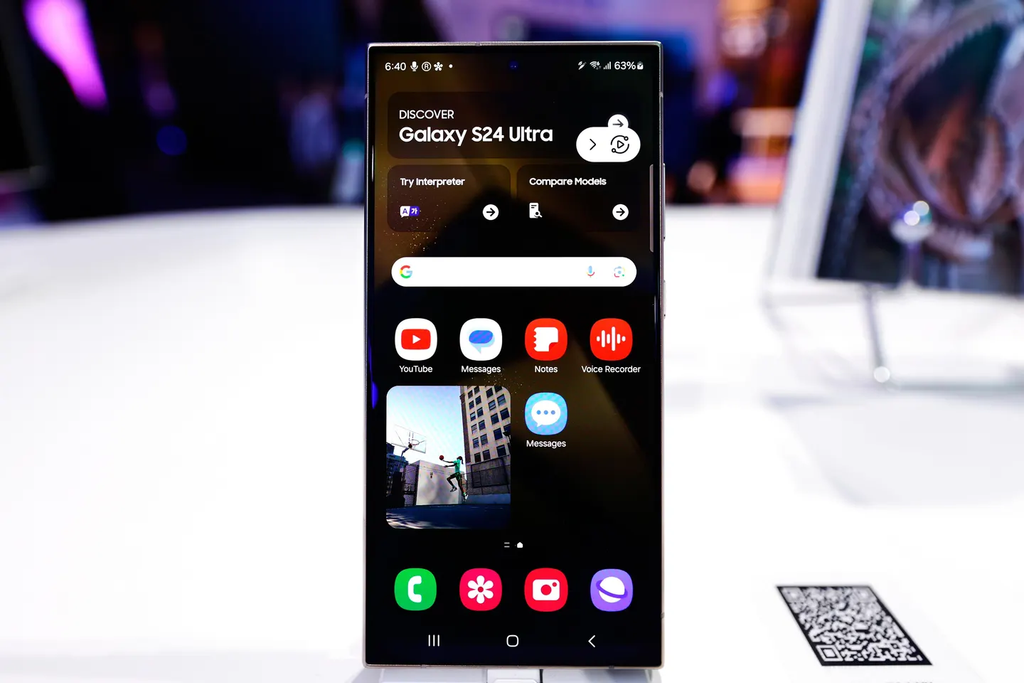
Samsung Galaxy owners are waking up to a massive surprise on their screens. If you carry a Galaxy S24 series flagship or the mid-range Galaxy A57, your long wait for the next generation of software is finally over. Samsung has officially pressed the green button, pushing its stable One UI 9 update—built directly on top of Google Android 17—to devices starting today.
The rollout marks one of the quickest turnarounds Samsung has ever pulled off for non-current-year flagships and mid-range devices. After debuting the software on newer hardware earlier this season, the Korean tech giant is wasting no time bringing these visual upgrades, privacy controls, and AI features to millions of daily drivers worldwide.
If you have been keeping an eye on how Samsung just dropped the Android 17 One UI 9 update, today’s release confirms that the rollout is moving much faster than previous generations. Here is the full breakdown of what is landing on your device, who gets it first, and what you need to do before hitting that update button.
What Is Landing on Your Phone Today
One UI 9 is the latest major software release from Samsung. Every Galaxy smartphone runs on Android, but Samsung adds its own signature look and feel on top. That custom software skin is what shapes your settings menus, home screen layouts, lock screens, quick settings, and camera controls.
With One UI 9, the core operating system jumps to Android 17. On previous builds, Samsung spent significant energy reworking the core interface layout. This time around, the focus is pure refinement. The update takes everything people found helpful in earlier versions, polishes the rough edges, eliminates lag, and integrates smarter artificial intelligence tools directly into your daily routine.
The $0 Secret To Launching Your Entire Online Empire
Why pay hundreds every month for separate software? Build funnels, send emails, and make sales with Systeme.io completely free.
Get Started For $0Free Forever • No Credit Card Needed • Beginner-Friendly
The software also brings noticeably smoother screen transitions. When you swipe open an app, pull down your notification shade, or bounce between active tasks, the animations look lighter and feel far more responsive. Even if your phone is already fast, this update makes everyday taps feel fresh and brand new.
Why the Galaxy A57 Getting One UI 9 Today Is a Huge Surprise
Flagship owners usually expect first priority when major software drops. Mid-range phone buyers, on the other hand, are used to waiting weeks or even months while top-tier phones get all the attention.
That is why today’s news is turning heads across the tech community. Samsung is sending the stable One UI 9 build straight to the Galaxy A57 alongside the premium S24 lineup. Only recently, rumors suggested that the Samsung Galaxy A57 is getting One UI 9 beta very soon, but Samsung skipped past extended testing periods and pushed the public version forward.
This move shows that Samsung is taking its popular A-series line seriously. The Galaxy A57 represents the sweet spot for millions of buyers who want premium screen quality and reliable cameras without spending four figures. Giving this device equal footing on release day proves that choosing a budget-conscious phone does not mean being left in the dust. If you have spent time learning how to choose between Samsung Galaxy S series and A series, this speedy software support makes the A-series an even smarter purchase.
Galaxy S24 Series Rollout: The Flagship Treatment
Owners of the Galaxy S24, Galaxy S24+, Galaxy S24 Ultra, and Galaxy S24 FE can finally stop refreshing their update screens. After watching newer models test the waters over the summer, the entire Galaxy S24 lineup is now officially receiving the full One UI 9 package.
The Galaxy S24 Ultra benefits the most from this new software package. Its built-in stylus, expansive display, and high-performance processor take full advantage of the updated multitasking tools and on-device machine learning. Meanwhile, base Galaxy S24 and S24+ users will immediately notice better battery optimization and faster photo processing inside the stock camera application.
Samsung spent months ironing out early performance quirks during beta testing. As Samsung expands One UI 9 testing to more Galaxy devices, early bugs like stuttering widgets and rapid battery drain were identified and patched. The build arriving on your phone today is the polished, daily-ready version built for long-term stability.
Regional Roadmap: Who Gets the Update First?
Samsung distributes major operating system upgrades in stages rather than unlocking them for every single person on earth at the exact same minute. This prevents global download servers from crashing and allows engineers to monitor network health as millions of files download simultaneously.
South Korea was the first region to see the update hit live devices earlier this week. Starting today, rollout notifications are actively popping up across Europe, India, and select parts of Southeast Asia. Unlocked retail units bought directly from Samsung or major electronics stores are receiving the notification prompt first.
If you bought your Galaxy phone through a cellular carrier, your timeline depends slightly on network certification. Carrier-locked models in North America and Latin America undergo quick network testing to ensure emergency calling and network bands operate without interference. Carrier variants are slated to catch up within a few days of the initial unlocked rollout. Keep an eye on the official Samsung Newsroom and the Samsung Members app on your phone for market-specific notices.
The Top New Features Inside One UI 9 and Android 17
One UI 9 packs dozens of smart tweaks designed to make your phone feel more intuitive. You do not have to dig through complex menus to spot the differences. Here are the most exciting features you will run into right after installing the update.
Smarter Galaxy AI and the Brand New Now Brief
Samsung’s daily briefing tool, Now Brief, received a complete overhaul. Instead of showing static cards that display the weather and your basic step count, Now Brief now uses generative intelligence to build adaptive cards.
If you have a busy morning, Now Brief groups your upcoming calendar appointments, travel times, and reminders into a single clean summary card. You can even edit and rearrange these cards so you only see what matters before leaving the house.
Alongside Now Brief is an intelligent helper called Now Nudge. When you copy an address or receive a message asking about dinner plans, your phone offers one-tap actions to open maps, create calendar events, or translate foreign text without forcing you to switch back and forth between different apps.
My FanCam Camera Tracking
Capturing video of friends, kids, or pets at crowded gatherings can be frustrating when people keep moving out of frame. One UI 9 introduces a camera tool called My FanCam.
Send, Spend & Hold Money Worldwide Without Hidden Fees
Transfer money internationally at the real exchange rate and hold 40+ currencies in one account.
Open a Wise AccountMid-market rate • Fast transfers • 40+ currencies
When you record video, My FanCam uses artificial intelligence to lock onto your primary subject. If that person steps to the left or moves into a group, the camera automatically tracks, zooms, and reframes the shot to keep them front and center. It feels like having a personal camera operator inside your phone, making it ideal for sports games, dance recitals, and weekend concerts.
Redesigned Quick Panel and Deeper Customization
The pull-down Quick Panel is one of the most frequently used parts of any Samsung phone. In One UI 9, Samsung gave users full command over how this panel looks and works.
You can now resize toggle clusters, move brightness and volume sliders to positions that suit one-handed use, and hide buttons you never click. The notification cards beneath your toggles also sport softer rounded edges and cleaner typography, making it much easier to read incoming alerts at a quick glance.
Stronger Security Brief and Android 17 Privacy Controls
Mobile security is a top priority in Android 17, and One UI 9 backs it up with practical safety tools. The new Security Brief dashboard lives inside your device settings. It actively scans for:
- Rogue apps installed from outside verified stores that ask for risky permissions.
- Background software secretly trying to read your clipboard data or message history.
- Suspicious phone numbers flagged globally for fraud and phishing attempts.
Samsung has also refined its location privacy indicator. Whenever an active app taps into your real-time GPS coordinates, a clear blue dot appears in your status bar. Tapping that indicator immediately reveals which app is accessing your location and gives you an instant toggle to turn off its tracking access. If you want even more peace of mind, pairing this with how to turn on Android theft protection before your phone gets taken will keep your sensitive data fully locked down.
Handy Upgrades for Samsung Notes and Lock Screens
Samsung Notes picked up a set of practical tools for everyday productivity:
- The Tape Tool: You can now place digital cover tape over text or sketches, which is perfect for quizzing yourself while studying or hiding confidential numbers in screenshots.
- Auto-Straighten Pen Lines: If you draw a diagram, underline a sentence, or draw a box with your finger or S Pen, the software snaps wobbly lines into neat, crisp geometric shapes.
- Adaptive Lock Screen Clocks: The clock numbers on your lock screen can now shift colors, depth, and placement automatically based on the background image you set. If your wallpaper has a bright sky or dark shadows, the clock adjusts its tint so you can always read the time effortlessly.
How to Check and Install One UI 9 Right Now
If you want to see if the update is ready for your Galaxy S24 or Galaxy A57 today, you do not have to wait for the automatic notification popup to appear. You can trigger a manual check in less than thirty seconds.
Follow these simple steps:
- Open your phone’s Settings app.
- Scroll all the way down and tap Software update.
- Tap Download and install.
- Your device will connect to Samsung update servers to scan for the new package.
- If the One UI 9 build is live for your carrier and model, tap Download.
- Once the download finishes, tap Install now or schedule the installation for overnight while you sleep.
Your phone will shut down, display a progress bar while rewriting system files, and restart back to your lock screen. The first reboot usually takes between five and ten minutes, so leave the phone resting on a flat surface until the home screen lights back up.
Before You Press Update: 5 Things You Must Do First
Major operating system upgrades change thousands of system files at once. While Samsung updates are generally very smooth, taking a few minutes to prep your hardware will prevent headaches.
The $0 Secret To Launching Your Entire Online Empire
Why pay hundreds every month for separate software? Build funnels, send emails, and make sales with Systeme.io completely free.
Get Started For $0Free Forever • No Credit Card Needed • Beginner-Friendly
1. Back Up Your Phone Completely
Never install a major software upgrade without a fresh backup. Use Samsung Cloud, Google Drive, or connect your phone to a computer using Samsung Smart Switch. Make sure your photos, contacts, message history, and two-factor authentication accounts are safely backed up before starting.
2. Free Up at Least 10GB to 15GB of Storage Space
The One UI 9 update file itself weighs between 3.5GB and 5GB depending on your exact model. However, your operating system needs additional temporary room to unpack files, replace old system software, and run cleanup routines. If your phone storage is sitting at 98% full, clear out temporary downloads and large video files first to avoid installation errors.
3. Charge Your Battery Past 50%
Your phone will actively refuse to install a major operating system update if your battery level is below 20%. To be completely safe, plug your phone into a wall charger or make sure your battery is sitting comfortably above 50% before tapping the install button. A sudden shutdown during a system write can cause boot-loop issues.
4. Connect to a Stable Wi-Fi Network
Downloading a 4GB update over spotty cellular data can result in corrupted file packages, unexpected data charges, or stalled downloads. Hook your phone up to a reliable home or office Wi-Fi connection with steady download speeds.
5. Update Your Third-Party Apps
Before you upgrade your operating system, open the Google Play Store and the Galaxy Store to update all your installed apps. App developers release compatibility updates ahead of major Android milestones. Having the newest versions of banking apps, social platforms, and messaging tools already installed prevents strange app crashes after One UI 9 boots up.
What to Do If Your Phone Feels Warm or Drains Battery After the Update
One of the most common complaints after any major Android release is battery drain. If you notice your Galaxy S24 or Galaxy A57 feels warmer than usual or drops battery percentage quickly during your first day on One UI 9, do not panic. This is standard behavior.
Whenever an Android phone installs a major generational update, it must rebuild app caches, index local files, optimize on-device machine learning models, and analyze battery usage patterns in the background. This indexing process works your processor hard for the first 24 to 48 hours.
Here is how to get your battery performance back on track:
- Give your phone two full charging cycles to complete background indexing.
- Check for runaway apps in Settings > Battery. If an old app is draining power in the background, force close it or check for an app update.
- Learn how to enable Samsung battery protection to extend battery lifespan to keep your battery cell healthy over the next few years.
- Remove unused background services by reviewing these 8 Samsung background apps you can safely uninstall without breaking anything.
Within two days of regular use, your device temperatures will settle down, and your battery life should return to normal—or even show slight improvements thanks to Android 17’s refined background process limits.
Which Samsung Devices Are in Line for One UI 9 Next?
The arrival of One UI 9 on the Galaxy S24 lineup and Galaxy A57 is just the start of Samsung’s broader roadmap. If you own an older phone or a different Galaxy model, here is who is scheduled to receive the update in the coming weeks:
- Galaxy S23 Family: The Galaxy S23, S23+, and S23 Ultra are scheduled for early November rollouts, with the Galaxy S23 FE following shortly after.
- Foldables: The Galaxy Z Fold 6, Z Flip 6, Galaxy Z Fold 5, and Z Flip 5 are currently wrapping up their regional testing, with public rollouts expanding over the next two to three weeks.
- Other A-Series Models: The Galaxy A55, Galaxy A54, Galaxy A36, and Galaxy A25 will begin picking up their software packages between mid-November and early December.
- Galaxy Tablets: The Galaxy Tab S11 series and Tab S10 lineup are slated for early-to-mid November releases.
Keep in mind that older budget handsets and phones that have exceeded their guaranteed update window will stay on earlier software builds. If you want to check if an older phone in your household qualifies, check this breakdown of Samsung devices that wont receive One UI 9 0 Android 17 update. Reviewing these key things users must know before launch date will also help you know what to expect when your device turns up on the schedule.
Frequently Asked Questions About One UI 9
Does installing One UI 9 delete any personal files, photos, or messages?
No. Standard operating system updates leave your personal data, downloaded media, apps, and accounts intact. However, because technical glitches during major firmware rewrites can occasionally happen, performing a backup before updating is always strongly recommended.
How big is the One UI 9 download file?
The download package typically weighs between 3.5GB and 5GB. The exact size varies depending on your specific phone model, your carrier, and whether you are jumping from One UI 8 or a newer interim patch like One UI 8.5.
What should I do if the update is not showing up on my Galaxy S24 or A57 yet?
Samsung rolls out updates in batches based on geographic region, model variant, and carrier approval. If manual checking in your Settings app says your software is up to date, your specific region or carrier batch has not unlocked yet. Keep checking once each day; rollouts usually expand to all major markets within a week.
Can I downgrade back to Android 16 or One UI 8 if I do not like the update?
Generally, no. Samsung applies updated bootloader security levels with major Android releases. Once a new bootloader version is flashed to your phone, system security blocks rollbacks to older operating system versions to prevent security vulnerabilities.
Why are some Galaxy AI features missing on my Galaxy A57?
Certain advanced Galaxy AI features require high-tier neural processing units (NPUs) built into flagship processors like the Snapdragon 8 Gen 3 or Exynos 2400 found in the Galaxy S24 series. The Galaxy A57 receives all the core visual updates, security enhancements, and several cloud-based AI tools, but intensive on-device tools may be limited to flagship hardware.
Will One UI 9 slow down an older phone?
No. One UI 9 was designed with improved memory management and lightweight animation curves. As long as you give your phone a couple of days to complete background file indexing, your phone should run just as fast—if not faster—than it did on previous software builds.
The arrival of One UI 9 on the Galaxy S24 family and Galaxy A57 shows how seriously Samsung is taking fast, reliable updates across both flagship and mid-range devices. With Android 17 under the hood, smoother animations across the board, intuitive AI cards in Now Brief, and stronger everyday security tools, this update gives your daily phone a fresh lease on life.
Take a few moments today to plug your phone in, back up your photos, clear a little free space, and check your software update menu.
Have you already received the One UI 9 download prompt on your Galaxy S24 or Galaxy A57, and how smooth are the new animations running on your screen?
