
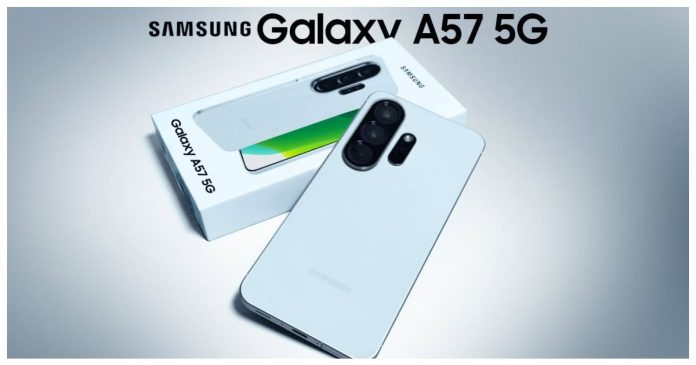
Samsung is moving surprisingly fast with its latest software updates, and mid-range phone owners are about to reap the rewards. If you carry a Galaxy A57 in your pocket, big news just surfaced. Samsung officially created a dedicated One UI Beta Program section for the Galaxy A57 on its public Community forum.
Creating this forum space is traditionally the final step Samsung takes right before opening public registration for an upcoming software build. That means the Android 17-based One UI 9 beta is no longer just an internal experiment locked away in testing labs—it is practically standing at your doorstep.
For a long time, early beta access was a luxury reserved almost exclusively for people who spent top dollar on flagship devices like the Galaxy S series or expensive foldables. Seeing a mid-tier phone jump into the beta line so early shows a major shift in how Samsung handles software support across its entire lineup.
The Big Forum Discovery: What Just Happened?
Tech observers and community tipsters noticed a brand-new, dedicated section under the official Samsung Community forums. This section is explicitly labeled for the Galaxy A57 One UI Beta Program.
Samsung follows a predictable blueprint whenever it prepares to test new software with real users:
The $0 Secret To Launching Your Entire Online Empire
Why pay hundreds every month for separate software? Build funnels, send emails, and make sales with Systeme.io completely free.
Get Started For $0Free Forever • No Credit Card Needed • Beginner-Friendly
- Internal developers build and test early software versions on private servers.
- Test builds are spotted on over-the-air update servers.
- Administrators open a public forum board for user feedback and bug reporting.
- Registration opens in the Samsung Members app, letting user enrollment begin.
- The public beta download link goes live.
Because the forum board is officially live, step three is complete. Reports on GSMArena and SamMobile confirm that unless an unexpected technical glitch delays development, the beta prompt should appear within days.
Internal testing traces for the A57 were first spotted back in June. Seeing the software move from closed testing to a public-facing forum board in roughly two months shows how smoothly the development cycle has progressed.
Why Galaxy A57 Owners Should Be Excited
The Galaxy A57 already stands out as one of the best value-for-money smartphones on the market. It packs a bright 120Hz Super AMOLED display, an efficient new-generation Exynos processor, 8GB of RAM, a 50MP AI-assisted camera system, and a robust 5000mAh battery that supports 45W fast charging.
Putting high-end hardware inside an affordable phone is only half the battle. Software dictates how fast your device feels, how long your battery lasts, and how easily you can get daily tasks done.
The upcoming One UI 9 update builds directly on top of Android 17. It is specifically engineered to squeeze better multitasking performance, smoother visual animations, and deeper system customization out of mid-range processors like the one powering the Galaxy A57.
If you want to stay updated on how smart algorithms and mobile software shape our daily mobile experience, check out our dedicated coverage on Technology & AI.
Key Features Headed to Your Phone in One UI 9
Samsung launched the stable version of One UI 9 alongside its newest foldable lineup before bringing it to the Galaxy S series. Now that the software is making its way down to the Galaxy A series, mid-range phone owners get to enjoy tools that were previously restricted to expensive flagships.
Gemini Intelligence Integration
One UI 9 integrates deeper artificial intelligence directly into the operating system. Powered by Gemini Intelligence, your phone can now assist with complex, multi-step actions across supported applications. You can ask your phone to look up details, organize schedule notes, or summarize long documents without jumping manually between three different apps.
Gemini Notebook
Gemini Notebook serves as a central hub for gathering information. You can collect text notes, voice memos, PDF files, and image snapshots in a single digital folder. The device can then process all those assets together to create instant summaries, meeting recaps, or organized study guides.
Upgraded Now Bar and Interactive Widgets
The bottom status bar, known as the Now Bar, gets a clean aesthetic refresh with darker backgrounds and live dynamic animations. When playing music, track details display neatly at the top while audio wave animations run along the bottom edge. Now Brief and Now Nudge cards give you customizable action buttons, letting you launch map navigation or reply to incoming messages right from your glanceable dashboard.
Seamless Cross-Platform Sharing
File sharing gets much easier with this release. Samsung updated Quick Share to communicate directly with Apple’s AirDrop network in both directions. Sending photos, videos, and large files between a Galaxy device and an iPhone no longer requires third-party cloud apps or messaging compression.
Visual Refinements and Performance Optimization
Aside from new smart capabilities, One UI 9 focuses heavily on system smoothness. Notification cards have cleaner edges, app-opening animations feel snappier, and background RAM management works more efficiently to keep your everyday applications ready to go.
How the Beta Program Works (And How to Join When It Goes Live)
A public beta gives everyday users early access to upcoming software before it reaches the general public. In exchange, users test out new features and report software bugs or performance hiccups to Samsung engineers.
Joining the testing phase is straightforward, but you need to take a few prep steps before hitting download.
Step 1: Install and Set Up Samsung Members
The enrollment process happens entirely through the official Samsung Members application. Make sure you have the app installed from the Galaxy Store, sign in with your active Samsung Account, and verify that your region settings are accurate.
Send, Spend & Hold Money Worldwide Without Hidden Fees
Transfer money internationally at the real exchange rate and hold 40+ currencies in one account.
Open a Wise AccountMid-market rate • Fast transfers • 40+ currencies
Step 2: Watch for the Registration Banner
Once Samsung officially opens the registration window, a prominent banner reading One UI Beta Program will appear on the main home screen or under the Notices section inside the Samsung Members app. Tapping this banner brings up the registration agreement.
Step 3: Accept Terms and Check for Updates
After clicking the register button and accepting the testing terms, navigate to your phone’s primary settings menu:
- Open Settings.
- Scroll down and select Software Update.
- Tap Download and Install.
Your Galaxy A57 will contact Samsung update servers and pull down the early access installation file.
Essential Precautions Before Installing Beta Software
Testing new features early is fun, but beta software is meant for testing, not flawless daily operation. Pre-release code usually contains unintended glitches that can affect your everyday phone experience.
Keep these practical rules in mind if you plan on enrolling:
- Always Back Up Your Personal Data: Before downloading any software update, back up your photos, contact lists, and documents to a cloud service or a computer. If a glitch forces you to perform a factory reset, your files remain secure.
- Expect Battery Drain: Beta builds often run background diagnostic tracking scripts to monitor system health. This can temporarily drain your battery faster than fully optimized stable releases.
- Banking Apps May Not Work Immediately: Some financial and mobile payment apps use strict security protocols that flag uncertified software. Certain banking apps might close unexpectedly until the software receives official stable certification.
- Keep Your Primary Phone Safe: If your Galaxy A57 is the only phone you rely on for critical work or school calls, waiting for the final stable release might save you from occasional software headaches.
What This Means for Other Galaxy Mid-Range Devices
Samsung’s quick rollout strategy signals great news for the broader Android market. Historically, mid-range smartphones had to wait three to six months after flagship releases to receive major software updates.
Seeing public beta testing open for the Galaxy A57 right after the Galaxy S26 series indicates that Samsung has successfully streamlined its software development pipeline.
This rollout pattern bodes well for other mid-tier devices line up for Android 17, such as the Galaxy A56, Galaxy A36, Galaxy A35, and Galaxy A17 5G. By catching system bugs early on the Galaxy A57, developers can deploy stable versions across the entire Galaxy A family much faster than in previous software generations.
How Modern Mobile Tech Powers Digital Creators
Mobile software upgrades do more than just change the look of your lock screen. For online creators, freelancers, and digital entrepreneurs, having an updated smartphone equipped with smart AI tools turns your mobile device into a portable workstation.
With upgraded background multitasking, camera enhancements, and smart note-taking, managing digital projects on the move becomes effortless. If you run online channels or create automated video content using mobile tools, explore our detailed guides on YouTube Automation to see how you can scale your creative efforts using modern technology.
The $0 Secret To Launching Your Entire Online Empire
Why pay hundreds every month for separate software? Build funnels, send emails, and make sales with Systeme.io completely free.
Get Started For $0Free Forever • No Credit Card Needed • Beginner-Friendly
Frequently Asked Questions (FAQs)
When will the stable One UI 9 update release for Galaxy A57?
The public beta period usually lasts between four to eight weeks. If testing goes smoothly without major bugs, the final stable One UI 9 build should start rolling out to all Galaxy A57 users shortly after the beta phase completes.
Will installing the One UI 9 beta wipe my phone data?
Enrolling in the beta program and installing the software update will not erase your photos, apps, or files. However, if you ever decide to leave the beta program and roll back to the stable One UI 8 version, your device will require a complete factory reset.
Which regions get access to the Galaxy A57 beta first?
Samsung typically rolls out beta testing in waves. Key initial markets usually include South Korea, the United States, India, Germany, Poland, and the United Kingdom, with additional regions joining shortly afterward.
Can I leave the beta program if I encounter too many bugs?
Yes. You can withdraw from the beta program at any time through the Samsung Members app. Once you withdraw, you can use the Samsung Smart Switch desktop application on a computer to restore your phone back to the latest official stable release.
Why is my Galaxy A57 showing a forum section but no download link yet?
Creating a community forum section is a prep step. It allows forum moderators to set up discussion threads and test bug reporting forms before thousands of users register and start submitting feedback simultaneously. The actual download banner usually follows a few days later.
Samsung’s decision to bring the One UI 9 beta to the Galaxy A57 highlights how serious the company is about taking care of mid-range device owners. Keep your Samsung Members app updated, back up your photos, and keep an eye on your notification shade—your phone is about to feel brand new very soon.
To learn more about our publication, visit our About Us page or get in touch through our Contact Page. Stay connected with our community on social media via Instagram, Facebook, and X (formerly Twitter) for real-time updates on technology, entertainment, and global trends!
