
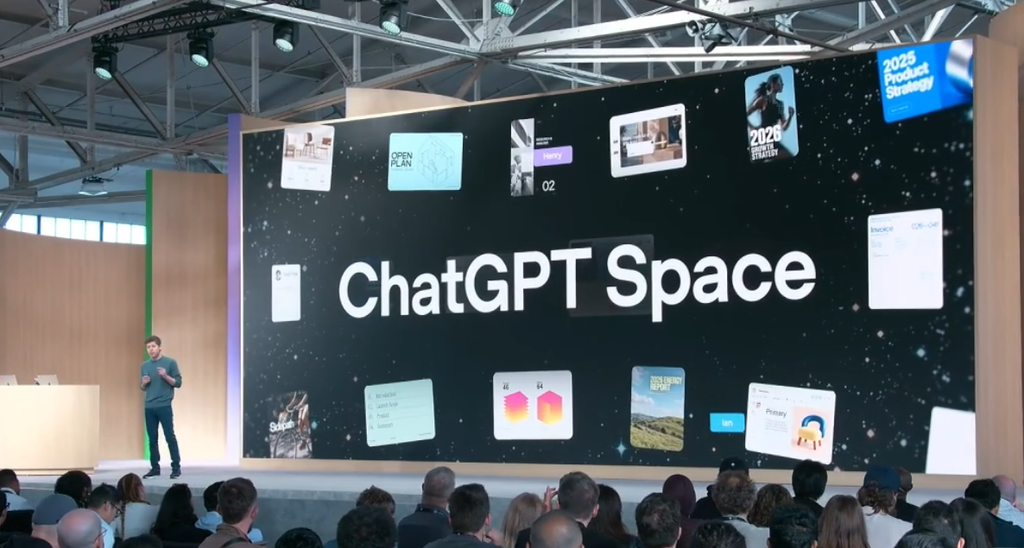
OpenAI has officially launched ChatGPT Space, a brand-new collaborative workspace designed to transform how teams build projects, share documents, and work alongside artificial intelligence. For a long time, using ChatGPT in a professional environment felt like a solitary experience. One person would type a prompt, copy the generated text, paste it into a Google Doc, and email it to colleagues.
That fragmented workflow is officially a thing of the past. With the release of ChatGPT Space, OpenAI is building a centralized digital headquarters where entire teams can collaborate with each other and AI agents in real time. Rather than treating AI as an isolated assistant that sits in a separate tab, Space places artificial intelligence right at the center of team projects.
This massive update brings interactive live documents called Pages, automated background tasks, shared team memory, and a powerful macOS meeting assistant. It represents the biggest shift in team collaboration software since the arrival of workplace chat platforms a decade ago. Here is everything you need to know about ChatGPT Space, how it works, and what it means for the future of modern work.
What Is ChatGPT Space and How Does It Work?
At its core, ChatGPT Space is a unified workspace where human team members, ChatGPT, Codex, and automated AI agents work together on shared projects. Instead of starting a fresh, isolated chat thread every time someone needs help, teams can now create dedicated Spaces for specific departments, clients, or product launches.
Inside a Space, team members can create and edit interactive documents known as Pages. Pages are not standard static text documents. They are live, editable canvases where humans can write text, build checklists, add images, and tag AI assistants directly into the workflow. When you mention ChatGPT inside a Page, the AI reads the entire document history, pulls context from connected company tools, and updates the content directly on the page.
The $0 Secret To Launching Your Entire Online Empire
Why pay hundreds every month for separate software? Build funnels, send emails, and make sales with Systeme.io completely free.
Get Started For $0Free Forever • No Credit Card Needed • Beginner-Friendly
This change fixes one of the biggest complaints business leaders had about generative AI. Previously, AI outputs lived inside short-lived chat windows that disappeared after a few days. Now, every plan, strategy brief, line of code, and research summary remains saved inside a persistent Space where everyone on the team can review, edit, and improve it.
OpenAI designed Space as a complete workspace layer rather than just another chatbot mode. It acts as a single source of truth for group projects. Teams can invite colleagues, assign permissions, track version history, and roll back unwanted edits with a single click.
Key Features That Make ChatGPT Space a Game Changer
Understanding why ChatGPT Space is generating so much excitement requires looking closely at the core tools built directly into the platform. OpenAI did not simply add shared folders to ChatGPT. They engineered a full suite of collaborative features that rethink how modern work gets done.
Interactive Pages and Co-Editing
Pages form the foundational building block of ChatGPT Space. A Page works similarly to Notion or Google Docs, but with built-in artificial intelligence co-authoring capabilities. Team members can write and edit text simultaneously, leave inline comments, and highlight sections that need improvement.
If a paragraph feels too formal or needs additional research, you can simply tag ChatGPT in a comment and request a quick rewrite or extra data. The AI edits the text directly inside the document while preserving the formatting and structure. OpenAI is also rolling out collaborative slide decks and interactive spreadsheets, allowing teams to generate visual presentations and financial models directly inside their shared workspace.
Team Tasks and Background AI Agents
Another standout capability is the introduction of Team Tasks. In standard AI chat tools, the artificial intelligence only works when an active user is typing prompts. Team Tasks changes this dynamic completely by letting AI operate autonomously in the background.
Teams can set up recurring jobs or event-driven triggers. For example, you can create a Team Task that instructs an AI agent to monitor industry news every morning, summarize key market changes, and post a digest into your launch Space. Because these tasks run on cloud infrastructure provided by OpenAI, users do not need to keep ChatGPT open on their laptops for the work to get completed.
The MacOS Meetings Plugin
Taking notes during long virtual calls often distracts team members from actively participating in discussions. To solve this problem, OpenAI launched a native Meetings plugin available within the ChatGPT desktop app for Mac users.
This tool listens to online meetings or in-person office discussions through your microphone and system audio without requiring a bot to join the call. Once the meeting ends, the plugin generates structured summaries, captures key decisions, and creates actionable to-do lists inside a dedicated Page in your Space. Users can then ask ChatGPT questions about what was discussed or click a single button to have AI start working on the action items immediately. This builds upon previous industry trends where tools like Google Meet now take notes for in-person meetings, proving that AI note-taking is becoming an essential office standard.
Deep Integration with Workplace Tools
ChatGPT Space does not exist on an isolated island. It connects directly with the software tools teams already rely on every day. Administrators can link company files, Google Drive folders, and communication apps like Slack and Microsoft Teams directly into a Space.
This deep connectivity means that when you ask ChatGPT a question inside a team Page, it can reference real company data, past campaign performance, and project files. It eliminates the hassle of searching through scattered folders across multiple apps to find relevant background context.
The Impact on Remote Teams and Modern Workflows
The transition toward flexible work environments has created major challenges for remote and hybrid teams. Staying aligned across different time zones often leads to endless video calls, buried message threads, and lost context. ChatGPT Space provides a structured environment that makes asynchronous collaboration much easier.
When team members work across different time zones, they can log into their shared Space, review the latest updates on a Page, read AI-generated summaries of missed discussions, and pick up right where their colleagues left off. The persistent nature of Space ensures that zero context is lost when handoffs occur between global teams.
This evolution aligns with broader industry shifts toward remote work efficiency. As platforms like Claude Cowork expand to mobile and web, major tech companies are racing to build platforms that support seamless remote execution. Furthermore, as governments launch initiatives like the Hire From Nigeria campaign to connect youth to global remote jobs, having intuitive collaborative tools like ChatGPT Space enables global talent to integrate instantly into international workforces.
For those interested in exploring flexible careers, learning how to get a fully remote job that lets you work from anywhere relies heavily on mastering these exact collaborative AI systems.
Send, Spend & Hold Money Worldwide Without Hidden Fees
Transfer money internationally at the real exchange rate and hold 40+ currencies in one account.
Open a Wise AccountMid-market rate • Fast transfers • 40+ currencies
ChatGPT Space vs Traditional Collaboration Platforms
With ChatGPT Space entering the market, many business owners are asking whether this tool will replace existing software stacks like Google Workspace, Notion, Slack, or Microsoft Teams. While it may not instantly eliminate those platforms, it certainly changes how teams interact with them.
Traditional platforms were built around human-to-human communication and manual document creation. In contrast, ChatGPT Space was built from the ground up around human-to-AI co-creation. Here is how it compares across key operational areas:
- Document Creation and Editing: Standard cloud editors require humans to research, draft, and organize every sentence manually. In ChatGPT Space, AI acts as an active co-creator, drafting initial versions, verifying facts, and updating data automatically when new inputs arrive.
- Task Management and Automation: Traditional project management systems rely on human employees updating status tickets manually. In Space, autonomous AI agents handle recurring tasks, monitor data feeds, and report progress directly to team members inside project channels.
- Communication and Knowledge Retrieval: Modern chat apps often suffer from information overload, where vital decisions get buried under hundreds of casual chat messages. ChatGPT Space solves this by organizing conversations directly around live artifacts and centralizing project context in one persistent location.
This shift mirrors OpenAI’s broader efforts to expand AI across everyday tools. Earlier updates, such as when OpenAI gave ChatGPT access to texts through Apple Messages integration, showed their ambition to make conversational AI accessible across all digital touchpoints.
How Businesses Can Leverage ChatGPT Space for Faster Growth
Small business owners, tech startups, and enterprise companies stand to gain significant efficiency boosts by integrating ChatGPT Space into their daily operations. Instead of hiring large administrative teams to handle document formatting, report synthesis, and routine updates, existing staff members can leverage AI agents inside Space to multiply their output.
For small businesses operating with lean teams, this tool acts as a major force multiplier. It builds on previous initiatives like the ChatGPT for Small Business program, where AI functions as a versatile digital assistant capable of taking on market research, content drafting, and customer outreach planning.
Startup founders can set up a Space dedicated to investor pitch decks, financial projections, and product roadmaps. Marketing teams can co-create campaign strategy briefs, research target audiences, and generate draft copy in minutes. Engineering teams can use Codex inside Space to review code snippets, document technical architecture, and track bug reports together.
Moreover, as AI models become more affordable—such as when OpenAI dropped GPT-6 Sol and Luna to make AI 50% cheaper—running complex team workflows and background agents in ChatGPT Space becomes highly cost-effective for businesses of all sizes.
Data Privacy, Security, and Admin Control
When adopting new team software, corporate enterprise teams always prioritize data security and governance. Companies need full assurance that sensitive internal documents, financial records, and proprietary strategy briefs will remain strictly confidential.
OpenAI has built robust admin and security controls directly into ChatGPT Space for Pro, Business, and Enterprise plan subscribers. Workspaces operate under strict enterprise privacy standards, meaning that business data, uploaded files, and internal team discussions held inside Space are never used to train OpenAI’s public AI models.
Workspace administrators maintain full control over role-based access permissions. Admins can determine which team members have authority to create new Spaces, invite external guests, or enable third-party tool integrations. Furthermore, every shared Page includes built-in version histories and approval boundaries. If an AI agent or team member makes an unauthorized edit, owners can easily restore the approved version with a single click.
The $0 Secret To Launching Your Entire Online Empire
Why pay hundreds every month for separate software? Build funnels, send emails, and make sales with Systeme.io completely free.
Get Started For $0Free Forever • No Credit Card Needed • Beginner-Friendly
This focus on structured security is essential because automated workplace experiments can backfire when proper controls are absent, as seen when news broke about Mark Zuckerberg’s failed plan to replace Meta staff with AI. OpenAI’s controlled permission layer ensures that humans remain in firm command of all final approvals.
Frequently Asked Questions (FAQs)
Is ChatGPT Space available for free users?
ChatGPT Space is currently available for ChatGPT Pro, Business, and Enterprise plan subscribers. Free tier users can access basic individual chat features, but creating shared team Spaces, interactive Pages, and running background Team Tasks requires a paid workspace subscription.
Can I share a Space with people outside my organization?
Yes, workspace administrators can configure permissions to allow guest access for external clients, contractors, or agency partners. However, external guests must have an eligible ChatGPT account and be granted explicit access by the Space owner.
How does ChatGPT Space handle version control and accidental edits?
Every Page inside ChatGPT Space tracks real-time edit histories. If a team member or AI assistant makes changes that you want to revert, you can open the document history, review past revisions, and restore previous versions instantly.
Do background Team Tasks consume my message limits?
Team Tasks operate on dedicated workspace cloud resources. While they count toward your team workspace usage metrics, OpenAI has optimized task processing so that background agents running on schedules do not deplete individual user chat limits.
How is a ChatGPT Space different from a standard group chat?
A standard group chat is a sequential thread where messages roll past continuously. A ChatGPT Space is an organized project hub that holds interactive Pages, shared files, automated tasks, and assigned team members in one organized location.
Final Thoughts
OpenAI’s launch of ChatGPT Space marks a pivotal moment in digital workplace technology. By combining live document co-editing, background AI agents, automated meeting summaries, and deep tool integrations, Space turns artificial intelligence from a simple text generator into an active, reliable teammate.
Whether your team is managing remote operations across continents or building a fast-growing local startup, adopting collaborative AI spaces can save dozens of hours every week and eliminate office miscommunication.
To discover more practical tech guides, viral trends, and industry insights, check out our About Us page or feel free to reach out directly through our Contact Us page.
Stay connected with our growing community across social media for the latest updates:
- Follow our visual stories on Instagram
- Join our community discussion on Facebook
- Catch real-time tech updates and breaking news on X (Twitter)
