
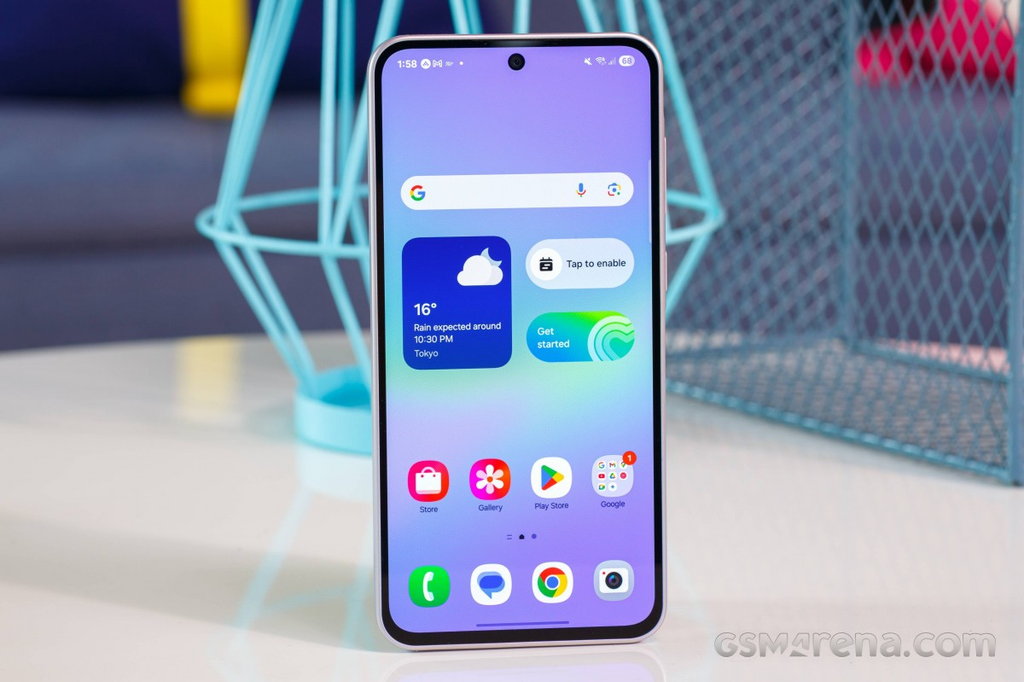
Getting a new smartphone usually comes down to one big feature: the camera. Everyone wants a phone that takes sharp photos for social media, clear selfies, and steady videos without costing a fortune. Samsung designed the Galaxy A36 to fill that exact middle-ground slot in the market. It promises high-quality mobile photography without the extreme price tag of top-tier flagship devices.
On paper, the specs look very promising. You get a 50MP main camera with optical stabilization, an 8MP ultrawide camera, a 5MP macro sensor, and a upgraded 12MP front camera. But hardware numbers on a box do not always tell the full story. How well do these camera lenses work when you step outside and start taking actual photos?
This detailed review breaks down every single lens, lighting condition, video mode, and hidden camera feature on the Samsung Galaxy A36 so you know exactly what to expect before buying.
Galaxy A36 Camera Specs at a Glance
Before looking at photo quality, it helps to understand what hardware sits inside the camera bump on the back of the phone.
The main rear camera features a 50-megapixel sensor with an f/1.8 aperture. It includes Phase Detection Autofocus (PDAF) alongside Optical Image Stabilization (OIS). OIS is a physical hardware mechanism that moves the lens slightly to offset natural hand shakes when you tap the shutter button.
The $0 Secret To Launching Your Entire Online Empire
Why pay hundreds every month for separate software? Build funnels, send emails, and make sales with Systeme.io completely free.
Get Started For $0Free Forever • No Credit Card Needed • Beginner-Friendly
The secondary rear camera is an 8-megapixel ultrawide lens with an f/2.2 aperture. It provides a 123-degree field of view, allowing you to fit much larger scenes into a single frame.
The third rear lens is a 5-megapixel macro sensor with an f/2.4 aperture. This dedicated lens handles close-up shots of small items just a few centimeters away from the lens.
On the front side, Samsung replaced older selfie sensors with an updated 12-megapixel camera featuring an f/2.2 aperture. This front camera can shoot high-definition pictures and high-resolution 4K video.
Main 50MP Camera: Daily Photo Quality
The 50MP main sensor carries most of the workload on this phone. By default, the camera app uses a process called pixel binning. Pixel binning combines four smaller pixels on the sensor into one larger pixel. Instead of saving a giant 50-megapixel file every time you snap a photo, the phone outputs a crisp 12.5-megapixel image.
This default mode is what you will use 90 percent of the time. Photos taken in daylight show strong contrast and crisp details. Brick walls, tree leaves, and clothing textures display high clarity without looking overly artificial.
Samsung is famous for its vibrant color style. Pictures taken on the Galaxy A36 feature rich, bright colors that look lively right out of the box. Blue skies look deep, grass looks fresh, and colorful flowers pop on the screen. While these colors are slightly boosted compared to real life, they look instantly attractive and ready for sharing online without needing extra photo filters.
Dynamic range on the main camera is impressively wide. Dynamic range refers to how well the camera balances bright sunlight and dark shadows in the same frame. When taking a picture of someone standing in front of a bright window, the camera prevents the background from turning completely white while keeping the person’s face nicely lit.
The main camera also handles 2x digital zoom surprisingly well. Because the sensor has 50 megapixels to work with, cropping in twice produces clean photos that look almost as sharp as a true optical zoom lens.
Full 50MP Resolution Mode: When to Use It
While the default 12.5MP setting works best for quick snapshots, you can manually switch the camera app into full 50MP resolution mode.
In 50MP mode, the camera captures raw pixel detail across the entire frame. If you take a picture of a wide city skyline or a distant mountain landscape, switching to 50MP allows you to zoom far into the saved picture later without losing sharp details.
However, using full 50MP mode comes with a few tradeoffs you should keep in mind:
First, file sizes are significantly larger. A standard 12.5MP photo takes up around 3 to 5 megabytes of storage space, while a 50MP photo can take up 15 to 25 megabytes.
Second, image processing takes a moment longer. The phone requires extra processing power to save all that detail, meaning you cannot snap fast consecutive shots in 50MP mode.
Third, 50MP shots require plenty of direct sunlight. In dim lighting, pixel binning actually produces cleaner shots than full resolution mode because combining pixels reduces digital noise. Save the 50MP switch specifically for bright, sunny outdoor scenes.
Ultrawide Camera Performance
The 8MP ultrawide camera is designed for moments when you cannot step back far enough to fit everything in your view. It is perfect for group photos with lots of friends, tall buildings, or wide scenic travel landscapes.
Send, Spend & Hold Money Worldwide Without Hidden Fees
Transfer money internationally at the real exchange rate and hold 40+ currencies in one account.
Open a Wise AccountMid-market rate • Fast transfers • 40+ currencies
With a 123-degree field of view, this lens captures much more of the surrounding environment than the main lens. Colors on the ultrawide camera stay relatively close to the main camera, ensuring your photo gallery maintains a consistent look across different lenses.
That said, 8 megapixels means fine detail is noticeably lower than on the main lens. If you zoom into the edges of an ultrawide photo, you will notice softer lines and minor blur. This is normal for budget ultrawide sensors, but it remains a handy tool for casual wide shots during daytime outings.
Edge distortion is handled decently by Samsung software. Ultrawide lenses naturally curve straight lines near the outer borders of a photo, but internal algorithms work behind the scenes to straighten out those curved lines before saving the final image.
Macro Camera: Up-Close Details
The 3rd lens on the back panel is a 5MP macro camera. Macro lenses are tailored for shooting objects at extremely close range, such as water droplets on a leaf, intricate jewelry patterns, small insects, or food textures.
Unlike cheap 2MP macro sensors found on some competing devices, this 5MP camera captures genuine texture and readable details. You can move the phone as close as 3 to 5 centimeters from your subject to get a unique perspective that standard lenses cannot focus on.
To get clean results from the macro camera, two things are necessary: bright lighting and steady hands. The macro lens lacks optical image stabilization and features a fixed focus distance. If your hands tremble or if you shoot in low light, macro images will appear blurry or grainy. For best results, use macro mode outdoors under direct sunlight or under strong indoor room lights.
Low Light and Night Mode Photography
Taking pictures in dark rooms or outdoors at night is where budget smartphones usually face their biggest test. The Galaxy A36 handles low-light conditions better than expected, largely thanks to its main sensor optical stabilization.
When shooting in low light with the main camera, Optical Image Stabilization (OIS) keeps the internal lens still. This allows the camera shutter to stay open for a fraction of a second longer, letting in more light without blurring the image from normal hand shakes.
The built-in Night Mode automatically activates when the phone detects dark environments. Night Mode takes several rapid exposure frames over two or three seconds and merges them together using software.
The resulting night shots look bright and clean. Dark shadowy areas receive a clean bump in brightness, while overly bright streetlights or glowing shop signs are prevented from overexposing into plain white spots.
The $0 Secret To Launching Your Entire Online Empire
Why pay hundreds every month for separate software? Build funnels, send emails, and make sales with Systeme.io completely free.
Get Started For $0Free Forever • No Credit Card Needed • Beginner-Friendly
There is a minor artistic tradeoff with Night Mode. The software uses digital noise reduction to clear up dark grain. This smoothing process can sometimes wipe out delicate surface textures on dark objects. If you prefer a raw, gritty photo look, you can turn off Night Mode in the camera settings, though doing so will show more natural digital grain in dark corners.
The ultrawide lens struggles significantly more in dark conditions compared to the main camera. Because the ultrawide lens has a smaller aperture and lacks OIS, night shots taken on the ultrawide appear noticeably darker and softer. It is best to stick to the main camera when shooting after sunset.
Selfie Camera Performance
Front-facing cameras are crucial for video calls, quick social media updates, and personal vlogs. Samsung updated the Galaxy A36 front camera to a 12MP sensor, and the improvement shows immediately.
Facial details look crisp and clear without appearing overly processed. Skin tones look natural, avoiding the pale or overly washed-out look that plagued older budget front cameras. Facial features like hair strands, skin textures, and clothing collars display sharp definition.
Portrait Mode on the selfie camera works very well. Software algorithms map out your face and body, blurring the background behind you to create a smooth, professional depth-of-field effect. Edge detection around complicated areas like messy hair or glasses frames is surprisingly accurate, keeping you sharp while softening background distractions.
In daylight, selfie dynamic range is strong. If you take a selfie outside with the sun behind you, the auto-HDR setting keeps your face properly illuminated while preventing the sky behind your head from turning pure white. In low-light rooms, selfie quality drops slightly, but activating the screen-flash feature illuminates your face nicely for clear indoor shots.
Video Recording Capabilities
The Samsung Galaxy A36 is a strong candidate for video recording in its price class. Both the main rear camera and the front selfie camera support full 4K video recording at 30 frames per second (fps).
Recording in 4K resolution produces rich, detailed video clips that look sharp on big computer screens or modern smart TVs. Colors stay bright, audio capture through the built-in microphones sounds clear, and focus tracking quickly adjusts when objects move closer to or further from the camera.
For stabilization during video capture, the phone uses Electronic Image Stabilization (Gyro-EIS). EIS works electronically by shifting the video frame to smooth out natural walking bounces and hand movement.
If you are running or recording active sports, you can enable Samsung’s Super Steady Mode. Super Steady uses the ultrawide camera combined with aggressive digital stabilization to deliver ultra-smooth footage that resembles an action camera setup. Super Steady mode caps resolution at 1080p, but it completely removes heavy camera shakes during fast movement.
The ultrawide camera records video up to 1080p at 30fps. While 1080p video from the ultrawide lens is not as razor-sharp as 4K main camera footage, it works well for casual wide vlog walk-and-talks in good lighting.
Software Features and Intelligent Tools
Hardware is only half of the camera equation; camera software handles the rest. The camera app on the Galaxy A36 includes several smart features designed to make photography simple and fun:
Portrait Blur Control allows you to adjust the strength of background blur before or after you take a photo. You can even change background blur styles inside the photo gallery app.
Single Take Mode is a useful feature for fast-moving events like birthday parties or pet movements. When you press the shutter in Single Take mode, the phone records a short 10-second clip using multiple lenses simultaneously. AI algorithms then automatically generate a curated collection of photos, filtered shots, cropped portraits, and short looped videos for you to pick from.
Built-in Editing Tools inside the Samsung gallery app allow you to retouch photos easily. The Object Eraser tool lets you tap on unwanted background items or random people walking through your frame to erase them automatically. The Photo Remaster feature analyzes older or dim images and automatically boosts clarity, contrast, and color balance with one tap.
Pro Mode gives experienced photographers full manual control over key settings. You can manually adjust ISO sensitivity, shutter speed, exposure compensation, manual focus, and white balance to match your exact creative vision.
Simple Tips to Get the Best Photos
To get maximum picture quality out of your Galaxy A36 camera system, try following these basic practical tips:
- Keep the camera lenses clean. The raised camera bump on the back naturally collects finger smudges when holding the phone. Always wipe the lenses with a soft cloth before taking pictures to avoid hazy, smudged photos.
- Stick to standard zoom buttons. Use the dedicated 0.6x, 1x, and 2x buttons inside the camera app interface rather than pinching the screen to zoom manually. Sticking to predefined zoom steps keeps processing algorithms sharp.
- Tap your subject to set focus and brightness. Before pressing the shutter button, tap directly on a person’s face or object on your screen. A small yellow ring will appear, locking focus and letting you slide a brightness bar up or down to adjust exposure instantly.
- Use 50MP mode only in bright outdoor light. Leave the phone in default 12.5MP mode for general daily use, and reserve 50MP mode strictly for well-lit landscapes where you want deep detail.
- Hold the phone steady for two seconds during Night Mode. When taking night shots, keep your hands as still as possible until the small loading circle finishes spinning to ensure maximum image sharpness.
Galaxy A36 vs Predecessors and Market Alternatives
Compared to last year’s Galaxy A35, the Galaxy A36 introduces small but meaningful camera improvements. The display on the A36 is noticeably brighter outdoors, making it far easier to frame complex photos on sunny days. The updated selfie sensor provides richer detail, and improved HDR software keeps color tone consistency higher across bright lighting setups.
When stacked up against competing devices in the same mid-range price segment, the Galaxy A36 holds its ground very well. While some alternative devices offer higher megapixel counts on paper, Samsung’s combination of Optical Image Stabilization, reliable 4K video recording on front and back cameras, and polished editing tools gives it a well-rounded edge.
If you want to know more about mobile tech and full phone specifications, check out our detailed breakdown on the About Us page or reach out directly to our team via our Contact Us page.
Frequently Asked Questions (FAQs)
Does the Samsung Galaxy A36 have Optical Image Stabilization (OIS)?
Yes, the main 50MP rear camera features physical Optical Image Stabilization (OIS). OIS reduces camera shake caused by hand movement, resulting in sharper daylight photos, smoother video recordings, and clearer low-light shots.
Can the Galaxy A36 record video in 4K resolution?
Yes, both the main 50MP rear camera and the 12MP front selfie camera can record high-definition 4K video at 30 frames per second. However, the ultrawide camera is limited to 1080p video recording.
Is the Galaxy A36 camera good for night photos?
The main camera performs well in dark environments thanks to OIS and dedicated Night Mode software. It brightens dark scenes and controls bright streetlights cleanly. However, the ultrawide camera struggles in dark lighting, so using the main camera for night shots is recommended.
How much storage space do 50MP photos use?
A standard default 12.5MP photo takes up roughly 3 to 5 megabytes of storage space. Switching to full 50MP resolution increases the file size to between 15 and 25 megabytes per picture.
Does the Galaxy A36 have a telephoto zoom lens?
No, the Galaxy A36 does not have a physical telephoto optical zoom lens. Instead, it uses digital zoom cropped directly from the high-resolution 50MP main sensor, providing clean 2x zoom photos.
Final Verdict
The Samsung Galaxy A36 delivers a remarkably balanced camera package for its price category. Its 50MP main sensor captures bright, punchy, and detailed images in daylight while offering solid stabilization for evening shots and 4K video recording.
While the 8MP ultrawide lens and 5MP macro camera are more situational, the upgraded 12MP selfie camera and intuitive software tools like Object Eraser make everyday mobile photography effortless. For anyone looking for a reliable, easy-to-use phone camera that delivers social-media-ready photos without breaking the bank, the Galaxy A36 is a very strong contender.
