
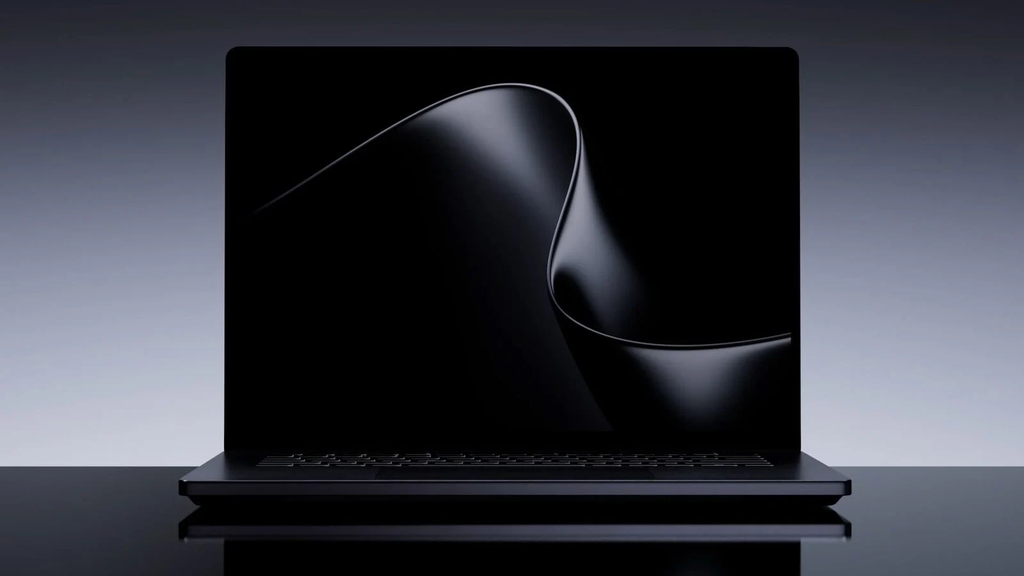
Microsoft has officially launched its most aggressive laptop in years. The new Surface Laptop Ultra is a premium $2,599 machine designed from the ground up to take on Apple’s high-end 16-inch MacBook Pro. It comes loaded with a custom Nvidia RTX Spark processor, up to 128GB of memory, a super bright 2,000-nit touchscreen, and a magnetic charging system that looks suspiciously familiar.
To make the deal even sweeter, Microsoft is offering up to $1,000 in cash back if you trade in an eligible MacBook. That is a direct attempt to lure creators, video editors, and software developers away from macOS. Pre-orders are already open, and the laptop officially starts shipping on October 16, 2026.
Here is everything you need to know about Microsoft’s new powerhouse, how it compares to Apple, and if it is actually worth your money.
Microsoft Takes Aim at Apple’s Crown
For a long time, creative professionals and heavy power users had one clear default choice: the MacBook Pro. While Windows laptops offered plenty of raw power, they often fell short on design, display quality, port options, or battery efficiency. Microsoft wants to change that story completely with the Surface Laptop Ultra.
According to official launch details shared by tech outlets like MacRumors and Tom’s Guide, Microsoft is positioning this 15-inch laptop directly against Apple’s 16-inch MacBook Pro. At a starting price of $2,599, Microsoft actually undercuts Apple’s base 16-inch MacBook Pro by roughly $400.
The $0 Secret To Launching Your Entire Online Empire
Why pay hundreds every month for separate software? Build funnels, send emails, and make sales with Systeme.io completely free.
Get Started For $0Free Forever • No Credit Card Needed • Beginner-Friendly
Instead of releasing a thin device with weak hardware, Microsoft went all out. They built a heavy-duty computer meant for people who push their machines to the absolute limit every single day.
The Power Inside: Nvidia RTX Spark N1X Silicon
The most surprising part of the Surface Laptop Ultra is what is under the hood. Microsoft skipped traditional laptop processors and partnered with Nvidia to create the RTX Spark N1X chip.
This chip combines an 18-core CPU with a massive 5,120-core GPU built on Nvidia’s advanced Blackwell graphics architecture. In plain terms, this means the Surface Laptop Ultra can handle intense tasks like editing 8K video, building 3D animations, and running complex code without breaking a sweat.
Microsoft claims that in heavy creative and artificial intelligence workflows, this new processor can perform up to 2.1 times faster than high-end MacBook models. That is a bold statement, and if independent testing confirms it, Apple could have real competition on its hands.
Unmatched Memory Options
Memory is another area where Microsoft is flexing its muscle. The base model comes standard with 24GB of fast LPDDR5x unified memory. If you need more headroom, you can configure the laptop all the way up to a staggering 128GB of memory.
Having access to 128GB of unified memory is a massive deal for programmers, video production teams, and people running large local AI models. It lets you keep giant files, heavy background tasks, and multiple intense apps open at the exact same time without slowing down your workflow.
A Stunning 2,000-Nit Touchscreen Display
A great creative laptop needs an amazing screen, and Microsoft did not cut corners here. The Surface Laptop Ultra features a 15-inch PixelSense touchscreen display with a crisp resolution of 3270 x 2180 pixels.
It also supports a 120Hz refresh rate, making scrolling, video playback, and casual gaming look incredibly smooth. The biggest highlight of the screen is its brightness. Microsoft revealed that the display can reach up to 2,000 nits peak brightness when viewing HDR content.
That extra brightness makes a huge difference if you work outdoors, near sunny studio windows, or under harsh office lights. Plus, unlike Apple, which still refuses to put touchscreens on MacBook Pros, Microsoft gives you full touch support right out of the box.
Dongle-Free Design and Magnetic Connect Charging
If you hate carrying USB dongles and adapters everywhere you go, the Surface Laptop Ultra will feel like a breath of fresh air. Microsoft packed a wide variety of full-sized ports straight into the metal body.
You get three USB-C ports, a classic USB-A port, an HDMI 2.1 port, a full-sized SD card reader, and a standard 3.5mm headphone jack. Editors can quickly plug in camera memory cards, connect external monitors, or hook up older flash drives without needing extra hubs.
Microsoft also introduced Magnetic Connect charging, which they call the first built-in magnetic USB-C charging system on a laptop. As noted in live coverage from CNET, this works very similarly to Apple’s MagSafe. If someone trips over your charging cable, the magnetic cord safely pops right off instead of pulling your $2,500 laptop off the table.
The $1,000 MacBook Trade-In Strategy
Microsoft is not hiding who they are targeting with this launch. To encourage people to switch platforms, Microsoft launched a direct breakup program.
If you trade in an eligible MacBook when buying a Surface Laptop Ultra, Microsoft will give you up to $1,000 in cash back. That is one of the highest trade-in bonuses a tech company has ever offered to steal customers directly from a competitor.
For anyone sitting on an older Intel-based MacBook or an early Apple Silicon model, getting $1,000 back makes the $2,599 price tag much easier to digest. It lowers the actual cost to around $1,599, putting high-end Nvidia Blackwell graphics into a much more affordable price range.
Send, Spend & Hold Money Worldwide Without Hidden Fees
Transfer money internationally at the real exchange rate and hold 40+ currencies in one account.
Open a Wise AccountMid-market rate • Fast transfers • 40+ currencies
Gaming and Local AI: Built for Power Users
One area where Microsoft holds a clear advantage over Apple is PC gaming and software compatibility. While Apple Silicon chips are very powerful, playing top-tier PC games on a Mac often requires extra setup or workaround software.
Because the Surface Laptop Ultra runs on Nvidia Blackwell graphics and standard Windows 11, it is fully capable of running modern AAA games right out of the box. You can finish your workday editing video or writing code, and then jump straight into high-end PC gaming on the exact same machine.
Running AI Locally
Microsoft is also pushing local AI performance hard with this release. Instead of paying monthly subscription fees to run AI tools in the cloud, the Surface Laptop Ultra lets developers and creators process AI tasks directly on the machine itself.
For massive teams and developers who need even more hardware power, Microsoft also announced the Surface RTX Spark Dev Box alongside the laptop. Priced at $5,999, that desktop machine delivers up to 1 petaflop of AI performance and can run local AI models with up to 120 billion parameters.
Battery Life and Real-World Usability
High performance usually comes at the cost of battery life, but Microsoft claims the Surface Laptop Ultra holds up well for daily use. Official specs state the laptop delivers up to 15 hours of continuous video playback or up to 12 hours of active web browsing on a single charge.
While those numbers are respectable, Apple still holds the upper hand when it comes to raw battery longevity. MacBooks regularly offer up to 20 or more hours of light use on a single charge.
The Surface Laptop Ultra weighs in at 4.41 pounds, which is slightly lighter than the 4.7-pound 16-inch MacBook Pro. Microsoft installed advanced vapor chamber cooling inside the chassis to keep temperatures stable and fan noise low during heavy workloads.
How the Surface Laptop Ultra Compares to the MacBook Pro
Choosing between these two premium laptops comes down to what you prioritize most in your day-to-day work.
Price is the first major difference. The Surface Laptop Ultra starts at $2,599 for a 15-inch model with 24GB of RAM and Nvidia RTX Spark graphics. The equivalent 16-inch MacBook Pro starts closer to $2,999, making Microsoft the cheaper option upfront.
Display features also set them apart. Microsoft gives you a 120Hz touchscreen that reaches 2,000 nits peak brightness. Apple gives you a beautiful Liquid Retina XDR screen with high brightness, but you cannot tap or draw on it with your fingers.
The $0 Secret To Launching Your Entire Online Empire
Why pay hundreds every month for separate software? Build funnels, send emails, and make sales with Systeme.io completely free.
Get Started For $0Free Forever • No Credit Card Needed • Beginner-Friendly
Port availability is very close on both devices, but Microsoft includes a standard USB-A port alongside modern USB-C and HDMI ports. That means you will not need to carry extra adapters for older thumb drives or wireless mouse receivers.
Software remains the deciding factor for most people. If you love macOS, use Final Cut Pro, or rely heavily on iPhone integration, Apple is still the natural fit. But if you prefer Windows 11, want native PC gaming, need flexible software support, or run local AI models, Microsoft’s new laptop provides a compelling alternative.
Who Should Buy the Surface Laptop Ultra?
This laptop was not built for light browsing or basic homework assignments. It is an expensive, high-powered machine built for demanding users who need top-level graphics power.
You should consider buying the Surface Laptop Ultra if you fit into one of these categories:
- Video editors and 3D artists who want fast rendering speeds and a bright, color-accurate touchscreen.
- Software engineers and AI researchers who need 64GB or 128GB of memory to build and test models locally.
- Power users who want one single device that can handle serious work projects during the day and play high-end PC games at night.
- Current MacBook owners who want to switch to Windows and take advantage of Microsoft’s $1,000 trade-in promotion.
On the other hand, if battery life is your top priority or you prefer thin, lightweight laptops for travel, standard models like the MacBook Air or basic Surface Laptop are much better fits for your budget.
Frequently Asked Questions (FAQs)
How much does the Surface Laptop Ultra cost?
The Surface Laptop Ultra starts at $2,599 for the base configuration with 24GB of unified memory. Fully maxed-out models with 128GB of memory and maximum storage cost up to $5,899.
When will the Surface Laptop Ultra be available?
Pre-orders are live right now through Microsoft and major retailers. Official store availability and customer shipping begin on Friday, October 16, 2026.
Can the Surface Laptop Ultra run AAA PC games?
Yes. Thanks to its custom Nvidia RTX Spark processor with Blackwell graphics architecture, the Surface Laptop Ultra runs native Windows PC games with strong performance.
How does the MacBook trade-in offer work?
Microsoft is offering up to $1,000 cash back when you purchase a Surface Laptop Ultra and trade in an eligible MacBook. The exact credit amount depends on the model, age, and condition of the Mac you trade in.
Does the Surface Laptop Ultra have a touchscreen?
Yes, it features a 15-inch PixelSense touchscreen display with a 120Hz refresh rate and up to 2,000 nits peak HDR brightness.
Is the storage in the Surface Laptop Ultra upgradable?
Yes, unlike modern MacBooks where storage is permanently soldered to the motherboard, the Surface Laptop Ultra features removable SSD storage options.
Microsoft making a direct push into the high-end creator market is great news for everyone. Competition forces companies to innovate faster, lower prices, and build better hardware for consumers. Whether Apple responds with new OLED displays or faster M-series chips, power users win either way.
If you want to read more fresh stories, tech news, and trending updates, feel free to visit our About Us page to see what we are all about. Have questions, feedback, or a story tip you want us to look into? You can reach out directly on our Contact Us page.
You can also join our growing community and follow our latest updates across social media on Instagram, Facebook, and X (Twitter).
