
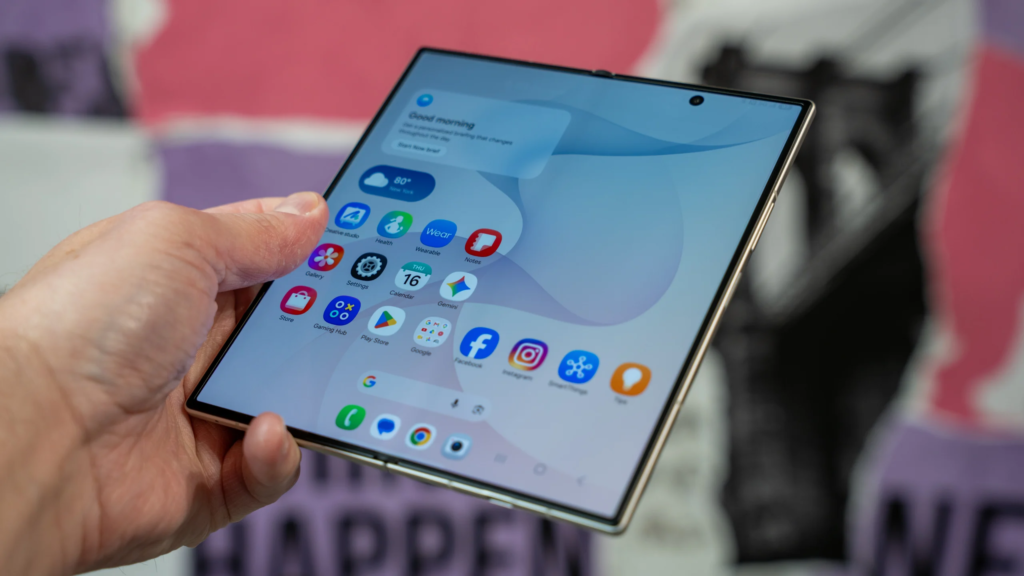
Smartphones have hit a huge turning point. For years, mobile phone updates meant a slightly sharper screen, a slightly faster processor, or an extra camera lens on the back.
But the real game-changer right now is artificial intelligence. Google and Samsung have joined forces to drop something huge into the mobile tech world: Google’s Gemini Intelligence, built directly into the new Samsung Galaxy Z Fold 8.
This is not just another basic voice assistant that sets a five-minute timer or tells you tomorrow’s weather forecast. Gemini Intelligence is designed to act like a real, helpful assistant that understands what you are doing, reads what is on your screen, and takes real actions across dozens of everyday apps. Combine that smart software with a giant screen that folds in half, and you get a completely new way to handle daily tasks.
At WhatsBuzzN, we keep a close eye on everything trending across technology, culture, and digital trends. You can read more of our latest breakdowns in our dedicated Technology & AI category. Here is everything you need to know about Google’s Gemini Intelligence on the Galaxy Z Fold 8, how it works, and why it changes how you use your phone.
What is Gemini Intelligence and Why Does it Matter?
Gemini Intelligence is Google’s newest and most advanced mobile AI system. In simple terms, it takes artificial intelligence from being a simple search bar to being an agentic assistant. An agentic assistant is software that can complete multi-step actions on your behalf instead of just giving you written answers.
The $0 Secret To Launching Your Entire Online Empire
Why pay hundreds every month for separate software? Build funnels, send emails, and make sales with Systeme.io completely free.
Get Started For $0Free Forever • No Credit Card Needed • Beginner-Friendly
Under the hood, the system runs on Google’s Gemini Nano 4 model. This on-device AI model works directly on the hardware inside your phone. Because it processes information locally, many AI tasks happen instantly without sending your private information back and forth to external servers. It supports over 140 languages and understands text, voice, images, and video context all at the same time.
For a long time, using AI on a mobile phone felt a bit clunky. You had to copy text from one app, paste it into an AI chat box, wait for an answer, and then copy that answer into another app. Gemini Intelligence removes all those extra steps. You simply describe what you need, and the AI communicates with your apps to get the job done.
The Galaxy Z Fold 8 Hardware: Built for Big Ideas
Before looking deeper into the software, it helps to understand the hardware itself. Samsung designed the Galaxy Z Fold 8 to give power users a massive screen experience without feeling heavy in your pocket.
The main inner screen opens up to a wide 7.6-inch Dynamic AMOLED display with a 4:3 aspect ratio. This shape feels much more like a small tablet or a digital notebook than a stretched-out phone screen. When the phone is closed, you use a comfortable 5.5-inch cover screen for quick messages, calls, and simple browsing.
Samsung also addressed two big complaints about older foldable phones: weight and display creases. The Z Fold 8 weighs just 201 grams and unfolds to a super thin 4.5mm profile. Thanks to new Flex Titanium display technology—which uses a durable titanium plate under the glass—the center screen crease is lighter and far less noticeable than ever before.
Under the hood, the device runs on the Qualcomm Snapdragon 8 Elite Gen 5 processor, paired with 12GB or 16GB of RAM. This massive hardware power is exactly what allows Gemini Nano 4 to run smooth, fast on-device AI calculations without slowing down the phone or killing your battery life. You can check out full official release details directly on the Samsung Newsroom launch page.
How Gemini Intelligence Transforms Multitasking on the Fold 8
The magic really happens when you pair smart AI with a 7.6-inch folding display. Having extra screen real estate gives Gemini Intelligence the room it needs to perform complex multi-tasking workflows side by side.
Deep App Automation Across 40+ Apps
One of the headline features of Gemini Intelligence is deep app automation. Google updated the AI system to work directly inside more than 40 popular apps and services.
Imagine you are planning a dinner outing with friends. Normally, you would open a text message, read the restaurant suggestion, open a web browser to search for the location, check reviews, open a map app for directions, and then open a booking app to reserve a table.
With Gemini Intelligence on the Galaxy Z Fold 8, you can activate Gemini and say something simple like, “Find a table for four at a nearby Italian restaurant around 7 PM and send the reservation details to my group chat.” The AI reads the request, checks supported apps, picks the best option, and completes the action in far fewer steps.
Gemini Notebook and Split-View Workflows
For anyone who manages projects, writes, or organizes large amounts of information, Gemini Notebook is a huge feature. It gives you a persistent digital workspace right on your large display.
You can gather text notes, voice recordings, photos, PDFs, and web pages inside Gemini Notebook. On the Z Fold 8, you can open Gemini Notebook on one half of the screen and keep your browser or documents on the other half using Split View.
Because drag-and-drop support is built directly into the software, you can grab images or text files from your screen and drop them straight into Gemini. From there, you can ask Gemini Intelligence to automatically generate visual summaries, audio overviews, meeting recaps, or full reports. It turns hours of manual research and organizing into a fast, simple task.
On-Screen Context Understanding
Gemini Intelligence does not just listen to your voice commands. It can also see what is currently showing on your display.
If you are looking at a complex chart, a long document, or a photo of an event poster on your screen, you can invoke Gemini without leaving the app. You can ask questions like, “What are the main key takeaways from this document?” or “Add the event date on this poster to my calendar.” The AI analyzes the screen context immediately and carries out your request.
Send, Spend & Hold Money Worldwide Without Hidden Fees
Transfer money internationally at the real exchange rate and hold 40+ currencies in one account.
Open a Wise AccountMid-market rate • Fast transfers • 40+ currencies
Smart Galaxy AI Features Powered by Gemini
Samsung built its custom One UI 9 software on top of Android 17 to bring extra Galaxy AI capabilities alongside Google’s Gemini Intelligence. These features work quietly in the background to keep your day organized.
Now Brief
Now Brief is your personalized daily command center. When you pick up your phone in the morning, Now Brief organizes your schedule, pending tasks, weather updates, and personalized recommendations into clean, readable cards. It can even highlight important security alerts and privacy updates to help you spot potential risks before they cause trouble.
Now Nudge
Now Nudge acts like a smart assistant silently observing your chats and notes for actionable plans. When you discuss meeting up with a coworker or buying concert tickets in a chat app, Now Nudge pops up subtle suggestions. It might offer to check your schedule for conflicts, pin a location on your map, or save a reminder automatically. On the large folding screen, these nudges sit neatly beside your conversation window so your chat is never interrupted.
Personal Privacy and Control
With so much AI handling personal data, privacy is a reasonable concern for everyone. Samsung and Google built strong privacy safeguards directly into One UI 9.
The phone relies on a Personal Data Engine (PDE) that keeps sensitive data locked locally on your device. Samsung added an AI Assistant Activity dashboard inside the settings. This dashboard gives you a complete, clear list of every single action AI performed on your behalf. If an AI agent accessed your calendar, checked your location, or read an email, you can see it clearly in one central spot and adjust permissions whenever you want.
Real-World Use Cases for Creators and Remote Workers
Smart technology is only useful if it makes daily life easier. The combination of the Galaxy Z Fold 8 hardware and Gemini Intelligence offers massive value for professionals, remote workers, and online content creators.
If you run digital projects or work in content creation, managing ideas on a small phone screen can feel frustrating. Using the Z Fold 8 in unfolded mode feels like working on a portable workstation. You can outline video ideas, draft scripts, and clean up audio notes in minutes using Gemini Notebook.
For creators who focus on automated video channels or social media growth, having smart on-device tools saves hours of repetitive editing and organizing. If you want to explore modern online content creation strategies, check out our guide on YouTube Automation on WhatsBuzzN to see how digital tools can streamline your workflow.
Remote workers also benefit from the portable setup. Instead of carrying a laptop to every quick meeting, you can unfold the 7.6-inch display, run two apps side by side, and let Gemini summarize long email threads or draft quick professional responses while you move between tasks.
Galaxy Z Fold 8 Specifications Breakdown
To give you a clear picture of what the Samsung Galaxy Z Fold 8 offers, here is a list of the core hardware specs that make this AI experience possible:
The $0 Secret To Launching Your Entire Online Empire
Why pay hundreds every month for separate software? Build funnels, send emails, and make sales with Systeme.io completely free.
Get Started For $0Free Forever • No Credit Card Needed • Beginner-Friendly
- Main Inner Screen: 7.6-inch Dynamic AMOLED 2X display (120Hz refresh rate, 3,000 nits peak brightness, 4:3 aspect ratio).
- Cover Screen: 5.5-inch Dynamic AMOLED 2X display (120Hz refresh rate).
- Processor: Qualcomm Snapdragon 8 Elite Gen 5 Mobile Platform for Galaxy.
- RAM & Storage: 12GB or 16GB RAM with options for 256GB, 512GB, or 1TB storage.
- Weight & Thickness: 201 grams weight and 4.5mm thickness when unfolded.
- Rear Cameras: 50MP main camera with OIS, 50MP ultra-wide camera.
- Battery & Charging: 4,800mAh dual battery supporting 45W wired charging and 20W wireless charging.
- Software: Android 17 with Samsung One UI 9.0.
- Build Quality: Flex Titanium display structure with IP48 dust and water resistance.
This hardware combination ensures that running on-device AI models like Gemini Nano 4 never slows down your daily routine.
How Galaxy Z Fold 8 Compares to Standard Flagships
If you already own a standard slab-style smartphone, you might wonder if switching to a foldable phone with Gemini Intelligence is worth it.
Standard flagship phones offer great cameras and fast processors, but they are limited by screen size. Working with two apps at the same time on a regular phone screen usually feels cramped. You end up switching back and forth between apps continuously.
The Galaxy Z Fold 8 changes that dynamic completely. The 4:3 inner screen aspect ratio gives you almost twice the viewable area of a standard phone screen. When Gemini Intelligence performs actions across apps, you can actually watch those actions happen side by side without losing track of your primary task. You can learn more about how Google’s AI models power these features in Google’s Gemini developer documentation.
While the Z Fold 8 comes with a premium price tag starting around $1,899, the jump in productivity and screen space makes it a solid option for people who use their phones for real work every day.
Is the Galaxy Z Fold 8 Worth It for You?
Deciding whether to buy the Galaxy Z Fold 8 depends on how you use your phone.
If you use your device mainly for basic social media scrolling, phone calls, and taking quick photos, a standard smartphone like the Galaxy S series or a standard Pixel device will easily handle your needs.
However, if you are a power user, a remote professional, a student, or a creator who needs serious multitasking tools, the Galaxy Z Fold 8 offers something genuinely unique. The combination of Gemini Nano 4, deep app automation, Gemini Notebook, and the lightweight titanium foldable design makes it one of the most capable mobile devices on the market today.
Frequently Asked Questions (FAQs)
Is Google Gemini Intelligence available on all Galaxy Z Fold 8 models?
Yes. Gemini Intelligence is built directly into the Galaxy Z Fold 8, Galaxy Z Fold 8 Ultra, and Galaxy Z Flip 8 running Samsung One UI 9 on Android 17.
Does Gemini Intelligence work without an internet connection?
Many Gemini Intelligence features use Gemini Nano 4, which runs directly on the device hardware. This means basic AI summarization, screen context tasks, and text generation can work offline. However, tasks that require real-time web searches or app actions (like booking reservations) will need an active internet connection.
How is Gemini Intelligence different from standard Google Assistant?
Standard Google Assistant mainly handles simple commands like setting alarms, making calls, or controlling smart home devices. Gemini Intelligence is an agentic AI system that understands complex natural language, analyzes visual screen content, and completes multi-step tasks across dozens of third-party apps automatically.
Is my private data safe when using Gemini Intelligence on Samsung devices?
Yes. On-device processing handles sensitive data locally through Samsung’s Personal Data Engine (PDE). Furthermore, One UI 9 includes a dedicated AI Assistant Activity dashboard where you can see all AI actions, manage permissions, and keep control over your personal information.
What is the starting price for the Galaxy Z Fold 8?
The base Galaxy Z Fold 8 with 12GB of RAM and 256GB of internal storage starts at $1,899.99, with higher storage options up to 1TB available.
Final Thoughts
The arrival of Google’s Gemini Intelligence on the Samsung Galaxy Z Fold 8 marks a huge leap forward for mobile technology. Instead of treating AI as a gimmick or a separate chat box, Samsung and Google have woven smart, agentic capabilities straight into the core foldable experience. From automated app actions to persistent drag-and-drop workspaces, this phone shows us where the future of mobile productivity is heading.
Stay connected with our community on social media to catch our latest tech reviews and trending stories:
- Follow us on Instagram
- Join our community on Facebook
- Catch our latest updates on X (formerly Twitter)
Have a question, feedback, or a story tip for our team? Feel free to reach out directly through our Contact Page. Stay curious, and keep checking back with WhatsBuzzN for more insights into the tech shaping our world!
