
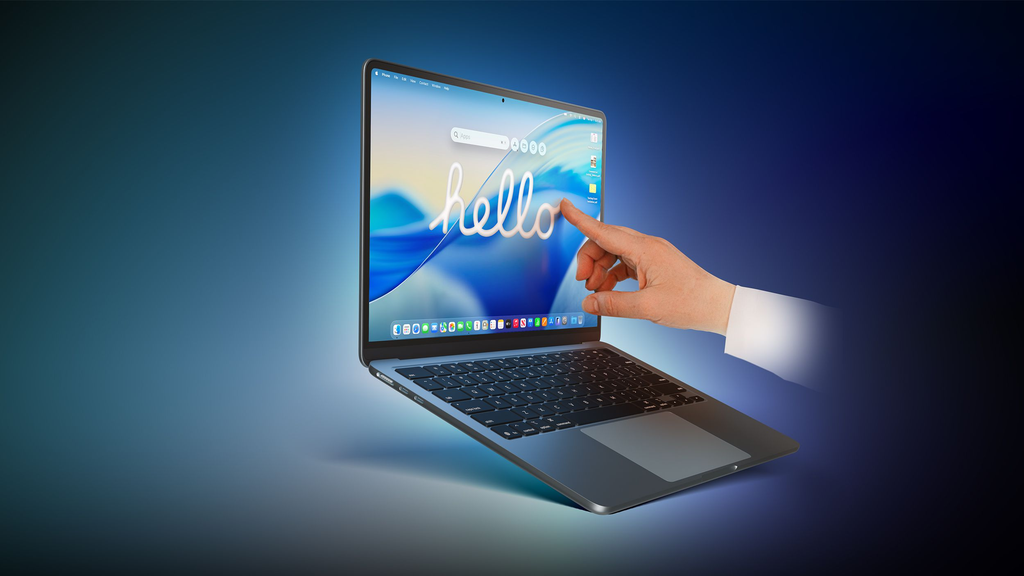
Apple is preparing one of the biggest shake-ups to its laptop family in recent memory. If you walked into an Apple Store today, you would see a lineup of MacBook Pro notebooks featuring mini-LED Liquid Retina XDR displays, traditional non-touch screens, and physical keyboards that have defined the pro Mac experience for years. That familiar setup is now living on borrowed time.
Fresh industry reports indicate that Apple is getting ready to discontinue its current generation of non-touch MacBook Pro models. In their place, Cupertino is preparing an ambitious transition toward high-end touchscreen OLED displays, alongside a broader hardware reshuffle that could reshape what high-performance computing looks like across macOS.
Whether you rely on your MacBook every day for intensive creative work, software development, or everyday productivity, this transition will affect your wallet, your upgrade cycle, and how you interact with a Mac computer.
Why Apple Is Ready to Sunset Current MacBook Pro Models
Apple rarely cancels or reworks a best-selling computer line without a calculated strategic shift. To understand why current MacBook Pro models are on the chopping block, we have to look at display technology, user interaction trends, and Apple’s silicon roadmap.
The Shift Toward Touchscreens on Mac
For over a decade, Apple leadership famously argued that touchscreens do not belong on laptops. Former Apple executives famously stated that lifting an arm to poke a vertical screen causes ergonomic fatigue. Instead, Apple pushed the iPad Pro as the primary touch-first workstation and introduced the ill-fated Touch Bar on MacBook Pros back in 2016 as a middle-ground compromise.
The $0 Secret To Launching Your Entire Online Empire
Why pay hundreds every month for separate software? Build funnels, send emails, and make sales with Systeme.io completely free.
Get Started For $0Free Forever • No Credit Card Needed • Beginner-Friendly
That philosophy is officially getting rewritten. Industry analysts report that Apple has developed a touch-enabled macOS experience designed specifically for next-generation clamshell designs. With rivals offering touchscreen Windows machines for years, premium laptop buyers have made it clear that having direct touch capability on glass can speed up sketching, document signing, audio mixing, and quick app navigation.
Current MacBook Pro models lack the hardware layer necessary to register capacitive touch inputs. To bring touch functionality to the flagship laptop range, Apple cannot simply update a software driver; it has to discontinue the existing non-touch chassis and replace it with purpose-built hardware.
Upgrading from Mini-LED to Tandem OLED
The Liquid Retina XDR displays on current 14-inch and 16-inch MacBook Pros rely on mini-LED backlighting. While mini-LED delivers outstanding peak brightness and deep contrast, it is thicker, heavier, and prone to occasional blooming around bright elements on pitch-black backgrounds.
Apple aims to bring ultra-thin tandem OLED displays—similar to the panels introduced on recent flagship iPads—across the entire high-end MacBook family. Tandem OLED stacks two light-emitting layers together to achieve astonishing brightness, true pixel-level blacks, near-instant pixel response times, and lower energy consumption.
Because OLED panels do not require bulky backlight arrays, Apple’s hardware engineering teams can trim significant thickness and weight from the laptop enclosure. The current MacBook Pro chassis was engineered specifically around thicker mini-LED assemblies and internal thermal ducts. Phasing out those enclosures is necessary to usher in thinner, lighter machines.
Hardware Realignment Across the Entire Lineup
Apple is quietly reimagining its entire personal computer catalog. Earlier this year, Apple formally retired the Mac Pro tower, focusing pro workstation users toward modular devices like the Mac Studio. In laptops, Apple is widening the gap between entry-level travel gear and elite creative workstations.
With affordable everyday portables like the rumored lightweight machines and competitive entry-level models taking over mainstream duties, the MacBook Pro must justify its premium price tag. Competing devices, such as the Samsung Galaxy Book lineup, are pushing ultra-thin designs and touch-ready displays at aggressive price points. Apple knows that keeping old display technology on its premier flagship laptop risks ceding territory to Windows alternatives.
What the New Touchscreen OLED MacBook Pro Will Look Like
When Apple retires the current non-touch models, what will take their place on store shelves? Supply chain leaks and analyst reports point to several significant upgrades.
1. Thinner, Lighter Aluminum Chassis
Current MacBook Pro models are celebrated for their port selection and thermal cooling, but they are undeniably blocky compared to MacBook Air models. With the transition to thinner OLED panels, Apple plans to reduce overall chassis depth, shrink display bezels, and produce a more streamlined profile without sacrificing internal battery capacity.
2. M-Series Silicon Built for Advanced On-Device AI
Apple’s future MacBook Pro lineup will run on next-generation Apple Silicon, featuring enhanced Neural Engines engineered to process massive on-device artificial intelligence workloads locally. Apple continues to expand AI capabilities across its device ecosystem, from OpenAI integrations in everyday Apple apps to next-generation system software. The incoming MacBook Pro models will pair OLED touch capability with dedicated hardware acceleration for local generative AI creation, video processing, and code compilation.
3. A Redesigned, Adaptive macOS Interface
You will not need to tap tiny desktop icons with your fingertips. Reports suggest that macOS will adapt dynamically when touch input is detected, enlarging target areas, supporting multi-touch gestures, and integrating stylus interaction or Apple Pencil compatibility on the horizontal hinge plane.
Which Models Are Getting Phased Out First?
The transition will not happen overnight in a single sweep. Instead, Apple appears to be following a phased retirement roadmap:
The premium 14-inch and 16-inch models equipped with Pro and Max tier silicon will be the first to transition to touchscreen OLED configurations. Meanwhile, the baseline 14-inch MacBook Pro may temporarily retain its current design to serve as an accessible price tier for students, corporate enterprise fleets, and budget-conscious professionals before Apple rolls the updated chassis down to entry tiers.
Pros and Cons of Sunsetting the Current MacBook Pro
Every time Apple retires an iconic hardware generation, user reactions are split. Here is a breakdown of what users stand to gain and what trade-offs they might face.
The Major Benefits
- Pixel-Level Image Precision: Tandem OLED panels eliminate blooming around subtitles, dark-mode windows, and graphic assets, offering video editors and photo retouchers true color grading accuracy.
- More Natural Workflow Controls: Having touch capability on a Mac means you can tap dialog boxes, scrub audio and video timelines with your finger, or sign documents without needing an external tablet.
- Better Battery Efficiency: OLED pixels turn completely off when displaying black, drastically reducing power draw during dark-mode workflows, writing, and coding sessions.
- Sleeker Portability: A thinner display lid and lighter chassis make carrying a 16-inch high-performance laptop far easier during commutes and business trips.
The Potential Drawbacks
- Noticeable Price Hikes: First-generation display overhauls rarely come cheap. As seen with recent premium rollouts, such as rumors surrounding Apple’s foldable hardware development, state-of-the-art display panels often drive retail prices upward.
- Screen Smudges and Glare: If you actively touch your laptop screen, fingerprints and facial oils will accumulate quickly on an otherwise pristine display.
- Battery Drain Under Full White Screens: While OLED saves energy on dark backgrounds, displaying solid white pages across an entire 16-inch display can draw more sustained power than mini-LED backlights.
How This Compares to Apple’s Broader Hardware Strategy
Apple is clearly undergoing a platform-wide hardware renaissance. Across every product category, the company is stripping away legacy conventions to prepare for spatial computing, folding displays, and generative software.
Send, Spend & Hold Money Worldwide Without Hidden Fees
Transfer money internationally at the real exchange rate and hold 40+ currencies in one account.
Open a Wise AccountMid-market rate • Fast transfers • 40+ currencies
From exploring radical new form factors like the rumored iPhone Duo foldable project to updating wearable and audio portfolios, Cupertino is actively auditing which legacy designs are worth keeping. Just as Apple eventually declared older landmark devices like the iPhone X obsolete to clear paths for modernized chipsets, the current generation of non-touch MacBook Pro laptops has reached the peak of its evolutionary lifespan.
Should You Buy a Current MacBook Pro Now or Wait?
With current MacBook Pro models facing planned obsolescence, laptop shoppers face an important dilemma: buy the battle-tested non-touch model today, or hold off for the next-generation touch OLED redesign?
Who Should Buy a Current MacBook Pro Today?
- Users Who Hate Fingerprints: If the thought of greasy finger marks on your laptop display makes you cringe, the current matte-like Liquid Retina XDR screen is one of the best displays ever built.
- Budget-Minded Power Users: As Apple prepares to cycle inventory out, third-party retailers and refurbished stores will offer steep discounts on current models.
- People Who Need Maximum Port Selection and Battery Life Right Now: The current MacBook Pro chassis is thick enough to support excellent sustained cooling, full-size HDMI ports, and a reliable SD card slot without thermal throttling.
- Anyone in Urgent Need of a Machine: If your current laptop is failing or slowing down your daily workflow, waiting months or years for an unreleased redesign does not make practical sense. You can browse our curated recommendations for the best laptops for remote work to find immediate options that match your budget.
Who Should Wait for the Next-Gen OLED MacBook Pro?
- Creative Professionals Working with HDR Video: If true black levels, zero halo blooming, and cinema-grade color fidelity are essential to your daily deliverables, tandem OLED is well worth the wait.
- Digital Artists and Visual Designers: If having touch functionality, quick gestures, or stylus compatibility on your main Mac computer will streamline your creative process, hold onto your existing hardware until Apple officially pulls the curtain back on the redesign.
- Upgraders on an M1 or Older Machine: If your current M1 Pro or Intel-based Mac still handles your daily workload without major hiccups, stretching its lifespan until the touchscreen OLED generation arrives will give you a generational leap in performance and design.
Frequently Asked Questions (FAQs)
Will Apple stop supporting current MacBook Pro models when they are discontinued?
No. Discontinuing a product simply means Apple stops manufacturing and selling new units through official store channels. Discontinued MacBook Pro models will continue to receive macOS software updates, security patches, and hardware repair support through Apple Authorized Service Providers for many years.
Will the new MacBook Pro replace the iPad Pro?
No. Apple views the Mac and the iPad as distinct devices serving complementary roles. The iPad Pro remains a modular, ultra-mobile slate designed around Apple Pencil drawing and tablet apps, while the MacBook Pro remains a full-fledged workstation running macOS with a physical keyboard, trackpad, and terminal access.
How much will the OLED touchscreen MacBook Pro cost?
While Apple has not announced official pricing, introducing tandem OLED display panels and capacitive touch digitization typically increases manufacturing costs. Analysts predict starting prices could jump slightly compared to current mini-LED configurations.
Can you turn off the touchscreen if you do not want to use it?
While final software features have not been officially detailed, macOS typically includes extensive accessibility and peripheral settings that allow users to disable secondary inputs. It is very likely Apple will include an option to disable screen touch detection for users who prefer using only the keyboard and trackpad.
The planned phase-out of current MacBook Pro models represents the end of an era for traditional clamshell computing at Apple. While the current generation remains an absolute workhorse, the arrival of touchscreen OLED technology promises a faster, sleeker, and more versatile future for professional Mac users everywhere.
