
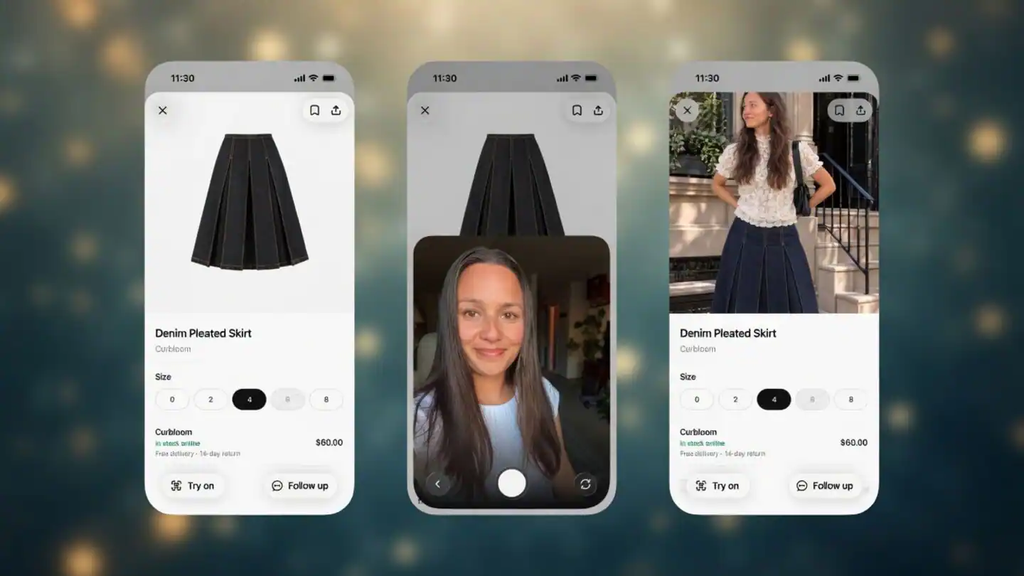
OpenAI just dropped a massive update that is about to change how millions of people shop for clothes online. You can now use ChatGPT to virtually try on clothes before spending a single dollar on them.
Finding a stunning dress, a sharp suit, or a casual pair of sneakers online often leaves you wondering if it will actually look good on you. Instead of guessing or hoping for the best, you can upload a picture of yourself and see an instant visual preview of yourself wearing those exact clothes.
This brand-new shopping feature is rolling out globally across mobile phones and desktop computers. It combines advanced artificial intelligence with simple photo uploads to turn your phone into a personal fitting room.
Shopping online has always come with a risk of buying something that looks great on a model but disappointing on you. This new tool aims to make online shopping easier, faster, and much more accurate.
How the ChatGPT Virtual Try-On Feature Works
You do not need to be a tech expert to understand how this new feature operates. The entire system is powered by OpenAI’s latest image creation technology, known as the ChatGPT Images 2.5 model.
The $0 Secret To Launching Your Entire Online Empire
Why pay hundreds every month for separate software? Build funnels, send emails, and make sales with Systeme.io completely free.
Get Started For $0Free Forever • No Credit Card Needed • Beginner-Friendly
When you search for clothing items inside ChatGPT, a new button labeled Try On appears next to the product search results. Tapping this button prompts the AI to combine the clothing item with a photo of your body.
You are not restricted to items that appear in ChatGPT’s built-in search results either. If you see a nice shirt, jacket, or outfit on another shopping website or social media page, you can take a screenshot of it.
Uploading that screenshot into your chat conversation allows you to ask the chatbot to show you wearing those clothes. Within moments, the AI generates a photo of you styled in that new outfit.
Reports from outlets like Engadget highlight how seamlessly this brings visual shopping directly into regular AI conversations.
Getting Started with Your Own Virtual Wardrobe
Setting up your virtual try-on experience takes less than two minutes. The process is designed to be straightforward for everyone.
First, you need a clear, well-lit picture of yourself. A full-body photo or a clear selfie works best because it gives the AI a clear view of your posture and body type.
You can upload a new photo every single time you search for clothes, but ChatGPT offers an even more convenient shortcut. You can save a reference photo directly in your account settings.
By going to your personal settings, you can save a reference picture that the chatbot remembers for future shopping trips. That way, you do not have to upload your picture again every time you want to try something on.
OpenAI has also launched a brand-new Favorites library alongside this feature. When you generate an outfit preview that you really like, you can save it to your personal collection inside the app so you can review or buy it later.
Coverage from India Today notes that these combined shopping tools make organizing your favorite outfits easier than ever.
Step-by-Step Guide to Trying On Clothes in ChatGPT
If you are ready to test this feature right now, here is a simple step-by-step walkthrough to get the best results:
- Open the ChatGPT App or WebsiteLaunch the app on your mobile device or open the website on your computer browser. Make sure you are logged into your account.
- Upload Your PhotoTap the attachment icon and upload a clear, front-facing picture of yourself with good lighting. Alternatively, save your photo under your account settings so it stays saved.
- Search for Clothing ItemsAsk ChatGPT to find specific items you want to buy. You can type requests like “Find me a dark blue denim jacket” or “Show me red summer dresses”.
- Select the Try On OptionWhen the product options appear, click the Try On button next to the item, or paste a screenshot of clothes from any online store.
- Let the AI Generate Your PreviewAsk the chatbot to show what the item looks like on your photo. Wait a few seconds for the image generator to create your custom picture.
- Save Your Top PicksIf you like how the outfit looks on you, hit the save icon to store it in your Favorites library for later viewing.
Practical Prompts You Can Use Right Away
To get the most out of this new AI tool, using clear and natural prompts is key. Here are several practical prompt examples you can copy and paste into your chat:
- For Workwear: “Find me three smart-casual outfits for an important Friday work meeting and let me virtually try on each option using my photo.”
- For Testing New Colors: “I want to try wearing colors I usually avoid. Show me three different colored shirts and let me virtually try them on so I can see what suits my skin tone.”
- For Special Events: “I am attending an outdoor evening wedding next month. Find me two classy dress options and show me wearing both.”
- For Outerwear: “Find me a warm winter coat that looks stylish without looking huge, and let me virtually try on your top recommendation.”
- For Footwear: “Show me three pairs of versatile everyday sneakers that match blue jeans, then generate a photo showing how each pair looks on me.”
Guides published by tech reviewers at Tom’s Guide demonstrate how typing descriptive prompts gives you far better style recommendations and sharper visual images.
What This Feature Can Do (And What It Cannot Do)
It is helpful to keep realistic expectations in mind while using any AI fashion assistant.
What the AI Does Exceptionally Well
- Visual Style Matching: You can quickly see how outfit colors, patterns, and clothing cuts look against your skin tone and overall frame.
- Outfit Coordination: You can mix and match tops, pants, jackets, and accessories to see how full outfits look together before spending money.
- Exploring New Trends: You can test bold new fashion trends or unusual color combinations risk-free without stepping foot inside a physical store.
What the AI Cannot Do
- Guarantee Exact Sizing: The AI photo is a visual concept, not a 3D medical measurement of your body. It cannot tell you if a pair of pants will feel too tight around your waist or if a shirt collar is too snug.
- Predict Fabric Comfort: The generated image cannot tell you if a fabric feels soft, heavy, stretchy, or scratchy.
- Replace Size Charts: You should still check official retailer size guides and measure yourself before placing an order.
As detailed in reports by Gulf News, OpenAI explicitly reminds users that these images are visual previews and do not guarantee physical fit.
Send, Spend & Hold Money Worldwide Without Hidden Fees
Transfer money internationally at the real exchange rate and hold 40+ currencies in one account.
Open a Wise AccountMid-market rate • Fast transfers • 40+ currencies
Privacy and Safety: What Happens to Your Selfies?
When you upload personal pictures to an AI service, keeping track of your digital privacy is important.
When you upload a selfie or full-body photo for virtual try-on, ChatGPT saves that reference photo so you can keep using it across future conversations. If you prefer not to leave your photos stored on OpenAI servers, you can delete them whenever you wish.
To manage or delete your stored photos, follow these simple steps:
- Go to your Settings inside ChatGPT.
- Click on Personalization.
- Select Reference Photos.
- View, update, or permanently delete any photo stored in your account.
Keep in mind that uploaded photos may be used for AI model training by default unless you turn off data sharing in your account settings. Taking a moment to check your privacy preferences ensures your personal pictures remain as private as you want them to be.
How ChatGPT Compares to Google Shopping and Other Tools
Virtual try-on tools are growing fast across the tech industry. Google added a similar try-on feature to Google Search back in 2025, allowing shoppers to see clothing on various model body types and real photos.
Platforms like Pinterest have also experimented with visual discovery tools to help people shop for fashion items directly from images.
Where ChatGPT stands out is its interactive, conversational setup. Instead of just searching for an item on a static web page, you can chat back and forth with the AI.
You can ask for budget friendly alternatives, request advice on matching shoes, or ask how to style a single jacket for three different occasions. Combining advice, visual try-ons, and product recommendations in one single chat creates a smooth shopping experience.
How Virtual Try-On Is Changing Online Shopping
For years, online shopping required a lot of imagination. Store websites show clothing on professional models under studio lighting, which does not always show how clothes look on people with different heights or body shapes.
This gap leads to high return rates for online retailers when clothes arrive and do not look like what shoppers expected.
The $0 Secret To Launching Your Entire Online Empire
Why pay hundreds every month for separate software? Build funnels, send emails, and make sales with Systeme.io completely free.
Get Started For $0Free Forever • No Credit Card Needed • Beginner-Friendly
By giving buyers an instant preview of clothes on their own photos, virtual try-on technology bridges that gap. It helps you shop with greater confidence and avoids the hassle of buying items only to ship them back a week later.
As AI image generation becomes sharper and faster, personalized shopping experiences will likely become the standard across all major fashion stores.
Stay Connected with WhatsBuzzn
Staying informed on the latest technology updates, AI tools, viral stories, and daily lifestyle tips keeps you ahead of the curve.
Want to learn more about our team and mission? Check out our About Page.
Have a question, feedback, or a story tip you want to share with us? Visit our Contact Page and drop us a message anytime.
Stay connected with us across all social media platforms for quick updates, trending news, and engaging discussions:
- Follow us on Instagram for daily trending stories and visuals.
- Join our growing community on Facebook for full articles and discussions.
- Get fast updates and real-time news on X (formerly Twitter).
Frequently Asked Questions (FAQs)
Is the ChatGPT virtual try-on feature free to use?
Yes, the virtual try-on feature is rolling out to ChatGPT users across free and paid account tiers. However, usage limits on image generation may apply depending on your subscription level.
Do I need to upload a full-body photo for virtual try-on to work?
A full-body photo works best for items like dresses, suits, and pants. For tops, shirts, hats, or glasses, a clear upper-body photo or selfie is usually sufficient.
Can ChatGPT determine my exact clothes size?
No. The feature generates a visual image showing how an outfit looks on your body type, but it cannot measure physical dimensions or guarantee exact sizing. Always check the retailer’s size guide before purchasing.
How do I delete my photos from ChatGPT settings?
You can remove saved pictures by going to Settings, opening the Personalization menu, selecting Reference Photos, and tapping delete on any saved image.
Can I try on clothes from any website?
Yes. You can take a screenshot of clothing from any online store or social media feed and upload it directly into your chat to request a virtual try-on.
Is this feature available on mobile devices?
Yes, the virtual try-on feature is supported on both the ChatGPT mobile app (iOS and Android) and desktop web browsers.
Testing out new fashion styles has never been easier or more accessible. By taking advantage of this new ChatGPT feature, you can browse online stores, test different outfits on your own photo, and make smarter shopping decisions without ever stepping into a crowded fitting room.
