
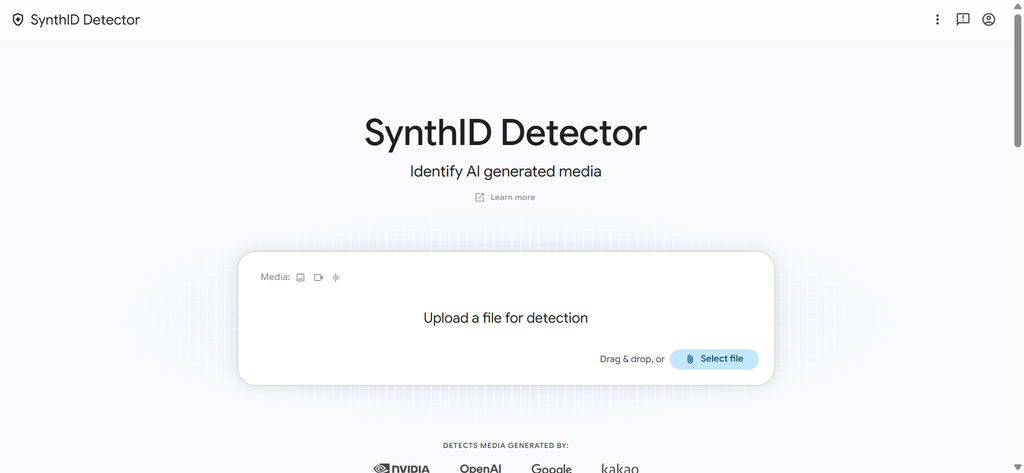
Google has officially opened public access to its standalone SynthID Detector website, giving everyone a free web-based portal to check if images, video clips, audio tracks, or text were created by artificial intelligence.
Up until now, this detection technology was locked behind closed doors, tested mostly by journalists and news organizations. Today, anyone can visit the tool online or access it through Google’s AI ecosystem to test suspicious media in seconds.
With fake photos, voice clones, and synthetic videos spreading across social media faster than ever, knowing what is real and what is computer-generated has become a daily struggle. This new tool aims to give everyday internet users the power to spot synthetic media before sharing it.
What Is Google’s SynthID Website and Why Is Everyone Talking About It?
The newly launched SynthID Detector site is a web portal designed to spot hidden digital signatures left behind by artificial intelligence generators. When AI tools build a picture, draft an article, or generate a human voice, SynthID bakes an invisible mark directly into the media file.
Until recently, finding out whether a photo or audio snippet was generated by a computer required specialized technical tools or manual inspection. Now, Google has made this process as simple as dragging and dropping a file into your web browser.
The $0 Secret To Launching Your Entire Online Empire
Why pay hundreds every month for separate software? Build funnels, send emails, and make sales with Systeme.io completely free.
Get Started For $0Free Forever • No Credit Card Needed • Beginner-Friendly
The public release comes at a critical time. Synthetic media is becoming so realistic that even trained eyes struggle to tell human work apart from machine output. By giving the public direct access to detection technology, Google is taking a major step toward bringing transparency back to online media.
This move aligns closely with broader industry efforts to combat internet spam and low-quality automation. In fact, web creators have already seen major shifts as Google’s latest spam update targets low-quality AI content across search engine rankings.
How SynthID Watermarking Actually Works
To understand why the SynthID website is so powerful, it helps to know how the underlying watermarking tech operates.
Traditional watermarks are visible logos or stamped text placed in the corner of a picture. Anyone with basic photo editing software can crop them out or paint over them. SynthID works completely differently by embedding an invisible digital code directly into the pixels of an image, the audio waves of a sound file, or the structural patterns of generated text.
This code is woven into the file at the exact moment of creation. Human eyes cannot see it, and human ears cannot hear it. The quality of the picture or audio file stays exactly the same, but specialized algorithms can scan the file and read the signature instantly.
What makes SynthID unique is its durability. If someone tries to trick the detector by cropping a photo, changing its colors, applying a heavy filter, or compressing a video clip, the invisible watermark usually survives.
This resilience sets it apart from standard visible markings. Users who follow big tech updates might remember how Google now lets you remove visible Gemini AI watermarks, making invisible, tamper-resistant watermarks like SynthID far more reliable for long-term verification.
What Kinds of Files Can You Check Right Now?
The new SynthID website and integrated verification tools can process several distinct media formats. Each format has its own specific testing guidelines to ensure the highest possible accuracy.
AI-Generated Images and Photos
Images are among the most common synthetic files shared across social media networks today. The detector scans the visual pixel structure of pictures created by models like Google DeepMind Imagen to confirm if AI was used to build or alter the image.
When uploading images for verification, accuracy depends on file quality. If you are submitting a screenshot of an image you found online, it is best to crop tightly around the picture itself rather than uploading a collage or a full screen with background borders.
AI Videos and Synthetic Movie Clips
Video verification is another major feature supported by the web portal. The system analyzes the frame sequence to spot hidden SynthID watermarks embedded in video outputs, such as those generated by Google’s Veo video engine.
Currently, video uploads are limited to files under 90 seconds in duration. When processing a video, the detector gives detailed results showing which specific sections of the timeline contained watermarked content.
Audio Clips and Voice Clones
Voice cloning technology has made phone scams and fake celebrity recordings a widespread problem. The SynthID audio scanner analyzes sound waves to identify synthetic voice tracks and computer-generated music.
The tool can handle audio files up to one hour long. It scans the sound frequencies for embedded markers that remain intact even if the audio file was compressed into an MP3 or converted into a low-quality phone clip.
Written Text and AI Articles
SynthID also extends to written text generated by large language models like Gemini. When AI generates sentences, it selects words based on statistical probability patterns. SynthID subtle shifts these word choices in a way that creates an invisible statistical signature without altering the meaning or readability of the text.
Send, Spend & Hold Money Worldwide Without Hidden Fees
Transfer money internationally at the real exchange rate and hold 40+ currencies in one account.
Open a Wise AccountMid-market rate • Fast transfers • 40+ currencies
The detector can analyze submitted text blocks to check if the writing carries these distinct structural patterns.
Is SynthID Only for Google AI, or Does It Work for Other Tools?
One of the biggest questions surrounding the new website is whether it only spots Google-made content or if it can identify content from competing AI platforms.
Google developed SynthID through its DeepMind research unit, but the company has been actively expanding the technology across the tech sector. While initial versions only recognized tools from Google’s internal ecosystem, the expanded portal now supports watermarked outputs from major industry partners, including OpenAI, NVIDIA, and Kakao. Integration with Apple technology is also slated to roll out soon.
This cross-industry cooperation is vital because single-company tools are far less effective when users interact with dozens of different generative apps every day. However, it is worth noting that some tech giants still rely on alternative standards. For instance, Microsoft and Meta frequently use separate content credentials frameworks, which do not always detect files generated across competing ecosystems.
Meanwhile, social media platforms are introducing strict policies to manage synthetic media on their networks. Platforms are taking noticeable action as seen when Instagram’s new policy cracks down on fake human accounts and AI influencers, making public detection tools essential for everyday users wanting to verify what they see in their feeds.
Step-by-Step Guide: How to Use the SynthID Detector Website
Using the new SynthID Detector portal is straightforward and requires no technical knowledge or software installation. Here is how you can test a file today:
Step 1: Access the Verification Portal
Open your web browser and navigate directly to the official Google DeepMind SynthID portal or open the Gemini web interface. You can log in using your standard personal Google account or a workspace account.
Step 2: Prepare Your File for Upload
Before uploading your media, double-check that your file meets the basic requirements:
- Photos and Images: Crop away extra whitespace or phone interface graphics.
- Video Files: Make sure the clip is trimmed to under 90 seconds.
- Audio Tracks: Ensure the file length is under one hour and saved in a standard audio format.
Step 3: Upload the Content
Drag and drop your file into the designated upload area, or tap the file upload button on your mobile screen. If you are using the Gemini mobile interface, you can select files directly from your photo library or Google Drive account.
Step 4: Submit Your Query
Once your file is uploaded, ask a simple verification question such as:
The $0 Secret To Launching Your Entire Online Empire
Why pay hundreds every month for separate software? Build funnels, send emails, and make sales with Systeme.io completely free.
Get Started For $0Free Forever • No Credit Card Needed • Beginner-Friendly
- Was this image created or edited by AI?
- Does this video contain a SynthID watermark?
- Is this audio file a real recording or a voice clone?
Step 5: Review the Detection Results
The system will scan the file and provide a clear output. If a watermark is found, the system will state that the content was generated or edited using artificial intelligence. For video files, it will pinpoint the exact timestamps where watermarked frames appeared.
Google’s broader AI ecosystem continues to grow at an unprecedented pace, with hundreds of millions of users interacting with these tools daily. You can read more about this growth in our article on how Google Gemini hits 950 million monthly users.
How to Spot AI Content With Your Own Eyes
While automated tools like the SynthID website make checking files much easier, it is always helpful to know how to spot synthetic content manually. Automated detectors work best when paired with a careful human eye.
Here are the most common visual and auditory clues that indicate a file might be generated by a computer:
Visual Clues in Photos and Art
- Unnatural Hands and Fingers: AI models frequently struggle with drawing realistic human hands, often adding extra fingers or blending knuckles together.
- Distorted Background Text: Look closely at signs, street names, or book covers in the background of a photo. AI often renders text as jumbled, unreadable symbols.
- Lighting and Shadow Mistakes: Check if shadows fall in directions that match the primary light source in the photo.
- Unnatural Skin and Hair: Human skin in AI photos can appear overly smooth or plastic-like, while hair strands may melt unnaturally into clothing.
Auditory Clues in Voice Recordings
- Robotic Cadence: Computer-generated voices often lack natural speech pauses, breath intake sounds, or emotional variation.
- Background Noise Disconnect: A synthetic voice might sound crystal clear while the background audio sounds like harsh static, indicating the two audio tracks were mixed artificially.
- Pronunciation Glitches: Listen closely to how unusual names or localized words are pronounced. AI voice models often mispronounce local slang or non-standard words.
Learning these manual checks helps you stay alert, whether you are trying out new web features or exploring 7 hidden Google Gemini features that will save you hours every single week.
The Difference Between SynthID Watermarks and Content Credentials
As you explore AI verification tools, you will likely hear two terms mentioned often: SynthID watermarks and Content Credentials. While both are built to fight online deception, they serve different purposes.
SynthID acts as a hidden signature stamped directly into the media data itself. It tells you specifically whether an algorithm created or modified the pixel or sound file.
Content Credentials work more like a digital passport for a piece of content. Created through open industry standards like the Coalition for Content Provenance and Authenticity (C2PA), Content Credentials attach metadata to a file. This metadata records the history of the file, including what camera captured it, what editing programs opened it, and whether any AI tools were used along the way.
Using both systems together gives the clearest picture of a media file’s origin. Content Credentials show the timeline of edits, while SynthID proves whether the core content came from a generator.
Why Public Access to Detection Tools Matters Right Now
The release of a free, public AI detector comes at a moment when online trust is under serious pressure. Deepfakes are no longer confined to Hollywood studios or tech labs. Anyone with a smartphone can generate convincing synthetic content in seconds.
This accessibility creates genuine risks:
- Scams and Fraud: Voice clones are increasingly used in targeted impersonation scams to trick family members into sending money.
- Fake Political News: Doctored photos and altered videos can spread misquotes or fake political events across social platforms within minutes.
- Copyright Concerns: Artists and creators need reliable ways to prove their original work is human-made and protect their intellectual property.
By offering a simple way for anyone to test files, Google is helping level the playing field between content creators and automated generators. This focus on search quality and media verification is also transforming web discovery, a topic covered extensively in our guide on how to get the most out of Google’s AI mode in search.
Frequently Asked Questions (FAQs)
Is the SynthID Detector website completely free to use?
Yes. Google has opened the SynthID Detector website for public use without charge. You simply need a standard personal Google account or a supported Workspace account to log in and begin checking files.
Can SynthID detect content created by ChatGPT or Midjourney?
SynthID specifically reads watermarks embedded by supported generators. While it natively checks Google tools like Imagen and Veo, it also supports watermarked outputs from major partners such as OpenAI and NVIDIA. However, if a third-party generator does not use the SynthID watermarking standard, the detector may not be able to identify it.
Will SynthID still work if an image has been cropped or filtered?
In most cases, yes. The SynthID watermarking system is designed to be highly resilient. The digital signature remains readable even after common alterations like cropping, color adjustments, frame rate changes, and file compression. However, extreme modifications may lower detection accuracy.
Can I access the SynthID Detector on my mobile phone?
Yes. You can visit the website using any mobile browser, or you can use the verification features integrated directly into the Gemini mobile app on Android and iOS devices.
Why can’t humans see or hear SynthID watermarks?
SynthID inserts tiny mathematical changes into the media file’s structure. For images, these changes are made to pixel values in a way that the human brain cannot register. For audio, the adjustments sit in subtle sound frequencies that human ears cannot isolate, leaving the overall quality completely unchanged.
Staying Informed and Safe Online
The launch of Google’s SynthID website marks an important milestone in the fight for internet transparency. As synthetic media tools grow more advanced, having free and accessible detection systems ensures that regular users can verify what they see and hear online.
Keeping up with technology updates does not have to be confusing. Having the right tools and information helps you stay confident as the digital landscape continues to evolve.
To learn more about our team and our mission to make complex technology news clear and easy to understand, check out our About Page. If you have questions, feedback, or news tips, feel free to reach out directly through our Contact Page.
You can also follow our official social channels for real-time news updates and trending discussions:
- Follow our latest stories on Instagram
- Join our community page on Facebook
- Get instant tech updates on X (formerly Twitter)
