
Google is rolling out a massive update to its mobile health app. Version 5.09 of Google Health brings a feature that fitness enthusiasts have requested for months: your Cardio Load now credits workouts recorded on non-Google hardware. If you use an Apple Watch, a Garmin device, or any other third-party fitness tracker, your heart-rate data from those workouts will finally count directly toward your daily and weekly effort scores inside the Google Health app.
This update is not just about third-party workout tracking. Version 5.09 also introduces advanced health metrics for Pixel Watch owners, simplifies custom food logging, resolves persistent iOS bugs, and restores missing historical step streaks.
Here is a full breakdown of everything included in Google Health 5.09, how these changes work in daily life, and how you can take advantage of every new feature right away.
What Is the Google Health 5.09 Update All About?
Google has spent the past year building its health app into a single hub for all fitness and health tracking. Instead of forcing users into a single closed ecosystem, Google Health aims to bring together data from multiple devices, wearables, and third-party applications.
Version 5.09 is rolling out across both Android and iOS devices. According to the official 9to5Google release notes, the update centers around flexibility. Millions of people switch between different smartwatches or use specific sports watches for outdoor runs while keeping Google Health as their primary dashboard. Before this update, workout effort recorded outside of a Pixel Watch or Fitbit was largely ignored by Google’s core effort metric.
The $0 Secret To Launching Your Entire Online Empire
Why pay hundreds every month for separate software? Build funnels, send emails, and make sales with Systeme.io completely free.
Get Started For $0Free Forever • No Credit Card Needed • Beginner-Friendly
That restriction is now officially gone.
Third-Party Cardio Load: The Big Game-Changer
To understand why this update is such a big deal, it helps to understand what Cardio Load actually measures.
Cardio Load is not a step counter. It is also not a simple measure of calories burned. Cardio Load measures cardiovascular strain. It calculates how hard your heart worked and how long it worked at higher intensities during physical activity.
In earlier app versions, Google Health required you to wear a supported Pixel Watch or Fitbit device during exercise to earn Cardio Load points. If you went on a long cycle using a Garmin bike computer or recorded a run on an Apple Watch, that effort showed up as logged minutes, but it never contributed to your actual heart strain score.
With Google Health 5.09, any workout tracked in another app or wearable and synced to Google Health will count toward your Cardio Load, provided that heart rate data was recorded during the activity.
How Health Connect and HealthKit Make It Work
This cross-platform sync works through Android’s Health Connect framework and Apple’s HealthKit system. When you finish a workout on a third-party device—such as a Garmin smartwatch, an Apple Watch, or a chest strap synced to Strava—the raw exercise session is shared with your phone’s central health data store.
Google Health 5.09 reads that heart-rate stream, analyzes the time spent in different heart-rate zones, and translates it into standard Cardio Load points.
This means you can wear a heavy-duty GPS watch on trails over the weekend, wear a lightweight Pixel Watch during the workweek, and maintain a seamless heart-strain score without any missing days.
Understanding Target Load and Training Balance
Cardio Load works side-by-side with your Target Load.
Target Load is a personalized weekly target range built from your actual activity history over the prior four weeks. It adapts over time as your stamina increases or decreases.
Instead of demanding the exact same effort every single day, Google Health evaluates your total weekly cardiovascular exertion. This design respects recovery days. If you complete a grueling workout on Tuesday, your Target Load ring will fill up significantly, allowing you to take a light stroll or rest day on Wednesday without the app labeling you as undertrained.
Your target is organized around three clear training focus states:
- Recovery: A lower weekly score designed to let your muscles and cardiovascular system rest after heavy exertion.
- Maintain: A balanced score aimed at preserving your current aerobic fitness level.
- Build: A higher score designed to push your cardiovascular capacity and increase endurance over time.
Because third-party workouts now feed directly into this calculation, your Target Load will be far more accurate if you regularly use non-Google devices.
Health Guardian Features Roll Out to Pixel Watch Users
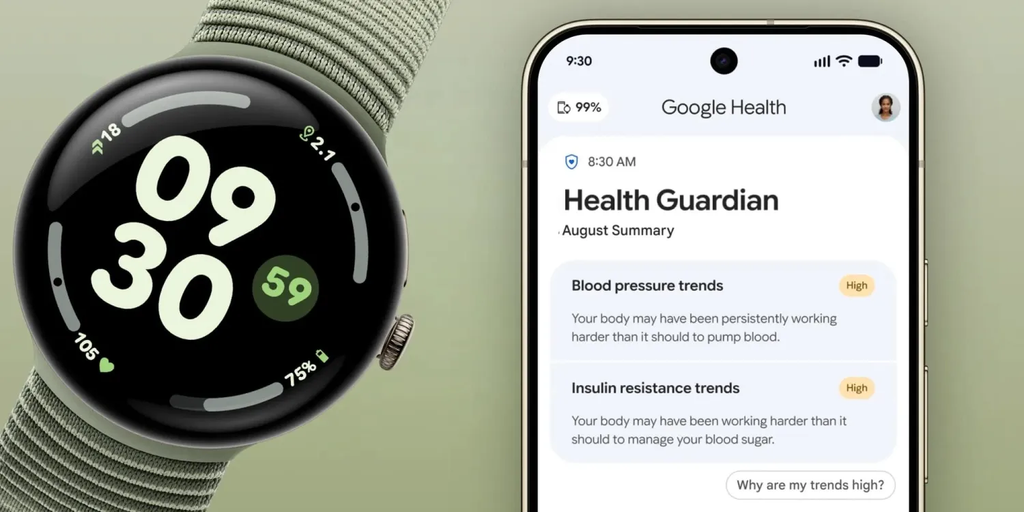
Alongside the third-party workout integration, version 5.09 introduces new Health Guardian metrics for Pixel Watch 3, Pixel Watch 4, and Pixel Watch 5 users.
These new tools focus on long-term physiological trend tracking rather than immediate snapshot numbers.
Send, Spend & Hold Money Worldwide Without Hidden Fees
Transfer money internationally at the real exchange rate and hold 40+ currencies in one account.
Open a Wise AccountMid-market rate • Fast transfers • 40+ currencies
Blood Pressure Trends
Located inside the Heart section of the main Health tab, blood pressure trend tracking helps users notice underlying patterns before they place unnecessary stress on the body. To view this metric, you must wear your supported Pixel Watch for at least five consecutive days during the month.
Insulin Resistance Trends
Found within the Metabolic section of the Health tab, insulin resistance trends provide key insights into how your body manages metabolic energy. Unlocking this information requires wearing your watch for seven or more days and nights within a given month.
Sleep Breathing Quality Metrics
Sleep tracking is getting a major upgrade with breathing quality analysis. Available in both the Sleep tab and the Respiratory section of the Health tab, this feature shows both daily and monthly breathing stability. It helps you see how nighttime breathing variations might be affecting your overall daytime energy and recovery scores.
All three Health Guardian metrics feed into a monthly summary report. Users will receive their first monthly summary at the start of October.
Nutrition Logging Improvements: Better Custom Foods
Tracking what you eat is often one of the most tedious parts of any health routine. Google Health 5.09 addresses several common user complaints regarding food logging.
When creating custom meals or recipes, you can now toggle serving units and meal times far more quickly. You no longer have to tap through several sub-menus just to switch between grams, ounces, or custom portion sizes.
The update also resolves two bug issues:
- iOS Custom Food Creation: iPhone users previously faced glitches where custom food items failed to save or caused the app to crash. This bug has been squashed.
- Ghost Items in Food Lists: A persistent bug caused deleted custom food items to keep reappearing on user food lists. Version 5.09 permanently clears deleted items from your database.
Activity Logging and Streak Restorations
If you like to manually log workouts that were not caught by an automatic sensor, Google Health 5.09 updates the Fitness tab experience. Tapping the “Log activity” button opens a revamped list of activity options, making it simpler to pick the exact sport or exercise style you completed.
Google has also resolved an issue that frustrated long-time users: missing historical step streaks. Some users had reported that months or years of continuous activity milestones vanished after recent server updates. Google confirmed that missing historical streak data is now being restored across all user accounts.
How to Set Up Third-Party Cardio Load Tracking
Setting up third-party workout tracking in Google Health 5.09 takes only a few quick steps. Here is how to make sure your workouts count:
The $0 Secret To Launching Your Entire Online Empire
Why pay hundreds every month for separate software? Build funnels, send emails, and make sales with Systeme.io completely free.
Get Started For $0Free Forever • No Credit Card Needed • Beginner-Friendly
- Update Google Health: Open the Google Play Store or Apple App Store and make sure your app is updated to version 5.09.
- Connect Health Syncing: On Android, ensure Health Connect is turned on and allowed to read exercise data from your secondary app (such as Garmin Connect, Strava, or Wahoo). On iPhone, check that Apple Health permissions allow Google Health to read workout data.
- Verify Heart Rate Data: Confirm that your third-party watch or chest strap was recording continuous heart rate data during the exercise session. Cardio Load cannot be calculated from manual time logs or step-only data.
- Check the Today Tab: Open Google Health after finishing your activity. Open the Cardio Load card on the main screen to see your updated weekly progress.
For additional details on metric calculations, you can consult the Google Health Support Guide.
Tips to Maximize Your Fitness Tracking
Having access to better metrics is great, but knowing how to interpret them is what creates long-term success.
Wear your primary tracker consistently. Because Target Load calculates an adaptive baseline over four weeks, wearing your device continuously produces much more accurate target ranges. If you only wear your wearable on high-intensity days and take it off during rest days, the app will falsely assume your baseline effort is much higher than it actually is.
Respect rest days. The goal is not to max out your Cardio Load score every single day. Taking recovery days prevents burnout, reduces injury risks, and keeps your cardiovascular system strong.
Listen to your body over your watch. Algorithms provide excellent estimates, but they do not know if you are coming down with a cold or suffering from mental fatigue. If your app tells you to push for a higher Cardio Load but you feel exhausted, prioritize rest.
Frequently Asked Questions (FAQs)
Do I need a Pixel Watch to get Cardio Load scores in version 5.09?
No. While a Pixel Watch or Fitbit device provides built-in tracking, version 5.09 allows you to earn Cardio Load from workouts recorded on third-party devices like Apple Watch or Garmin, as long as heart rate data is included.
Why is my logged workout not adding to my Cardio Load?
Cardio Load requires continuous heart-rate data recorded during the exercise. If you manually log a workout time without heart-rate data, or if your wearable lost connection to your heart-rate sensor during the session, the activity will count toward active minutes but will not generate Cardio Load points.
Which Pixel Watch models support the new Health Guardian features?
The Health Guardian features—including blood pressure trends, insulin resistance trends, and sleep breathing quality metrics—are supported on Pixel Watch 3, Pixel Watch 4, and Pixel Watch 5.
How do I fix missing custom food items on iOS?
Updating your app to version 5.09 resolves the custom food creation bug. If you still experience issues, force close the app, update to the latest release, and restart your iPhone.
Will my old step streaks return automatically?
Yes. Google is actively restoring historical step streak data across accounts. Once your app updates to version 5.09, missing streaks should reappear on your profile automatically over the coming days.
Is Google Health 5.09 a paid update?
No. Version 5.09 is a free software update available to all Android and iOS users through their respective app stores.
Google Health 5.09 is one of the most useful updates to hit the platform this year. Opening up Cardio Load to third-party devices makes fitness tracking fairer, more flexible, and far more accurate for anyone using multiple wearables. Coupled with Health Guardian features, smoother nutrition tracking, and bug fixes, this update gives you far better control over your daily health goals.
Stay connected with us for more tech news and practical health guides! You can visit our about page to learn more about what we do, or head to our contact page to send us your thoughts and questions. Do not forget to follow us on Instagram, like us on Facebook, and join the conversation on X (formerly Twitter).
