
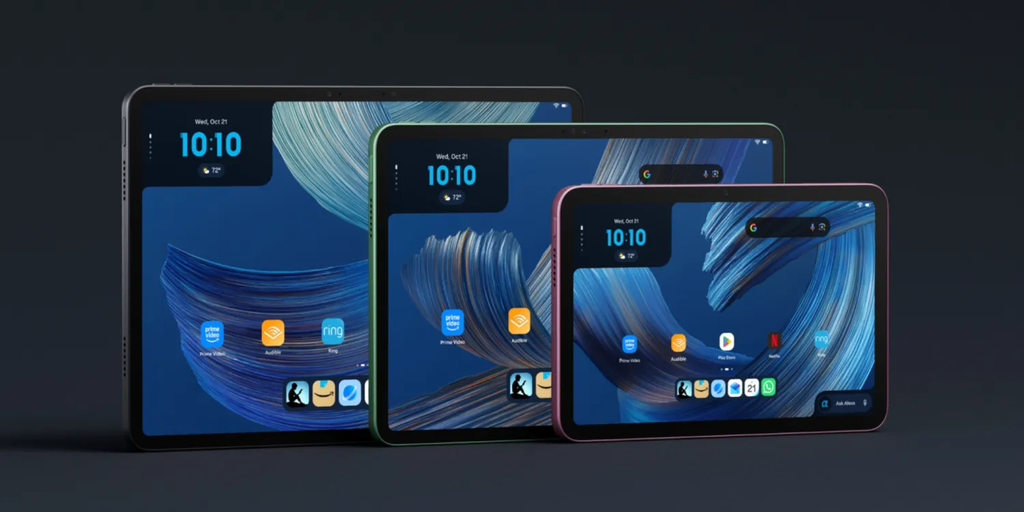
Amazon has officially thrown down the gauntlet in the tablet world. For over a decade, Apple’s iPad line has enjoyed an almost total monopoly over what people consider a “real” tablet. If you wanted something snappy with a bright screen, solid metal build, and smooth software, you had to hand over hundreds of dollars to Apple. Amazon stayed comfortably in its own lane, selling low-cost Fire tablets that were fine for watching movies in bed or keeping kids entertained on long car rides, but nobody seriously compared them to an iPad.
That dynamic just changed completely. Amazon’s newest Alexa tablet lineup takes aim directly at Apple’s mid-tier dominance. By pairing premium aluminum hardware and a fast display with next-generation conversational AI, Amazon is delivering a device that handles 90 percent of what everyday tablet buyers actually want for a fraction of the cost.
Apple has spent years pushing the iPad into expensive productivity territory, treating tablets as lightweight laptop replacements with price tags to match. Meanwhile, millions of regular buyers just want a reliable screen for browsing, streaming, managing their home, and getting quick answers. Amazon saw that opening and built a device designed specifically for real life, giving the iPad its biggest reality check in years.
The Hardware Shift: Amazon Stops Playing Budget and Goes Premium
For years, buying an Amazon tablet meant accepting cheap plastic shells, dim screens, and sluggish performance. They were built for low prices, not luxury. The new Alexa tablet completely throws out that old design playbook.
Holding this new device feels startlingly similar to holding an iPad Air. It features a lightweight aluminum chassis, slim uniform bezels around the glass, and a sharp, high-resolution screen with a high refresh rate that makes scrolling through websites and apps feel effortless.
The $0 Secret To Launching Your Entire Online Empire
Why pay hundreds every month for separate software? Build funnels, send emails, and make sales with Systeme.io completely free.
Get Started For $0Free Forever • No Credit Card Needed • Beginner-Friendly
- Display Quality: The crisp high-definition panel offers vibrant colors and great outdoor brightness, matching what you get on significantly more expensive tablets.
- Build and Finish: The lightweight metal body eliminates the flex and plastic feel of older budget models.
- Audio Setup: Quad-speaker audio tuned for room-filling sound makes watching videos or playing casual games surprisingly immersive.
- Battery Endurance: Optimizations in power management deliver all-day battery life, easily keeping up with heavy usage without constant charging.
Budget screens used to be Amazon’s biggest weakness, but this display directly challenges mid-range competitors. When you place it side-by-side with an entry-level iPad, the visual difference is virtually non-existent. Consumers who want a gorgeous glass-and-aluminum slab no longer have to pay Apple’s high hardware markup.
This shift in strategy mirrors what we have seen across the mobile industry recently. As detailed in our breakdown of Samsung’s tablet market moves, tablet makers are realizing that shoppers refuse to pay top dollar unless the hardware feels truly premium in their hands.
The Brains Behind the Machine: Next-Gen Alexa vs. Apple Intelligence
Hardware is only half of the story. The real secret weapon in Amazon’s new tablet is its updated, supercharged version of Alexa. Powered by advanced generative AI models, this is not the old voice assistant that got confused when you asked for the weather forecast twice in a row.
The new Alexa acts as an actual conversational partner and device assistant. You can speak to it naturally without using robotic commands, ask complex multi-step questions, or have it draft text, summarize long articles, and control complex smart home routines.
Apple has been heavily promoting its own Apple Intelligence features across iOS and iPadOS, but implementation has been slow and limited to high-end hardware. Many users are still waiting for Siri to become genuinely useful for daily tasks. Amazon took the opposite approach by building its new tablet ground-up around conversational AI from day one.
Understanding what makes different AI assistants unique shows why Amazon’s approach works so well for households. While Apple focuses heavily on local device processing for individual users, Amazon focuses on broad home integration and seamless voice execution.
The rumors surrounding Apple’s leaked home hub plans suggest that Apple knows it is behind in the smart home display category. Amazon’s new tablet essentially delivers that combined smart hub and personal tablet experience today.
Pricing Reality Check: Why Paying $1,000 for an iPad Is Hard to Justify
The biggest driver of this new competitive threat comes down to simple math. Over the last few years, the cost of entering the Apple ecosystem has climbed steadily. A basic iPad with adequate storage, plus an official keyboard and stylus, can easily push your total bill close to $800 or $1,000.
For professional digital artists or video editors, that investment makes sense. But for someone who wants to read news, check emails, shop online, watch videos, and keep track of family calendars, spending $1,000 on a tablet feels unnecessary.
Amazon priced its new Alexa tablet aggressively, slotting it well below Apple’s base models while including premium features right out of the box.
- Lower Entry Cost: You get high-tier screen technology and metal build quality at a mid-tier price point.
- Affordable Accessories: Keyboard covers and active stylus options cost significantly less than Apple’s Magic Keyboard or Apple Pencil.
- Included Smart Features: You do not need to purchase separate smart displays or home hubs because the tablet docks and switches to smart display mode automatically.
This value proposition appeals directly to practical buyers looking for smart spending decisions. If you look at current market trends and top budget alternatives in mobile tech, consumers are increasingly walking away from overly expensive gadgets when cheaper alternatives perform nearly as well.
It also serves people running small side hustles or digital stores. For instance, entrepreneurs managing online shops or learning how to launch an Amazon business on a budget can handle inventory checks, order management, and customer messaging on an affordable tablet without draining their capital.
Software and Ecosystem: Fire OS vs. iPadOS
Let us be completely fair and honest about where Apple still holds an advantage: software depth for professional work.
iPadOS has a massive head start when it comes to pro-level creative applications. If you rely on software like Procreate for professional illustration, Logic Pro for audio production, or Final Cut Pro for multi-track 4K video editing, an Amazon tablet cannot replace your iPad. Fire OS simply does not have those desktop-class creative suites.
However, for the vast majority of everyday tablet users, iPadOS has actually become overly complicated. Multi-tasking features like Stage Manager feel cluttered to many users who just want simple app switching and clean web browsing.
Send, Spend & Hold Money Worldwide Without Hidden Fees
Transfer money internationally at the real exchange rate and hold 40+ currencies in one account.
Open a Wise AccountMid-market rate • Fast transfers • 40+ currencies
Amazon’s Fire OS has undergone a major redesign for this release. It is cleaner, faster, and much less aggressive about pushing ads on your lock screen compared to older models.
- App Selection: Major streaming apps, social media platforms, web browsers, and productivity tools like Microsoft Office and Google Workspace run smoothly.
- Sideloading and Compatibility: Advanced users can easily install third-party app stores or APKs to expand software capabilities beyond the standard Amazon Appstore.
- Ease of Use: The interface remains simple enough for children and seniors to navigate without technical help.
When you look at Microsoft’s surface and laptop rivals, you see a similar battle playing out across the industry. Companies are realizing that most people prefer straightforward tools that work out of the box over complex software environments they will never fully utilize.
Furthermore, power users who prefer flexibility over walled gardens often point to why Android devices appeal to power users. Amazon’s refreshed OS leans into that open utility, making file transfers and media management far less restrictive than on an iPad.
The Ultimate Smart Home Centerpiece
Where the new Alexa tablet completely distances itself from the iPad is how it behaves when you are not actively holding it. An iPad lying on a coffee table is just a dark slab of glass draining its standby battery.
Amazon built its new tablet with an intelligent docking ecosystem. When you place the tablet on its charging stand, the screen seamlessly transitions into a full-featured Alexa Smart Display.
- Hands-Free Control: Far-field microphones pick up your voice from across the room, allowing you to control lighting, security cameras, and thermostats.
- Ambient Dashboard: The display automatically cycles through family photo albums, weather updates, live door camera feeds, and daily reminders.
- Shared Family Hub: Multiple family members can use voice recognition to pull up their individual schedules, sports scores, or favorite playlists on Spotify and Prime Music.
This dual-identity design turns a personal entertainment device into a shared family asset. Instead of leaving an expensive tablet sitting idle in a drawer, Amazon’s tablet remains continuously useful throughout the entire day.
How It Fits Into Your Daily Routine
To understand why this device poses such a threat to Apple, think about how a typical day with the Amazon Alexa tablet actually looks.
In the morning, the tablet sits on its kitchen dock, acting as an alarm and alarm dashboard. While you make coffee, you ask Alexa to read the morning headlines, give you a quick traffic update for your commute, and show your calendar for the day. You don’t have to unlock a single screen or tap through five different apps.
During the afternoon, you pull the tablet off its dock, snap on the magnetic keyboard case, and take it to a coffee shop or desk. You can catch up on emails, write documents, manage spreadsheets, and browse web pages with fast Wi-Fi performance and snappy touch responsiveness.
In the evening, you take the tablet to the couch or bed to stream your favorite television shows or read ebooks. When you are finished, you dock it back on the nightstand or kitchen counter, where it recharges while staying ready to control your bedtime smart home routines.
The $0 Secret To Launching Your Entire Online Empire
Why pay hundreds every month for separate software? Build funnels, send emails, and make sales with Systeme.io completely free.
Get Started For $0Free Forever • No Credit Card Needed • Beginner-Friendly
The seamless transition from smart home hub to work device to entertainment screen makes it feel like an essential tool rather than an expensive luxury gadget.
Frequently Asked Questions
Is the new Amazon Alexa tablet better than a base iPad?
It depends on what you need. If you want a device for video streaming, web browsing, smart home management, and casual reading, the Amazon Alexa tablet offers better value, better voice AI features, and a superior smart dock experience at a significantly lower price. However, if you need heavy video editing, professional digital drawing apps, or deep integration with an iPhone and Mac, the iPad remains the stronger choice.
Can you run standard Android apps on Amazon’s new tablet?
Yes. While the tablet comes with the Amazon Appstore pre-installed with popular apps like Netflix, Prime Video, Disney+, Zoom, and Microsoft Office, you can also easily install third-party app stores or sideload standard Android APK files if you need access to specific software.
Does the Amazon Alexa tablet support a stylus and keyboard?
Yes. Amazon offers optional magnetic keyboard cases and pressure-sensitive active stylus pens designed specifically for this lineup. The stylus allows for quick note-taking, sketching, and document signing without noticeable input lag.
Do you need a paid subscription to use the new AI features?
Basic Alexa voice features, smart home controls, and standard device capabilities do not require any monthly fee. However, accessing advanced generative AI capabilities or bundled premium storage services may require an active Amazon Prime membership or a dedicated software tier depending on your region.
How long does the battery last on a single charge?
Under normal mixed usage, including web browsing, video streaming, and casual app use, the tablet delivers between 11 to 13 hours of continuous battery life. When docked on its smart stand, it stays charged continuously while functioning as a smart home display.
Apple spent years building a dominant tablet empire by convincing buyers that a high price tag was the only way to get a premium screen and fast performance. Amazon’s newest Alexa tablet shatters that myth. By offering high-end design, capable software, and truly useful conversational AI at a realistic price point, Amazon has finally delivered the tablet competition shoppers have been waiting for.
If you have questions about choosing the right tech for your home or want to share your thoughts on the new Alexa tablet, feel free to reach out to our team directly through our contact page.
