
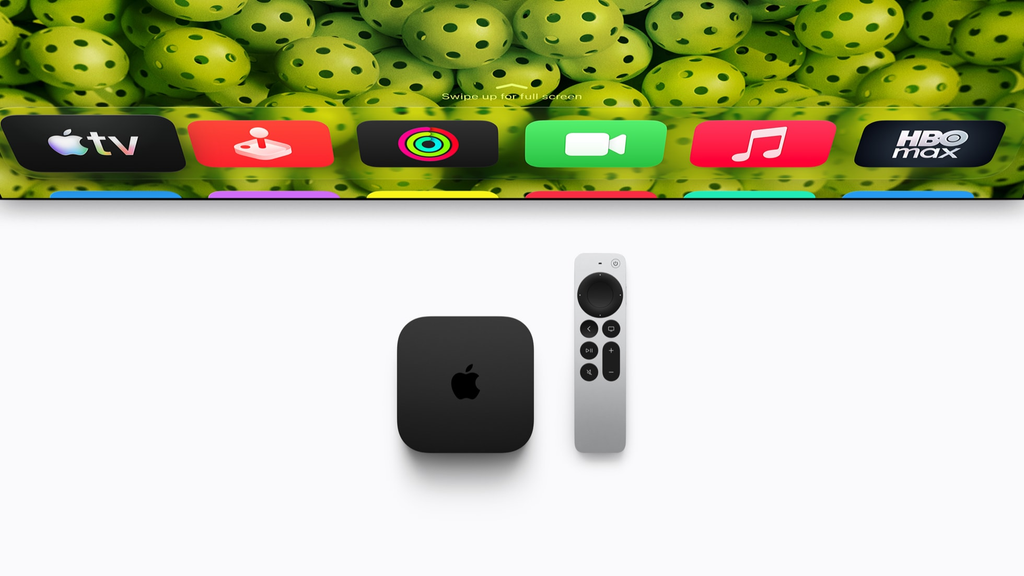
Apple officially pulled back the curtain on its next-generation Apple TV 4K, bringing the biggest overhaul to the living room streaming experience in years. Packed with Apple’s cutting-edge A19 processor, a completely redesigned Siri AI powered by Apple Intelligence, built-in far-field microphones, and a Siri Remote equipped with Find My Precision Finding, this device sets a brand new standard for home entertainment.
The latest model is not merely a modest refresh with a slightly faster chip. Instead, Apple has repositioned the streamer into an intelligent, conversational home centerpiece. According to Apple’s official newsroom announcement, the new Apple TV 4K is available for pre-order starting today, with shipments landing on doorsteps and store shelves beginning November 13, 2026.
If you have ever spent twenty minutes scrolling endlessly through movie posters without picking anything, or searched between sofa cushions for a missing remote, this new hardware addresses those exact pain points. Here is everything you need to know about the new device, what has changed, and how it performs in everyday use.
Siri AI Transforms the Living Room Screen
The headline feature of the new Apple TV 4K is Siri AI. For years, voice assistants on television boxes have felt stiff and limited. They could pause a show, adjust the volume, or open an app, but having a genuine conversation was out of reach. That changes with this update.
Powered by the next generation of Apple Intelligence, Siri AI brings a full-screen conversational interface straight to your television. You no longer need to remember exact show titles or rely on clunky keyword searches. You can speak naturally, ask complex questions, and receive smart answers instantly.
The $0 Secret To Launching Your Entire Online Empire
Why pay hundreds every month for separate software? Build funnels, send emails, and make sales with Systeme.io completely free.
Get Started For $0Free Forever • No Credit Card Needed • Beginner-Friendly
Siri AI understands that kind of casual description. It taps into broad world knowledge to pull up the exact title you meant, presenting high-resolution artwork, critic scores, and streaming platform links right on the screen.
Context That Knows Your Personal Taste
The real magic of Siri AI comes from its ability to understand your personal context through secure integration with Apple Intelligence on your iPhone.
Imagine sitting down on Friday night and saying, “Play the comedy series my brother texted me about on Tuesday”. Because Siri AI bridges your personal Apple ecosystem with on-device intelligence, it can locate the recommendation from your Messages app and queue it up on your TV screen without forcing you to unlock your phone.
You can also ask open-ended questions like, “What comedy shows won Emmys this year?” Siri AI will immediately curate an interactive row of award winners, complete with suggestions for similar comedies you might enjoy next.
Smart Overlays That Do Not Block Your Movie
One of the most frustrating aspects of traditional TV search assistants is how intrusive they are. If you want to know who plays a minor character in a scene, summoning an assistant often pauses your movie and covers the entire screen with a giant menu.
Siri AI solves this by introducing subtle, transparent overlays. While watching a film, you can ask questions like:
- “Where was this movie filmed?”
- “What is the name of the song playing right now?”
- “Is this show appropriate for a 14-year-old?”
- “What other movies has this lead actor starred in?”
Siri AI displays a small, neat card near the corner of your screen that answers your question in seconds, letting the video play uninterrupted in the background. It feels less like an operating system menu and more like an informed companion sitting next to you.
True Hands-Free Control With Far-Field Microphones
For the first time on an Apple TV box, Apple has built three far-field microphones directly into the hardware unit itself.
In prior generations, talking to Siri required picking up the Siri Remote and pressing down the dedicated microphone button. If the remote was on the coffee table out of reach, or if your hands were covered in popcorn butter, you were out of luck.
The new three-microphone array allows full hands-free operation. You can simply say “Siri” or “Hey Siri” from across the room to pause playback, skip forward thirty seconds, switch profiles, or launch a workout.
Advanced Echo Cancellation That Cuts Through Noise
A common concern with hands-free TV microphones is background noise. If your speakers are blasting an action movie explosion, can the box still hear your voice?
Apple integrated advanced machine-learning echo cancellation into the A19 chip. The processor constantly isolates the incoming audio coming out of your speakers from the physical sound of your voice in the room. Even when dialogue or bass-heavy music fills the space, the Apple TV 4K picks up your voice commands accurately without requiring you to shout.
For households that value privacy, Apple included a physical microphone privacy toggle in the tvOS settings, allowing you to disable the far-field mics whenever you prefer to use the remote exclusively.
The Siri Remote Adds Precision Finding and a Speaker
Every household knows the frustration of a missing television remote. It slips between sofa cushions, ends up under a throw blanket, or gets carried into the kitchen by mistake.
Apple has finally resolved this issue by integrating Find My technology directly into the Siri Remote.
Send, Spend & Hold Money Worldwide Without Hidden Fees
Transfer money internationally at the real exchange rate and hold 40+ currencies in one account.
Open a Wise AccountMid-market rate • Fast transfers • 40+ currencies
Precision Finding on Your iPhone
The updated Siri Remote features an internal Ultra Wideband chip. If your remote goes missing, you can open the Find My app on your iPhone or pull up the Control Center widget.
Your phone screen will guide you directly to the remote using Precision Finding, showing exact directional arrows and counting down the distance foot by foot until you find it.
A Remote That Chirps on Command
If the remote is trapped deep inside a cushion where you cannot see it, you can tap a button on your iPhone to make the remote play a loud, clear sound. Apple fitted a tiny acoustic speaker into the base of the aluminum remote casing.
The speaker produces a distinctive chirping chime that cuts through fabric and upholstery, allowing you to track it down in seconds rather than spending ten minutes tearing apart your living room furniture.
The exterior aluminum body maintains its comfortable weight and clickpad touch surface, but this internal addition makes it one of the smartest remote controls on the market.
Blazing Fast Performance: The A19 Chip and AV1 Decoding
Under the hood, the new Apple TV 4K makes a massive leap in processing power by adopting the A19 chip.
Comparing this model to the previous edition running an A15 Bionic chip, the numbers speak for themselves:
- CPU Performance: Up to 50 percent faster processing speeds.
- GPU Graphics: Up to 2x faster graphics rendering.
- Neural Engine: Dramatically faster on-device AI processing for real-time Siri responses.
- Video Decoding: Hardware-accelerated AV1 decoder support.
Why Extra Power Matters for a Streaming Box
You might wonder why a television box needs a chip as powerful as the A19. The answer comes down to system responsiveness and advanced software capabilities.
Apps load instantaneously. Switching between live sports, your photo library, and video streaming apps happens with zero stutter or lag. The interface animations run at a locked, buttery-smooth refresh rate that makes browsing feel effortless.
For gaming enthusiasts, the 2x GPU boost turns the Apple TV 4K into a capable micro-console. Paired with a wireless PlayStation, Xbox, or Nintendo controller, demanding Apple Arcade titles run with improved lighting effects, higher frame rates, and sharper textures.
The $0 Secret To Launching Your Entire Online Empire
Why pay hundreds every month for separate software? Build funnels, send emails, and make sales with Systeme.io completely free.
Get Started For $0Free Forever • No Credit Card Needed • Beginner-Friendly
Dedicated AV1 Hardware Decoder
Streaming video requires efficient compression. The A19 chip includes a dedicated AV1 video decoder.
Major platforms like YouTube, Netflix, and other streaming providers have increasingly adopted AV1 because it delivers noticeably crisper 4K HDR picture quality while using significantly less internet data.
With hardware-level AV1 decoding, your streams buffer faster, use less of your home broadband bandwidth, and maintain peak visual fidelity even during peak internet usage hours.
Cinematic Sound: Four-Speaker HomePod Surround Sound
Apple TV 4K has long supported stereo pairing with Apple HomePod speakers, but this launch introduces a true wireless surround sound breakthrough.
For the first time, users can connect up to four HomePod speakers to create a complete four-speaker surround sound system.
How the Four-Speaker Setup Works
The setup allows you to place two speakers at the front of your room on either side of the television, and two matching speakers behind your seating area.
Supported speaker configurations include:
- Four HomePod mini 2 units
- Four full-size HomePod (2nd generation) units
- Two HomePod (2nd gen) units in front paired with two HomePod mini 2 units in the rear
The Apple TV 4K coordinates all four speakers wirelessly. Using built-in spatial microphones on the HomePods, the system plays calibration tones to map out the physical boundaries of your living room.
It automatically calculates distances, audio delays, and reflection angles, balancing the sound levels without requiring any complex receiver configuration or audio calibration gear.
Wireless Dolby Atmos Without Running Speaker Cables
Setting up traditional 5.1 surround sound usually requires drilling holes, running thick speaker wire under carpets, and buying an expensive audio-video receiver.
Apple’s four-speaker wireless arrangement delivers immersive Dolby Atmos and Spatial Audio effects directly through your home Wi-Fi. Sound effects move naturally above and around you, dialogue stays anchored clearly to the actors on screen, and low-frequency rumble fills the room cleanly.
A More Capable Smart Home Command Center
Beyond movies and shows, the Apple TV 4K continues to serve as an indispensable smart home hub for your living space.
With built-in Thread radio and Wi-Fi networking, the box maintains a stable connection with all your Matter-compatible smart home accessories, including smart plugs, light bulbs, thermostats, and sensors.
Doorbell Notifications on the Big Screen
When someone rings a compatible HomeKit doorbell, a live video feed appears directly in the upper corner of your television screen.
Without pausing your movie, you can see who is standing outside, speak to them using the Apple TV microphones, and tap a button on your remote to unlock a smart door lock.
AI Camera Activity Summaries
Home security camera notifications can quickly clutter your devices with dozens of alerts. Apple Intelligence upgrades HomeKit Secure Video to solve this problem.
Instead of receiving a generic notification saying “Motion detected in driveway,” Siri AI generates a clear text summary on your screen:
“Delivery driver placed a package by the porch and walked back to the van.”
These instant summaries allow you to stay informed about what is happening around your property without interrupting your evening relaxation.
Price, Pre-Orders, and Availability
Apple has officially opened pre-orders for the new Apple TV 4K across 30 countries. In-store availability and customer deliveries commence on Friday, November 13, 2026.
- Retail Price: $299
- Installment Option: $49.83 per month for six months
- Included in the Box: Apple TV 4K unit, updated Siri Remote with Find My, power cable, and documentation
While the price point sits higher than entry-level budget streaming sticks, the addition of the A19 chip, on-device Siri AI capabilities, hands-free microphones, and advanced smart hub hardware places this box in a category of its own.
If you already own an older model and find yourself content with basic video streaming, you may not feel an immediate urge to upgrade on day one. However, if you want hands-free voice control, frequently misplace your remote, or plan to build a wireless HomePod surround sound theater, the new model presents an enormous leap in convenience and performance.
Setting Up Your New Apple TV 4K for the Best Experience
When your new unit arrives, taking a few simple steps will ensure you get the absolute most out of its upgraded capabilities:
- Position the Box in the Open: Because the new Apple TV 4K houses three far-field microphones, place it on top of your media console rather than tucking it inside a closed cabinet. This positioning ensures Siri AI can hear your voice clearly across the room.
- Connect to an HDMI 2.1 Port: To take full advantage of high frame rate HDR, eARC audio pass-through, and gaming performance, plug the device into an HDMI 2.1 port on your television with an Ultra High Speed HDMI cable.
- Turn on Siri Personal Context: Make sure your iPhone is signed in to the same Apple ID and running the latest version of iOS. This link enables Siri AI to access your message recommendations, reminders, and personalized watchlist suggestions seamlessly.
- Calibrate Your HomePods: If you are using the four-speaker setup, place your front pair level with the display and your rear pair at ear height behind your seating area. Run the room calibration utility in the Audio settings menu for balanced sound delivery.
Frequently Asked Questions (FAQs)
Will older Apple TV models receive Siri AI through a software update?
No. Siri AI requires the advanced Neural Engine and memory architecture found in Apple Intelligence hardware. Older models running A15 or older processors will keep the standard Siri assistant interface, while the full conversational Siri AI experience remains exclusive to this new generation.
Can I turn off the built-in far-field microphones if I prefer privacy?
Yes. Apple includes software toggles inside tvOS settings to turn off the always-listening far-field microphones completely. You can still use Siri by pressing the voice button on the Siri Remote whenever you want.
How does Find My work on the new Siri Remote?
The remote includes both an Ultra Wideband chip and an acoustic speaker. You can use the Find My app on an iPhone to see directional arrows leading directly to the remote, or trigger a loud chirping sound to locate it under pillows or couch cushions.
Can I pair different types of HomePods together for the four-speaker surround sound?
Apple requires that front and rear speaker pairs match. That means you can use two full-size HomePods in the front and two HomePod mini units in the rear, or four identical HomePod units all around.
Does the new Apple TV 4K support non-Apple smart home accessories?
Yes. Thanks to native Matter and Thread protocol support, the Apple TV 4K acts as a universal smart home hub for any certified Matter accessories, regardless of the manufacturer.
Is there a monthly subscription fee required to use Siri AI on the Apple TV?
No. Siri AI and Apple Intelligence features are built directly into tvOS without any additional monthly subscription fees. You only pay for your standard third-party streaming services like Netflix, Apple TV+, Disney+, or Prime Video.
The new Apple TV 4K proves that home streaming boxes still have plenty of room to evolve. By combining fast A19 silicon, intelligent conversational discovery, hands-free living, and thoughtful fixes for everyday problems like lost remotes, Apple has built a home entertainment powerhouse that stands head and shoulders above simple budget sticks.
If you are building out your home theater setup or upgrading an older living room box, this November release is shaping up to be one of the most exciting tech arrivals of the season.
Have questions about setting up your smart home or want to share your thoughts on Apple’s latest hardware? Feel free to contact our team anytime. You can also join the conversation and follow all our latest tech updates across social media on Instagram, Facebook, and X (formerly Twitter).
