
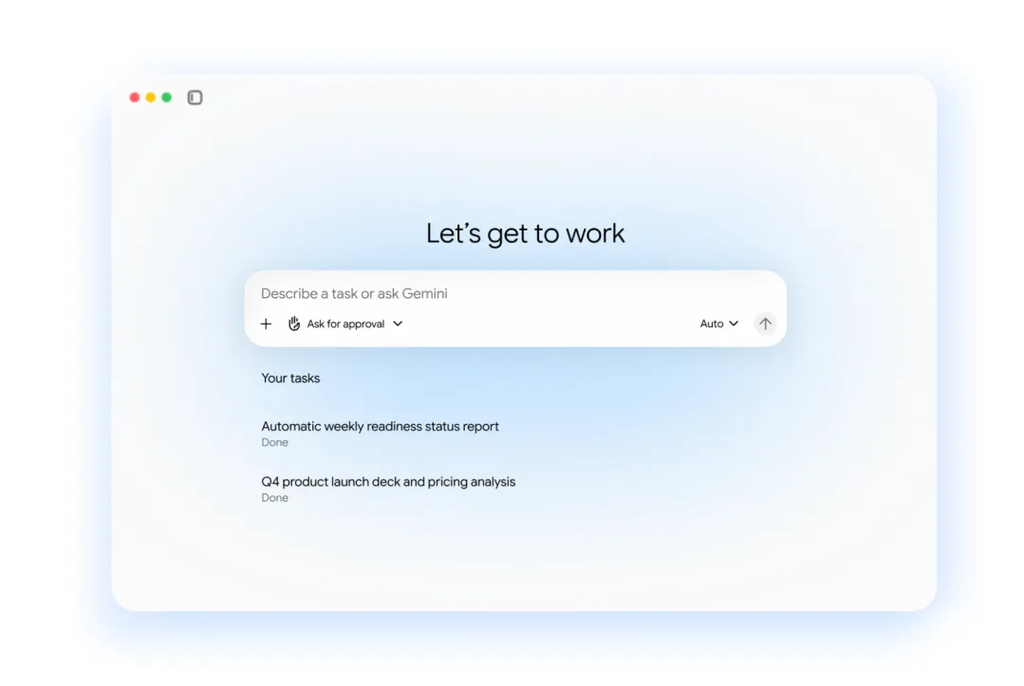
Google just dropped a massive announcement that is about to change your daily work life forever. At the Gemini at Work event, Google Cloud officially launched the new universal Gemini agent. This is not just another simple chatbot that gives you quick text answers when you type a prompt. Google built a full digital worker that can handle long tasks, write code, run research, and carry out actual work assignments across your apps from start to finish.
Imagine having a helper at work who already knows your schedule, reads your emails, and understands your team projects. That is what Google is delivering with this launch. Instead of sitting at your desk giving AI step-by-step instructions all day long, you give this new agent a final goal. You set the outcome you want, step away from your keyboard, and come back later to completed work.
This new tool connects directly into Gmail, Google Docs, Google Sheets, Google Slides, Google Chat, and Google Drive. It even works across other platforms like Microsoft 365 and Slack.
The launch marks a huge shift in how businesses handle everyday tasks. If you have been following how Google Gemini hits 950 million monthly users, you already know Google has been pushing hard to lead the tech race. Now, they are taking things a step further by bringing persistent AI agents straight into your daily workflow.
What Is the Universal Gemini Agent?
The universal Gemini agent is a single AI system designed to act as your ultimate workplace partner. In the past, AI tools required you to copy text from one window, paste it into another, and constantly prompt the system to get anything done. If you closed your browser tab, the AI forgot what you were working on.
The $0 Secret To Launching Your Entire Online Empire
Why pay hundreds every month for separate software? Build funnels, send emails, and make sales with Systeme.io completely free.
Get Started For $0Free Forever • No Credit Card Needed • Beginner-Friendly
Google changed that completely with this release. The new Gemini agent is persistent, which means it can run tasks in the background for hours or even days. It operates through a unified interface and API that stays active even if you turn off your laptop or leave your desk.
It can read through giant documents, analyze financial figures, build presentation decks, write software code, and run tests inside secure cloud sandboxes. You can start a project on your phone while commuting, let the agent work while you are in meetings, and review the final output on your desktop computer later in the evening.
Google built this agent to solve the biggest problem with modern office work: constant app switching. Most workers waste hours every day jumping between email, spreadsheets, chat groups, and presentation tools. The Gemini agent bridges all of those apps together into a single prompt box where work actually gets done.
The Three Ways Gemini Works Inside Your Workspace
Google structured the new Gemini agent to operate in three primary modes inside Google Workspace. Each mode solves a different headache that office workers, freelancers, and business owners face every day.
1. Personal Assistance
In personal assistance mode, Gemini arrives at work already knowing who you are and what you are doing. It connects securely to your Google Calendar, your team threads, your project folders, and your recent documents. It is fully briefed before you even start your workday.
For example, if you need to set up a meeting with regional team leaders next week, you do not need to hunt down everyone’s email address or check ten different calendars. You simply ask Gemini to set up the meeting. The agent checks your past chat spaces to identify the right team members, checks their availability, and starts an email thread to coordinate a time that works for everyone.
It handles multi-app workflows the exact same way. You can ask Gemini to research new market trends, build a financial model in Google Sheets, and summarize the results into a Google Slides presentation. It carries out every step automatically without you having to re-explain the project at each phase.
2. Proactive Delegation
The second mode is called proactive delegation. Workspace Intelligence constantly scans incoming information to spot routine tasks that you can hand off to AI.
If your boss emails you asking for a slide deck update on a current project, Workspace Intelligence recognizes that request instantly. It shows you a simple one-click button option to delegate the job to Gemini. When you click it, Gemini gathers the latest project updates from your Docs and Drive folders and drafts the presentation for you.
The agent applies this same smart filtering to your email inbox. Instead of showing you emails based only on the time they arrived, it surfaces the messages that matter most to your immediate projects and explains why you should look at them first. This helps you ignore non-essential emails and focus on high-priority assignments.
3. Coworker Agents (AI Team Members)
The most groundbreaking feature of this release is the ability to create dedicated coworker agents. You can build an AI team member with its own custom job role, complete with its own corporate identity.
When you create a coworker agent, Google provisions a genuine Workspace account for it. The agent gets its own company email address, its own Google Calendar, its own Drive storage, and an official listing in your company staff directory.
Your human teammates interact with this AI worker just like they would with any human colleague. They can invite it to Google Chat spaces, tag it in document comments using the @ symbol, or send it direct emails.
If a marketing manager tags an “Events Coordinator Agent” in a document comment, the agent reads the note, makes the suggested edits directly inside the Google Doc, and replies in the comment thread. Its actions appear under its own name in the document version history.
Real-Life Examples: How This Changes a Regular Workday
To see how much this changes daily work, think about how long basic office tasks usually take.
Send, Spend & Hold Money Worldwide Without Hidden Fees
Transfer money internationally at the real exchange rate and hold 40+ currencies in one account.
Open a Wise AccountMid-market rate • Fast transfers • 40+ currencies
Suppose you run an online business or manage a remote team. In the past, creating marketing materials meant reading customer feedback, writing a summary report, building a sales pipeline, and sending updates to your team. If you want to see how people built systems before this, check out this guide on how to build a fully automated sales funnel.
Now, with the universal Gemini agent, that entire process takes a few simple prompts:
- You ask Gemini to read customer feedback emails from the past month in Gmail.
- It extracts common customer complaints and product praise into a clean summary.
- It opens Google Sheets, builds a data tracking sheet, and creates trend charts.
- It generates a complete Google Slides deck showcasing the core findings.
- It posts the final presentation link into your team’s Google Chat room.
Because the agent runs in the cloud, you do not have to leave your computer screen open while it compiles data. You can set the goal, go grab lunch, and view the finished report when you get back.
Freelancers and independent workers stand to gain massive time savings here as well. If you are learning how to start freelancing and make money online, managing client communication, invoices, and research can devour half of your working hours. Having a personal Gemini agent handle administrative back-and-forth gives you more time to deliver actual work for clients.
Why Giving AI Its Own Email Address Is a Big Deal
Assigning an email address and calendar to an AI agent sounds like science fiction, but it solves a huge practical problem in enterprise software.
When early AI tools were integrated into business systems, they operated under the human user’s account credentials. If an employee gave an AI tool permission to read files, that AI suddenly had access to every private document, financial record, and personal note that employee owned. That created serious security hazards for companies.
By giving the Gemini agent its own separate Workspace identity, Google fixes this security loophole completely:
- Separate Identity: Coworker agents act under their own account name, not yours.
- Controlled Access: The agent can only view documents, folders, and chats that human team members explicitly share with it.
- Clear Audit Logs: Every edit, comment, code run, and email sent by the agent is logged clearly under its account name in system history logs.
- Isolated Permissions: A marketing agent cannot accidentally view confidential payroll files unless someone specifically grants it access.
This approach gives companies the confidence to let AI run long tasks without worrying about sensitive data leaking across departments.
Privacy, Security, and Enterprise Guardrails
Security is always the biggest concern when companies adopt automated AI tools. Google built multiple security guardrails directly into the universal Gemini agent platform to protect business data.
First, Google Cloud uses cryptographic verification to verify the identity of every running agent. When an agent needs to write and execute code to solve a problem, it does so inside an isolated, secure sandbox. This prevents raw code from touching live company servers or external systems without permission.
The $0 Secret To Launching Your Entire Online Empire
Why pay hundreds every month for separate software? Build funnels, send emails, and make sales with Systeme.io completely free.
Get Started For $0Free Forever • No Credit Card Needed • Beginner-Friendly
Second, an enterprise-grade Agent Gateway controls all communications between agents and outside software. Administrators can set company-wide policies to restrict what external websites or services an agent is allowed to contact.
Third, Google added strict spending controls for token usage and computing costs. If an agent task consumes too much computing power and hits a pre-set spending cap, the system automatically pauses the project. System admins receive an alert and can resume the work with a single click in their management console.
Most importantly, Google reassured enterprise customers according to details in the official Google Cloud announcement that customer data used by Gemini agents is kept private. Corporate files and internal communications are never used to train public AI models.
How Gemini Compares to Other AI Work Tools
The workplace AI market has gotten extremely competitive over the last two years. Every major technology firm is racing to release digital helpers for office workers.
Microsoft has been heavily pushing its Copilot assistant across Windows and Office applications. Meanwhile, startups like Anthropic have expanded tools like Claude Cowork across web and mobile platforms to help teams organize research. Other companies have experimented with automated tools as well, though not all efforts succeeded. You can read about past industry struggles in our story on inside Mark Zuckerberg’s plan to replace staff with AI.
Here is how Google’s universal Gemini agent sets itself apart from competitors:
Deep Google Workspace Integration
Because Google owns Gmail, Drive, Docs, Sheets, and Slides, Gemini operates natively inside these applications without requiring third-party plugins or complex software setups.
True Agentic Execution
While standard AI assistants wait for line-by-line commands, the Gemini agent works toward broad goals. You delegate an outcome rather than dictating every individual click.
Standalone Digital Coworkers
Creating dedicated AI accounts with email addresses, directory presence, and distinct security permissions is a unique setup that makes AI feel like a true digital teammate rather than a basic browser widget.
Will AI Coworkers Replace Human Jobs?
Whenever tech companies unveil autonomous AI tools, people naturally worry about job loss. Will these new agents make human office workers obsolete?
The reality is that Gemini agents are built to handle repetitive, time-consuming busywork rather than replace human creative decision-making.
Most office jobs involve a mix of high-value work (like creative strategy, relationship building, and critical problem solving) and low-value administration (like scheduling, updating spreadsheets, formatting slides, and sorting through endless email threads).
Gemini takes care of the low-value administrative burden. By letting AI handle data sorting and basic draft creation, human workers can spend more time on strategic decisions that actually grow a business.
This shift is opening up new opportunities across many industries. Remote workers and online freelancers can take on more clients because they waste less time on manual administration. If you are looking to work flexibly from anywhere, check out our guide on how to get a fully remote job that lets you work from anywhere.
Rather than replacing humans, AI agents are becoming the ultimate productivity tool for people who want to accomplish more in less time.
How to Prepare Your Workflow for the Agentic AI Era
If you want to get the best results from tools like the universal Gemini agent, you need to adjust how you organize your daily work. Here are five practical steps you can take right now to prepare:
Clean Up Your Digital Files
AI agents rely on clear data to deliver accurate results. If your company Drive folders are messy and full of duplicate files, the agent might pull outdated information. Take time to organize your project folders and delete old drafts.
Practice Goal-Based Prompting
Stop giving AI tiny, step-by-step instructions. Practice giving broad, goal-oriented directions. Instead of asking AI to “write three bullet points about sales,” ask it to “analyze our Q3 sales notes in Drive and draft a five-slide presentation highlighting top growth areas.”
Set Up Clear Permissions
Ensure your team understands file sharing permissions. Since coworker agents only see files explicitly shared with them, setting up clean shared folders for your projects ensures your AI helpers have access to everything they need.
Document Standard Operating Procedures
AI agents perform best when they follow established rules. Having written guides for how your team handles reports, customer replies, or launch plans allows you to feed those rules directly into custom agents.
Keep a Human Eye on Quality
Never send AI-generated work to clients or management without reviewing it first. Even advanced tools make mistakes. Always treat AI outputs as high-quality first drafts that require your final approval. To understand why quality control matters so much in modern tech, read about Google’s spam updates targeting low-quality AI content.
Frequently Asked Questions (FAQs)
What is the new Google Gemini agent?
The Gemini agent is a universal AI assistant announced by Google Cloud at Gemini at Work. It handles complex knowledge work, creates images and media, writes and executes code, and runs multi-day tasks across Google Workspace and external applications.
How does a coworker agent work in Google Workspace?
A coworker agent is an AI team member created by a user to fulfill a specific office role. It gets its own official Workspace account, including a corporate email address, calendar, Drive storage, and directory listing. Teammates can chat with it, tag it in document comments, or email it work assignments.
Can the Gemini agent run tasks when my computer is turned off?
Yes. Because execution happens in the cloud, the agent continues running background tasks, running code, and organizing workflows even if you turn off your laptop or leave your desk.
Is my private company data safe with the Gemini agent?
Yes. Google enforces enterprise security controls, cryptographic identities, sandboxed code execution, and strict permission limits. Coworker agents can only view files that team members explicitly share with them, and corporate data is not used to train public AI models.
Does the Gemini agent work with non-Google apps?
Yes. The universal Gemini agent operates through a single interface and API that integrates across web browsers, mobile devices, desktop systems, command-line tools, Microsoft 365, and Slack.
Do small businesses need a full IT team to use this?
No. Workspace users can trigger personal assistance and proactive delegation features directly inside Gmail, Docs, and Sheets using simple prompt windows and single-click delegation buttons.
Final Thoughts
The launch of Google’s universal Gemini agent marks a major milestone in how technology assists us at work. We are moving away from simple AI search boxes and stepping into an era of true digital coworkers that can share the heavy lifting of modern jobs.
By automating routine scheduling, inbox sorting, document editing, and data analysis, this technology gives workers back hours of valuable time every single week. Whether you run a large enterprise team, operate a small local business, or work as an independent freelancer, learning how to delegate tasks to AI agents is becoming an essential skill for the future.
Stay connected with us for more breaking technology updates, practical work tips, and trending stories. Explore our full story archive on our About Page or get in touch with our editorial team directly through our Contact Page.
Follow our social channels to keep up with the latest trends:
- Instagram: WhatsBuzzn Nigeria on Instagram
- Facebook: WhatsBuzzn Nigeria on Facebook
- X (formerly Twitter): WhatsBuzzn Nigeria on X
