
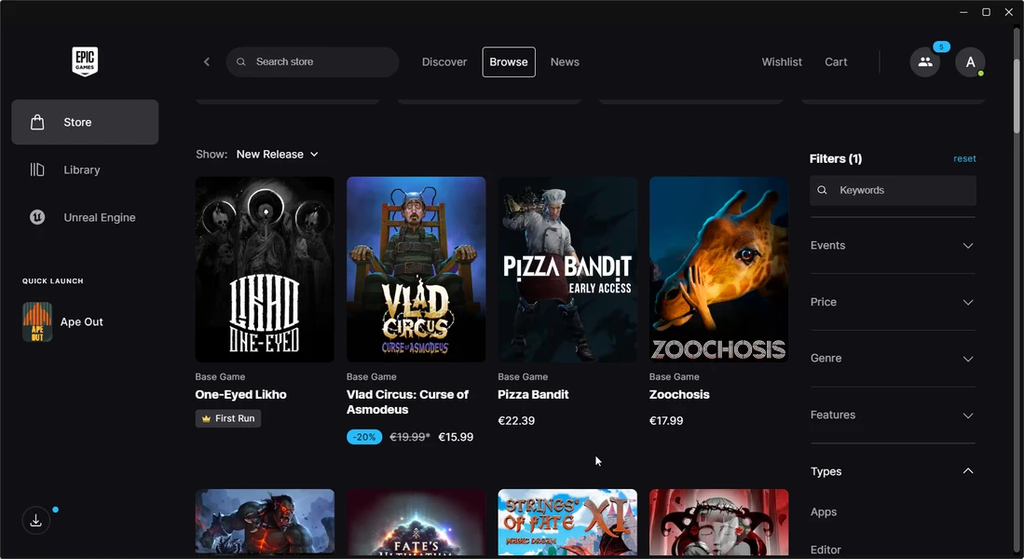
Epic Games has officially released an early preview of its completely rebuilt desktop client, and it arrives with an unexpected reveal that has the entire gaming and technology world talking. For nearly a decade, PC gamers have voiced deep frustration over the sluggish, bloated, and unresponsive nature of the original Epic Games Launcher. In a bold move, Epic decided to tear down the old software and start fresh. The company claims the updated application loads your game library up to thirty times faster, boots up in roughly half the time of Steam, and natively supports Linux for the very first time.
Even more surprising than the performance jump is how the software was developed. In its official launch announcement, Epic stated that programming is hard, so the engineering team decided to “vibe code” a new launcher instead. While that line immediately ignited debate across online gaming communities, it marks a significant experiment in modern software development. Epic Games is attempting to transform what was once widely regarded as the slowest storefront on personal computers into a lightweight, high-performance desktop client.
This early preview represents a major turning point for millions of players who log in regularly to claim free weekly titles or jump into multiplayer matches. With native Linux support, an overhauled download manager, and a drastically reduced system footprint, Epic is making a serious bid to reshape PC gaming. Here is an honest, clear breakdown of what just happened, how artificial intelligence shaped the code, how the performance stacks up in real tests, and how you can try out the preview right now.
The “Vibe Coding” Story: Did AI Really Build This App?
When Epic published its official preview notes on the Epic Games Store news portal, the opening sentence grabbed immediate attention. The announcement playfully proclaimed that instead of dealing with traditional programming headaches, the company “vibe coded” a brand-new launcher that runs faster, responds instantly, and looks modern. Gamers immediately began asking questions: Did Epic hand the keys over to a chatbot, or is there more to the story?
The reality sits between clever marketing and modern software development. Speaking in an interview with The Verge, Martin Keely, Vice President and General Manager of the Epic Games Store, clarified how the team worked. Epic did not simply type a single prompt into an AI tool and ship the result. Instead, human developers supervised and directed autonomous AI coding agents to replicate, refine, and modernize the core functionality of the launcher.
The $0 Secret To Launching Your Entire Online Empire
Why pay hundreds every month for separate software? Build funnels, send emails, and make sales with Systeme.io completely free.
Get Started For $0Free Forever • No Credit Card Needed • Beginner-Friendly
According to Keely, the development team used artificial intelligence to review, write, and optimize massive blocks of code, but experienced software engineers managed the entire process. Human programmers established the architecture, validated security protocols, and tested performance at every stage. This release aligns with the broader company vision from Epic Chief Executive Officer Tim Sweeney, who recently signaled a company-wide pivot toward AI acceleration.
While “vibe coding” began as an internet meme describing casual hobbyists generating code without programming knowledge, Epic’s adoption of the term highlights an ambitious corporate experiment. The gaming community responded with both amusement and skepticism. Many players questioned whether an AI-assisted program might introduce bugs, while others noted that if human developers previously struggled to make the old launcher snappy, utilizing smart automation tools to rebuild it was a practical solution.
Real Speed Upgrades: Breaking Down the Performance Numbers
If you have spent any time over the past few years waiting for the original Epic Games Launcher to open, you know the frustration well. The previous version was notorious for consuming heavy background memory, lagging on basic mouse clicks, and stuttering whenever users scrolled through large game libraries. For a platform competing directly with Valve’s Steam, that lack of polish remained a constant barrier for gamers.
The new preview launcher attacks those pain points directly, prioritizing raw speed and system efficiency. Epic describes this first preview build as a speedboat rather than a luxury yacht, cutting away excess weight so it can move as fast as possible.
Early technical benchmarks and company testing reveal several striking improvements:
- Cold startup time drops to 5.47 seconds, compared to roughly 10.07 seconds on Steam. That makes the new Epic launcher roughly 1.8 times faster to boot from a dead stop.
- Restoring the application from the Windows system tray is 14 percent quicker than before, eliminating the familiar delay when bringing the app back into view.
- The game library loads up to thirty times faster than the previous launcher. Players who own hundreds of titles from weekly giveaways can now scroll through their catalog without frozen screens.
- The installation footprint has been trimmed down dramatically to around 300 megabytes, putting far less strain on your storage drive and everyday background memory.
- Background CPU and RAM usage have been optimized to ensure the launcher does not drain system resources while demanding games run.
These numbers reflect a noticeable difference in daily use. On budget laptops and older desktop computers, the lighter footprint alone is a major relief. The interface feels responsive, clicks register instantly, and moving between the store catalog and personal library happens without delay.
What Is New Inside the Preview: Design, Downloads, and Features
Beyond raw speed, the updated launcher introduces a redesigned visual layout that looks clean, modern, and uncluttered. The interface strips away visual noise, focusing on what matters most when sitting down to play: your games, your progress, and your friends.
Dedicated Game Hubs
In the past, clicking on a title in your library often triggered an awkward loading sequence. In the new preview, selecting any game brings you to a dedicated hub page. This screen displays everything in one centralized view, including installation status, recent gameplay activity, update logs, cloud save synchronization, and quick-launch controls.
Unified PC Game Library
One of the most welcome additions is support for multi-platform PC library connections. Rather than forcing you to jump between multiple separate storefront applications on your machine, the new Epic launcher lets you link your other PC libraries. This allows you to view all of your owned titles together in a single consolidated window.
Custom Navigation and Collections
Personalization has received a major upgrade. Players can now customize the top navigation toolbar by pinning favorite games, tools, or store tabs directly to the header. If you only use the launcher to play two specific titles, you can place them right at the top for one-click access. You can also organize your collection using flexible grid and list views, create custom game folders, and use smart search filters that return results instantly as you type.
Modern Download and Disk Manager
Managing game installations has historically been another common complaint. The rebuilt download center provides transparent, real-time insights into what your computer is actually doing. The new interface displays detailed graphs for network download speeds, disk read speeds, and disk write speeds, alongside clear breakdowns of active, queued, and scheduled downloads.
Integrated Voice and Party Chat
Social features have also received an overhaul. The preview integrates cross-game party connections and voice chat, linking seamlessly with Fortnite, the Epic Games Store, and the companion mobile app. You can chat with your squad without needing separate third-party communication tools open in the background.
The Shopping Cart Returns on Day One
In a humorous self-referential nod, Epic made sure to highlight that the new preview includes a digital shopping cart right away. When the Epic Games Store originally launched years ago, it famously lacked a basic shopping cart for an extended period, which became an ongoing running joke. Epic proved it can laugh at past missteps by highlighting the feature right at the top of its announcement.
The Linux Revolution: Native Support and the Future of Fortnite
Perhaps the most monumental announcement tucked inside this update is official native Linux support. For years, Linux gamers have relied on community-made third-party workarounds like Heroic Games Launcher or Lutris to download and run games purchased on Epic’s store. An official native client from Epic has been on the gaming wish list for a very long time.
Epic is now distributing the launcher preview for Linux as an AppImage package. The company is officially testing and supporting distributions including Ubuntu 22.04 LTS or newer, Fedora 43 or newer, and Debian 12 or newer. While the client itself runs natively on Linux, Epic notes that many games on the store are Windows-only builds that may require a compatibility layer like Proton or Wine to run.
Send, Spend & Hold Money Worldwide Without Hidden Fees
Transfer money internationally at the real exchange rate and hold 40+ currencies in one account.
Open a Wise AccountMid-market rate • Fast transfers • 40+ currencies
Even bigger news arrived alongside the Linux launcher: Fortnite is officially coming to Linux.
Historically, running Fortnite on Linux has been blocked by anti-cheat restrictions. Epic’s current anti-cheat system was built primarily around Windows security architecture, preventing millions of Linux users and handheld console owners from playing. To solve this problem, Epic announced that it is completely rebuilding its protection system with Easy Anti-Cheat Linux version 2 (EAC Linux v2).
Rather than relying on invasive Linux kernel modules, the new EAC Linux v2 uses an anti-cheat systemd service alongside modern eBPF kernel programs. It also links with UEFI Secure Boot keys signed by major Linux distributions. Epic confirmed that it will pilot EAC Linux v2 inside Fortnite first. Once the system proves successful, Epic plans to make the upgraded anti-cheat framework available to all third-party game developers, which could spark a massive wave of multiplayer games arriving on Linux.
Epic also acknowledged the Steam Deck, confirming that while the current SteamOS configuration does not yet meet all the requirements for EAC Linux v2, the company is actively talking with Valve to figure out compatibility in the future.
The “Speedboat” Approach: What Is Missing from the Preview
While the speed gains and modern visuals are obvious, this release is explicitly labeled as an early preview for a reason. Epic was open about the current state of the application: it is intentionally light on extra features right now.
If you decide to install the preview today, you will notice that certain secondary features from the older launcher are not yet present:
- In-depth storefront tabs, community review sections, and niche account management pages are still in development.
- Certain advanced launcher settings, developer tooling panels, and deep third-party integrations have not yet been migrated into the new codebase.
- Because this is a public beta build, users may experience occasional UI glitches, visual hiccups, or unexpected bugs during specific operations.
- Running games through the Linux client still requires users to check compatibility for Windows-native titles.
Epic has emphasized that the existing, full-featured launcher remains completely available and supported. You do not have to uninstall your current setup to test the preview. Both versions can coexist on your computer, giving you the freedom to test the new speed while falling back to the standard client whenever you need a specific tool.
The development team has included a dedicated “Send Feedback” button directly inside the launcher, complete with an integrated screenshot tool. Epic is encouraging everyday players to submit bug reports and performance metrics so the team can address real-world community feedback before the client replaces the old launcher permanently.
How to Download and Test the New Epic Games Launcher
Getting started with the new launcher is straightforward, and your existing games and account records will remain completely intact throughout the process. Here is how you can try out the new client safely:
1. Visit the Official Preview Portal
Navigate to the official download page at launcher.epicgames.com. Make sure you download the software directly from Epic to ensure you receive a genuine, secure installation package.
The $0 Secret To Launching Your Entire Online Empire
Why pay hundreds every month for separate software? Build funnels, send emails, and make sales with Systeme.io completely free.
Get Started For $0Free Forever • No Credit Card Needed • Beginner-Friendly
2. Verify Your System Requirements
Check that your system meets the basic hardware requirements. For Windows and macOS users, any standard modern operating system is supported. For Linux users, you will need a 64-bit x86 processor, at least 4 gigabytes of system RAM, and 2 gigabytes of free disk space, running a supported distribution such as Ubuntu 22.04 LTS+, Fedora 43+, or Debian 12+.
3. Run the Installer and Sign In
Download the installer for your operating system and run it. Once the installation finishes, open the application and log in using your standard Epic Games account credentials.
4. Let Your Library Sync
Your purchased titles, installed games, cloud save progress, and friends list are stored securely on Epic’s servers and will automatically carry over to the preview client. You do not need to redownload your installed games; the new launcher will automatically detect existing game directories on your hard drives.
5. Explore and Share Your Feedback
Take time to test your game library, monitor download speeds, and customize your top navigation bar. If you run into any performance hiccups or strange errors, click the feedback icon in the bottom corner of the screen to submit a report directly to the development team.
Epic vs. Steam: Can Better Performance Change Gamer Minds?
Since its debut in late 2018, the Epic Games Store has fought an uphill battle against Valve’s Steam. Epic attempted to attract players by offering generous revenue splits to game developers, spending hundreds of millions of dollars securing exclusive releases, and giving away high-profile free games every single Thursday.
Despite those massive investments, a huge segment of the PC gaming community remained loyal to Steam. When asked why, gamers almost universally pointed to the quality of the software itself. Steam offered community forums, user reviews, workshop mod support, seamless controller configuration, and a snappy interface. The Epic Games Launcher, by comparison, often felt sluggish, heavy, and frustrating to navigate.
By rebuilding the client to be lighter and faster than Steam itself, Epic is finally addressing the single biggest complaint gamers have held against the platform. While features like community workshops and user discussions are still critical parts of the Steam ecosystem, raw speed and low system overhead matter immensely to anyone playing hardware-intensive titles.
If Epic can maintain this high level of performance as it gradually adds back necessary store features, the competitive landscape on PC could look very different over the coming years. A launcher that starts up in five seconds, stays out of your way, and supports Linux out of the box is a serious step in the right direction.
Frequently Asked Questions About the New Epic Games Launcher
Is the new Epic Games Launcher free to download?
Yes. The new preview client is completely free to download and use for anyone with an Epic Games account.
Will installing the preview delete my installed games or save data?
No. Your account details, game purchases, installed game files, and cloud saves are tied directly to your Epic profile and local storage. The preview client will automatically detect your existing files without requiring you to reinstall your games.
Can I still use the original Epic Games Launcher?
Yes. The standard Epic Games Launcher remains fully operational and supported. You can keep both versions on your computer simultaneously and switch between them whenever you wish.
Did artificial intelligence write the entire program by itself?
No. While Epic playfully described the project as “vibe coded,” human engineers actively guided, supervised, and managed the AI agents. Human developers wrote specifications, verified security standards, reviewed code lines, and conducted quality assurance tests.
Is Fortnite playable on Linux right now through the preview?
Not yet. While the launcher itself runs natively on Linux, Fortnite will become available on Linux once Epic finishes rebuilding and testing Easy Anti-Cheat Linux version 2 (EAC Linux v2).
Does the new launcher run on the Valve Steam Deck?
The preview launcher can run on Linux systems, but Epic has noted that the Steam Deck operating system does not currently meet all the technical security requirements for its upcoming anti-cheat update. Epic is working directly with Valve to address compatibility in the future.
What should I do if I find a bug in the preview?
You can use the built-in “Send Feedback” button located in the bottom-right corner of the launcher window. You can include a detailed description and attach a screenshot directly from the tool.
The Next Era for the Epic Games Ecosystem
The launch of the rebuilt Epic Games Launcher Preview marks one of the most daring experiments in modern PC gaming software. By openly embracing AI-assisted development to fix longstanding performance flaws, Epic has produced a client that feels noticeably quicker, cleaner, and far more respectful of system resources. Adding native Linux support and paving the way for Fortnite on open-source platforms demonstrates that Epic is paying close attention to where the future of gaming hardware is heading.
As testing continues, the real challenge will be watching how the software evolves. Maintaining this blistering speed while gradually reintroducing advanced storefront features will require careful engineering. For now, PC players finally have access to a lightweight, responsive desktop client that boots up fast and gets straight to the action.
