
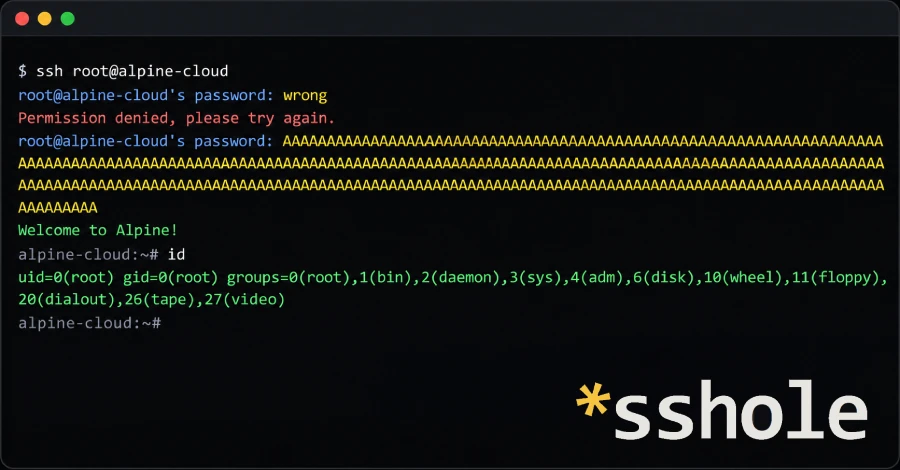
Security teams across the tech world are scrambling after developers discovered a jaw-dropping security flaw that turns secure Linux systems completely inside out. A newly disclosed vulnerability in OpenSSH—tracked officially under CVE-2026-123158 and dubbed by researchers as “sshole”—lets anyone log into an Alpine Linux server without ever knowing a real password.
All an attacker needs to do is paste a random string of characters longer than 256 bytes into the password box. If the target server meets a few common conditions, the system gets confused, mistakes an error message for an exact password match, and opens the door wide open.
The OpenSSH development team rushed out an emergency fix in OpenSSH 10.6p2, and Alpine Linux pushed out urgent software updates across all supported versions. Cloud teams and system administrators are being told in no uncertain terms: patch your machines and restart your secure shell services immediately, or turn off password-based logins right away.
What Just Happened? The Flaw That Made Passwords Optional
We have all been taught that longer passwords are safer. Every cybersecurity guide, website registration form, and corporate IT rule insists that eight characters is weak, twelve is decent, and a giant random passphrase is nearly unbreakable. We have watched major platforms roll out upgrades like the recent WhatsApp security upgrades with passkeys and protections to keep out intruders.
In this rare case, typing an extra-long password did not make the server more secure. It broke the lock completely.
The $0 Secret To Launching Your Entire Online Empire
Why pay hundreds every month for separate software? Build funnels, send emails, and make sales with Systeme.io completely free.
Get Started For $0Free Forever • No Credit Card Needed • Beginner-Friendly
The problem lives at the crossroads between the OpenSSH server software and the lightweight system library used by Alpine Linux, known as musl libc. When someone connects to a server over SSH and tries to log in using a password, the system needs to check if that password matches the secret stored in the server’s files.
If the password typed into the login prompt is longer than 256 characters, the internal password processing function crashes into an internal limit. Instead of rejecting the connection or showing a standard error prompt, the system passes back a single character: an asterisk.
The trouble is that on Linux systems, an asterisk is also the exact symbol stored in the user directory to mean an account has no password set. OpenSSH looked at the returned asterisk, looked at the account’s stored asterisk, decided they matched, and welcomed the stranger straight into the system.
Much like the recurring waves of mass password reset waves and account breaches seen across social media, this glitch shows how a tiny software logic mismatch can compromise entire digital setups.
The Technical Breakdown in Plain English
To understand why this happened, you do not need a computer science degree. You just need to look at how basic Linux accounts store their passwords.
When you create an account on a Linux machine, the server never saves your actual plain password. Storing plain words would be reckless because anyone who read the file could steal every single login. Instead, Linux takes your password and runs it through a mathematical blender called a hashing function. The blender turns your word into an unreadable scrambled code.
Every time you log in, the server runs your typed word through the same blender. If the new scrambled code matches the scrambled code saved in a protected file called /etc/shadow, you are authenticated.
The 256-Byte Input Limit
Most heavy Linux distributions, like Ubuntu or Red Hat, rely on a standard system engine called glibc. Alpine Linux chose a different engine called musl libc. Musl is beloved because it is tiny, fast, and uses almost no memory.
Musl has its own version of the blender function, called crypt(). This function has a built-in rule: if anyone feeds it an input that is longer than 256 bytes, it stops processing. It refuses to blend the input.
When crypt() hits an error like this, it does not throw an alarm bell or shut down. It simply returns a one-character fallback string: *.
The Dangerous Meaning of the Asterisk
In standard Unix and Linux design, the /etc/shadow file uses special symbols when an account is not meant to use normal passwords:
- An exclamation mark (
!) means the account is locked. Nobody can log into it using a password. - An asterisk (
*) means the account has no password assigned.
System administrators frequently create accounts that use secure SSH keys instead of typed passwords. When you create a key-only account, the operating system puts an asterisk into the password field. You might think that having an asterisk there means nobody can guess a password to get in.
Unfortunately, when someone connects over SSH and enters a password containing 300 repeated letters like “AAAAAAAA…”, musl’s blender encounters an oversized input, hits the 256-byte limit, gives up, and returns an asterisk.
OpenSSH compares the two sides:
- Blender result:
* - Stored account setting:
*
Because both strings match, OpenSSH concludes that the password was correct. It hands the connection an active session.
Send, Spend & Hold Money Worldwide Without Hidden Fees
Transfer money internationally at the real exchange rate and hold 40+ currencies in one account.
Open a Wise AccountMid-market rate • Fast transfers • 40+ currencies
The Four Exact Conditions Hackers Need to Strike
This authentication bypass does not hit every single computer running Linux. Researchers discovered that a server must meet four distinct conditions at the same time for the bypass to succeed:
- The server runs OpenSSH without PAM. By default, Alpine’s standard
openssh-serverpackage is built without Pluggable Authentication Modules (PAM). Without PAM, OpenSSH handles the password comparison directly through the C library functions. - Password authentication is turned on. The setting
PasswordAuthentication yesmust be active in the SSH configuration file. This is the factory default for OpenSSH unless an administrator explicitly switches it off. - An account has an asterisk in its password field. The target user must have an asterisk listed in
/etc/shadow. This includes accounts created for SSH key access only, accounts imported through directory services, and default users packaged with certain lightweight cloud images. - At least one other account on the machine has a standard hashed password. The system must contain at least one user with a modern password hash starting with
$5$(SHA-256) or$6$(SHA-512). Musl needs this existing hash to borrow salt settings during the process.
If all four conditions are met, an attacker does not have to guess anything. They only need the username of an account with no password. They send an oversized text string between 257 and 1,024 bytes long, and the attack succeeds on the very first attempt.
Why Alpine Linux Was Right in the Crosshairs
Alpine Linux is one of the most widely deployed operating systems on the modern web, even if everyday internet users rarely hear its name. Because of its tiny footprint, software engineers use Alpine to build lightweight Docker containers, cloud microservices, and network appliances.
When software teams deploy modern applications, they want images that download in seconds rather than minutes. Alpine delivers that efficiency. But that lightweight design also created the exact environment where this flaw could thrive.
Key-Only Users Were Left Completely Exposed
The irony of this vulnerability is that it actively punished people trying to follow security best practices.
Administrators are constantly advised to never give remote accounts passwords. The common rule is simple: create the user, leave the password blank, assign an SSH public key, and lock things down. But on an unpatched Alpine system, creating a key-only account placed an asterisk in the password field.
If anyone else on that server had a standard password set, that key-only account instantly became a wide-open side door for anyone who sent an oversized password.
Cloud Base Images at High Risk
The danger expanded further when researchers inspected Alpine’s cloud images. Official cloud images built with the tiny-cloud utility shipped with a default user named alpine.
That default alpine user had an asterisk in its password field, along with permission to run administrative commands using the doas tool without entering a password. If a system administrator launched that image and added a password to any other utility account, the alpine user became instantly exploitable.
An intruder could connect as alpine using 300 random letters, execute administrative commands, and take complete control of the machine.
The $0 Secret To Launching Your Entire Online Empire
Why pay hundreds every month for separate software? Build funnels, send emails, and make sales with Systeme.io completely free.
Get Started For $0Free Forever • No Credit Card Needed • Beginner-Friendly
The Big Debate: Who Caused the Bug?
Whenever an emergency patch drops, a debate breaks out over who is responsible. As reported by The Hacker News, the release of OpenSSH 10.6p2 arrived alongside differing viewpoints between core open-source developers.
The OpenSSH development team made it clear that their code change is technically a workaround. In their view, the core flaw belongs to the underlying C library. Their position is that a password hashing function should never spit out a valid Unix shadow string as an error code.
To stop the leak immediately, OpenSSH modified its code so that sshd will reject any password match whenever the stored password string is shorter than four characters. Since a single asterisk is only one character long, the match fails right away.
On the other side of the table, Rich Felker, the primary author and maintainer of musl libc, pushed back against calling it a musl vulnerability. From the library’s viewpoint, returning an asterisk has been an established convention to indicate an invalid or failed operation for decades.
Regardless of who owns the philosophical blame, real-world systems were left wide open. Both OpenSSH and Alpine Linux moved swiftly to publish software updates that close the gap before cybercriminals could weaponize it.
The Vanishing Window: Why AI Makes Immediate Patching Vital
One of the most eye-opening revelations from the OpenSSH announcement was why the patch was published so quickly without the traditional private embargo period.
In previous years, when a researcher found a severe vulnerability, software projects would quietly notify operating system vendors weeks in advance. Everyone would prepare patches behind closed doors, and the public would only learn about the bug after fixes were ready everywhere.
That playbook is no longer viable. The maintainers of OpenSSH noted that they can no longer maintain long private embargoes because artificial intelligence tools are actively being used to analyze public commits and rediscover reported bugs within hours.
If security teams sit on a known flaw, automated vulnerability discovery scanners and AI code analysis engines can independently find the exact same hole and hand working exploit recipes to threat actors. Speed is now the only dependable defense.
We have witnessed similar rapid exploitation patterns play out across other web technologies, such as the critical vulnerabilities found in unpatched WordPress sites and the aggressive tactics used when hackers turn web ads into phone spyware. Leaving a known flaw unpatched for even 24 hours is an invitation to disaster.
Step-by-Step: How to Secure Your Servers Right Now
If you manage servers running Alpine Linux or any system using OpenSSH built on musl libc, you need to take action right now.
Step 1: The Instant Workaround
If you cannot immediately update your packages, you can eliminate the danger right now by disabling password authentication entirely.
Open your SSH daemon configuration file:
Bash
vi /etc/ssh/sshd_config
Find the password authentication line and make sure it is set to no:
Plaintext
PasswordAuthentication no
Save the file and restart the SSH service:
Bash
rc-service sshd restart
Once password logins are disabled, the server will only accept SSH keys. Because the bypass requires password authentication to be active, this completely shuts down the attack path.
Step 2: The Permanent Software Update
If you want to keep password authentication enabled or ensure your base packages are fully secured, update your package repository and install the patched binaries:
Bash
apk upgrade -U -a
Upgrading the package files on your storage drive does not automatically update the program currently running in your server’s memory. You must restart the SSH service immediately after updating:
Bash
rc-service sshd restart
If you forget to run that restart command, your server remains vulnerable until the next full system reboot.
Step 3: Checking If an Intruder Already Walked In
Because this attack leaves very little trace beyond an unusual password length in standard connection logs, administrators should check their systems carefully if they were exposed to the internet.
Take these investigative steps:
- Inspect
/var/log/messagesor your SSH authentication logs for successful password logins on accounts that should never have had passwords. - Check
/etc/passwdand/etc/shadowto see if any unexpected user accounts were generated recently. - Review
/root/.ssh/authorized_keysand the authorized keys of any user with administrative permissions to ensure no unrecognized SSH keys were added. - Review the history of tools like
doasorsudoto verify that no unauthorized commands were run with elevated privileges.
If you find evidence of an unauthorized login, the official recommendation from Alpine Linux is straightforward: do not try to clean the server. Treat the entire machine as fully compromised, rebuild it from a clean backup, and issue new credentials across your network.
Other Operating Systems: Are You at Risk?
Whenever an OpenSSH headline makes the rounds, panic spreads across the broader developer ecosystem. It is just as important to know what is not affected:
- Debian, Ubuntu, and Red Hat: Mainstream distributions that use the GNU C Library (glibc) are not vulnerable to this bug. Glibc handles password input lengths and hashing errors through entirely different mechanisms.
- Servers running PAM: If your OpenSSH installation uses Pluggable Authentication Modules with the directive
UsePAM yes, the server hands password verification off to the PAM stack rather than processing it directly, shielding it from this logic mismatch. - OpenWrt with Dropbear: While OpenWrt is a musl-based system, its default SSH service is Dropbear, not OpenSSH. Dropbear is not affected by this flaw. OpenWrt is only at risk if an administrator manually replaced Dropbear with the standalone OpenSSH server package.
- Machines without standard password hashes: If a machine has zero accounts containing a
$5$or$6$password hash, musl cannot borrow the necessary salt, and the bypass condition does not trigger.
Understanding these boundaries helps security teams prioritize what needs immediate patching and avoid unnecessary fire drills on unaffected systems. Learning to manage updates smoothly is an essential operational skill, much like the protocols recommended in our breakdown of Apple’s security update overhaul.
Frequently Asked Questions (FAQs)
What is CVE-2026-123158?
CVE-2026-123158 is a high-severity authentication bypass vulnerability in OpenSSH when running on Linux distributions that use the musl C library without PAM, most notably Alpine Linux. It allows an attacker to log in to passwordless accounts by sending an oversized password string between 257 and 1,024 bytes long.
Does this vulnerability affect my regular Ubuntu or CentOS servers?
No. Standard distributions like Ubuntu, Debian, CentOS, AlmaLinux, and Rocky Linux use glibc rather than musl libc. This specific error handling condition only occurs when OpenSSH interacts directly with musl’s crypt() implementation without PAM.
Can an attacker access the root account with this bug?
Only if direct root password logins are enabled. By default, OpenSSH blocks direct root logins via password. However, if an administrator relaxed that setting, or if an attacker logs in to an account with passwordless sudo or doas privileges (such as the default alpine user in certain cloud images), they can quickly escalate their permissions to full root access.
Why does sending a long password cause the system to accept it?
Musl libc’s crypt() function has a 256-byte input limit. When fed a string longer than 256 bytes, it fails and outputs an asterisk (*). In Linux, an asterisk in the /etc/shadow file indicates an account with no password. OpenSSH compares the returned asterisk against the stored asterisk, assumes the credentials match, and grants entry.
Is upgrading the package with apk enough to protect my machine?
No. Running apk upgrade -U -a replaces the software files on the disk, but the old, vulnerable OpenSSH process continues running in memory. You must run rc-service sshd restart or reboot your machine to activate the fix.
Are Docker containers running Alpine Linux vulnerable?
Only if those containers actively run the OpenSSH server (sshd) with password authentication enabled and expose port 22 to external or untrusted traffic. The vast majority of Alpine Docker containers run individual application binaries (like web servers or background workers) without an active SSH daemon and are therefore unaffected.
The Lessons of the Asterisk Incident
The discovery of CVE-2026-123158 serves as a humble reminder of how fragile digital trust can be. For years, computer users have been told that complex, exceptionally long passphrases are the ultimate line of defense. Yet here, a simple string of 300 identical letters bypassed the entire authentication perimeter because two pieces of software interpreted an asterisk differently.
As the cloud shifts toward lighter, leaner operating systems, the interactions between small helper libraries and giant foundational services like OpenSSH will continue to reveal unexpected blind spots.
If you manage servers running Alpine Linux, check your configuration files today. Disable password authentication if you rely on keys, upgrade your packages to OpenSSH 10.6p2, and always remember to restart your services after applying updates.
