
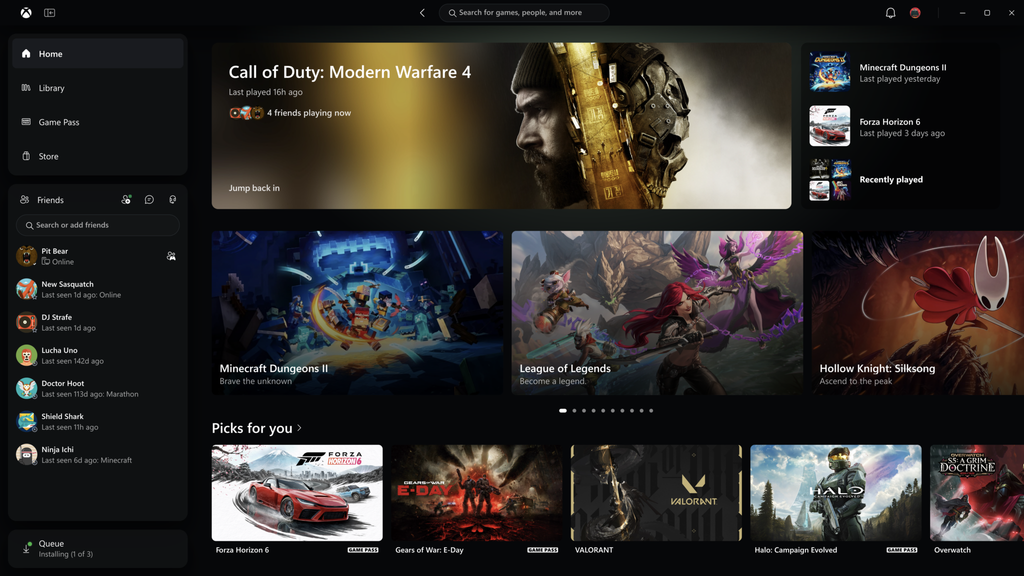
Microsoft has officially rolled out a massive overhaul for the Xbox app across PC, web browsers, and cloud streaming. The long-awaited update tackles the slow load times, cluttered menus, and sluggish social tools that have frustrated players for years. With performance boosts reaching up to 60%, the new design turns the platform into a lean, lightning-quick gaming hub built for modern hardware.
The update is live right now for members of the Xbox Insider program on PC, alongside a completely revamped browser interface at Xbox Cloud Gaming that works on mobile devices, smart TVs, and VR headsets.
What Is the New Xbox Experience on PC, Web, and Cloud?
The Xbox PC app has long suffered from heavy resource usage and slow response times. Launching the software, loading game store pages, or simply trying to check if your friends were online often felt sluggish, even on high-end gaming rigs.
Microsoft set out to rebuild the experience with speed and simplicity as the core foundation. The overhaul is not just a fresh coat of paint. It is a fundamental rework of how the app handles navigation, caching, and game discovery.
According to Jason Beaumont, Vice President of Xbox Experiences, the team gathered extensive community feedback to eliminate lag points. The goal is to give players instant access to their titles whether they are sitting at a high-end desktop, gaming on a mid-range laptop, streaming via a browser on an iPad, or firing up a smart TV.
The $0 Secret To Launching Your Entire Online Empire
Why pay hundreds every month for separate software? Build funnels, send emails, and make sales with Systeme.io completely free.
Get Started For $0Free Forever • No Credit Card Needed • Beginner-Friendly
Raw Speed: How Much Faster Is the New Xbox App?
The numbers behind this update show a serious boost in day-to-day usability. Microsoft’s internal testing and rollout metrics highlight notable performance improvements across every major section of the app:
- Up to 60% faster launch time: The desktop application opens more than twice as fast as the previous version, getting you into your games with almost zero boot delay.
- Up to 50% faster page loading: Browsing the Home screen, the digital Store, and the Game Pass catalog is snappy, eliminating the blank loading boxes that used to pop up during navigation.
- Up to 65% faster pop-up windows: Secondary menus, purchase dialogues, and in-app system screens now appear instantly without freezing background processes.
These responsiveness tweaks arrive at a time when hardware efficiency is paramount for desktop gamers. As Microsoft continues refining background resource consumption, as seen in their efforts where Microsoft is finally making Windows 11 run smoothly on 8GB RAM laptops, lighter system tools make a noticeable difference for everyday performance.
5 Major Upgrades Coming to Your Screen
Beyond sheer speed, Microsoft reworked several pain points that previously made the PC and web apps cumbersome to navigate. Here are the five key features included in the new rollout.
1. A Redesigned, Easy-to-Organize Library
Your personal game collection is finally easier to sort and manage. The refreshed library features simplified navigation bar tabs, smart sorting, and advanced filters. You can filter titles by installation status, genre, cloud compatibility, and storage drive in just one click.
Finding a game you bought three years ago or sorting through hundreds of Game Pass options no longer requires endless scrolling.
2. Social Features Front and Center
Connecting with squad mates has been simplified. Previously, checking your friends list required popping open secondary overlays or dealing with clunky side windows.
Social features and the Friends list are now integrated straight into the main navigation rail on the left. You can see what your friends are playing, launch a text chat, or jump into a party directly from your main dashboard. For content creators, streamers, and casual gamers exploring what Twitch streaming is and how gamers make money online, having quick access to party chats and community interaction right on PC makes coordinating multiplayer lobbies much faster.
3. Unified Universal Search
Finding specific content across the Xbox ecosystem used to be disjointed. The new unified search tool queries everything at once.
When you type a title into the search bar, the app simultaneously returns installed games, available store add-ons, DLC, Game Pass entries, and community profiles. Whether you are looking for an expansion pack or a friend’s gamertag, you get your answer in one place.
4. Cleaner Visual Interface and Modern Cards
The entire interface has received a visual refresh. Game cards have been updated with clean typography, clear install badges, and streamlined hover animations that do not drain system memory. The Home screen cuts down on unwanted promotional banners, prioritizing the games you actually play and the titles you have recently downloaded.
5. Accessibility and High-Contrast Themes
Microsoft has introduced five brand-new high-contrast display options alongside the standard light and dark themes. These modes improve text readability and menu visibility for players with low vision or high sensitivity to screen glare.
Expanding Beyond the PC: Xbox Web and Cloud Gaming
This update is not limited to Windows desktops. Microsoft is aligning the PC application with its browser-based platform at Xbox Cloud Gaming to provide a single, unified interface.
The company is rolling out this streamlined UI to web browsers, mobile browsers, supported Samsung and Amazon Fire smart TVs, and Meta Quest VR headsets.
Players on portable hardware or budget machines no longer need an expensive dedicated GPU to jump into titles like Halo Infinite or Forza Horizon 5. With cloud streaming, the web browser handles the heavy lifting, delivering console-grade graphics over the internet. This shift fits neatly into broader consumer hardware trends, especially as high-performance displays become standard on everyday machines, like how Samsung launches the $799 Galaxy Book 6 to challenge the Apple MacBook Neo, giving mobile players sharp screens for cloud gaming.
Why Microsoft Is Doubling Down on Cloud and PC
Microsoft’s console hardware numbers have experienced market shifts over recent quarters, as detailed in reports showing how Xbox revenue dropped 10 percent as Microsoft’s cloud and AI business surged. Rather than relying solely on dedicated living-room consoles, Microsoft is shifting its strategy toward software and cloud distribution.
Send, Spend & Hold Money Worldwide Without Hidden Fees
Transfer money internationally at the real exchange rate and hold 40+ currencies in one account.
Open a Wise AccountMid-market rate • Fast transfers • 40+ currencies
Gamers want to access their purchases everywhere without buying a separate console. Last month, Microsoft introduced standalone cloud gaming subscriptions that do not even require a full Game Pass Ultimate bundle, opening the door for mobile and casual players.
By cleaning up the PC app and speeding up the web client, Microsoft removes the friction that once drove PC players away toward competitors like Steam. With Windows 11 topping 70 percent share in Steam hardware surveys, Microsoft has a direct window to millions of PC players who want smooth, responsive native apps.
How to Test the New Xbox PC App Right Now
If you want to try out the redesigned PC app before the general public release, you can do so through the official insider program:
- Open the Microsoft Store on your Windows 10 or Windows 11 PC.
- Search for Xbox Insider Hub and install the free utility.
- Launch the Xbox Insider Hub and log in with your primary Microsoft account.
- Navigate to the Previews tab on the left dashboard.
- Select Windows Gaming and click Join.
- Once enrolled, open the Microsoft Store, click on Library, and hit Get Updates to download the latest Xbox app build.
For cloud players, you can test the redesigned web layout immediately by heading directly to the cloud portal via any Chromium or Safari browser.
Frequently Asked Questions (FAQs)
What is the new Xbox PC app update?
It is a comprehensive performance and visual overhaul of the Xbox PC and web application. It makes the app launch up to 60% faster, loads store pages 50% faster, adds universal search, and organizes the game library with simplified navigation.
Do I need an Xbox Game Pass subscription to use the new app?
No. The Xbox app is free for all Windows users. You only need a Game Pass subscription if you want access to the Game Pass game catalog or Xbox Cloud Gaming features. Any games you own individually can be launched and managed without a monthly fee.
When will the new Xbox experience roll out to all users?
The update is currently available to Xbox Insiders on PC and is being enabled by default across web browsers and smart TVs over the coming weeks. A full global rollout to all standard Windows users will follow after Insider testing wraps up.
Will this update work on older PCs and laptops?
Yes. Because the app has been optimized to use fewer system resources and launch up to 60% faster, older hardware and laptops with modest specifications will experience smoother operation compared to older app versions.
Can I play Xbox games on Mac using this update?
Yes, through Xbox Cloud Gaming. Mac users can open Safari, Chrome, or Edge, visit the official Xbox play website, and stream supported titles directly with a compatible Bluetooth controller.
Microsoft is finally addressing the long-standing performance complaints that have trailed the Xbox PC software for years. By cutting load times in half, making social features effortless to open, and bringing the exact same snappy interface to browser screens and TVs, the company is making gaming significantly more accessible.
The $0 Secret To Launching Your Entire Online Empire
Why pay hundreds every month for separate software? Build funnels, send emails, and make sales with Systeme.io completely free.
Get Started For $0Free Forever • No Credit Card Needed • Beginner-Friendly
