
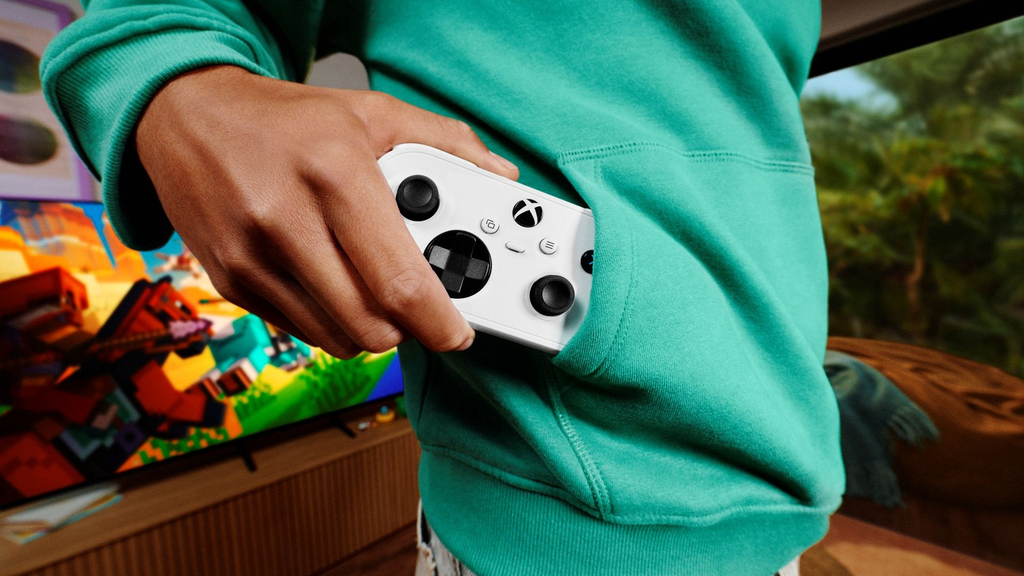
Microsoft just dropped a massive surprise on the gaming community, and it fits right in the palm of your hand. The company has officially revealed the Xbox Nano Controller, a pocket-sized gamepad built to take your games anywhere you go.
If you have ever tried cramming a standard Xbox controller into a backpack or coat pocket, you know how bulky it feels. The thick plastic grips take up way too much room, the thumbsticks catch on your zipper, and the weight adds up quickly.
Microsoft noticed this problem and decided to redesign their classic gamepad from scratch. The result is a miniature device that measures barely five inches long and weighs less than an ordinary chocolate bar.
It looks like something straight out of a retro gaming dream, but it packs all modern features. It connects to your console, laptop, phone, and even your television screen without skipping a beat.
Here is everything you need to know about this tiny new gadget, how it works, what it costs, and if you should grab one for yourself.
The $0 Secret To Launching Your Entire Online Empire
Why pay hundreds every month for separate software? Build funnels, send emails, and make sales with Systeme.io completely free.
Get Started For $0Free Forever • No Credit Card Needed • Beginner-Friendly
What Is the Xbox Nano Controller?
The Xbox Nano Controller is an ultra-compact wireless gamepad designed for portable play, casual gaming sessions, and gamers who prefer smaller hardware.
At just over five inches in length and weighing roughly 3.5 ounces (under 100 grams), it is the smallest official controller Microsoft has ever released. To put that in perspective, a standard Xbox Series X wireless controller weighs roughly 280 grams with batteries installed. The Nano weighs barely a third of that.
Instead of the long, sculpted grips found on regular gamepads, the Nano uses a flattened, rectangular shape. It reminds many gamers of classic portable systems or the vintage Super Nintendo pad, but modernized for games played in 2026.
Despite the dramatic reduction in physical footprint, Microsoft did not strip away essential inputs. The Nano retains eighteen standard gaming buttons. You still get dual analog thumbsticks, a directional pad, front face buttons, shoulder bumpers, analog triggers, and menu buttons.
It runs on an internal rechargeable battery and connects over both official Xbox Wireless signals and standard Bluetooth.
The controller is priced at $49.99 and officially hits shelves on November 4, 2026, with pre-orders open right now.
Why Did Microsoft Decide to Shrink the Controller?
For years, gaming hardware companies focused on making controllers bigger, heavier, and packed with extra vibration motors. But the way people enjoy video games has changed drastically over the last few years.
Console gaming is no longer limited to sitting six feet away from a giant television screen in your living room. Today, millions of people jump into matches during lunch breaks at work, on commuter trains, or from a hotel room on vacation.
Services like Xbox Cloud Gaming allow players to stream massive blockbusters directly to a phone, an iPad, or a smart television without owning an actual console.
Carrying a standard, chunky controller on a flight or a bus ride is annoying. It bulges out of bags, easily gets damaged, and feels out of place in casual settings.
Microsoft created the Nano to solve that specific headache. They wanted a device that you can slip into your jeans pocket right next to your phone.
They also wanted a controller that feels comfortable in smaller hands. Many young children, teenagers, and adults with smaller palms struggle to reach every trigger and bumper on traditional gamepads. The Nano solves this by pulling all controls closer together.
Lastly, Microsoft wants the Xbox ecosystem to blend into everyday living rooms. Because the Nano looks simple and neat, it can sit beside your TV remote on a coffee table without making your living room look cluttered.
Design and Build: Small Body, Full-Sized Control
The design of the Xbox Nano focuses heavily on simple, functional geometry.
When you pick it up, the first thing you notice is the smooth outer shell. Microsoft skipped the large wing grips entirely. The body is flat across the front with rounded corners that slide into pockets without snagging.
Send, Spend & Hold Money Worldwide Without Hidden Fees
Transfer money internationally at the real exchange rate and hold 40+ currencies in one account.
Open a Wise AccountMid-market rate • Fast transfers • 40+ currencies
The thumbsticks are slightly lower in profile than normal sticks, but they still provide full 360-degree analog control. They have textured rubber rims to keep your thumbs from slipping during fast-paced movement.
Between the thumbsticks, you will find the signature hybrid D-pad. This disc-style pad makes it easy to click diagonal inputs, which is helpful for fighting games, vintage platformers, and menu navigation.
On the top edges, you have the standard bumper buttons (LB and RB) alongside triggers (LT and RT). Because space is limited, the triggers have a shorter pull distance than normal Xbox triggers, but they still register fine-tuned pressure.
The front face features the classic A, B, X, and Y buttons. They are spaced close enough for rapid finger transitions without feeling cramped. You also get the dedicated Share button for capturing clips and screenshots, along with the Menu and View keys.
The entire device feels sturdy. There is no cheap creaking when you squeeze it, and the matte plastic finish keeps oily fingerprints away.
The Secret Weapon: The New Programmable Action Button
One of the biggest surprises on the Xbox Nano is an extra button that standard Xbox controllers do not even have: the dedicated Action Button.
Microsoft placed this programmable button in a convenient spot where your index or middle finger naturally rests.
You can customize what this button does using the official Xbox Accessories app on your console or Windows computer.
Here are a few useful ways you can configure the Action Button:
- Map it to jump or slide so you never have to take your thumb off the right analog stick during an intense game.
- Set it as a quick mute button for your party chat.
- Use it as an instant screenshot or video clip shortcut without holding down multiple buttons.
- Assign it as a quick-launch shortcut to open your favorite cloud game or media streaming app.
Having custom button mapping on an entry-level $50 controller gives players premium functionality without having to pay for an expensive pro-grade gamepad.
The $0 Secret To Launching Your Entire Online Empire
Why pay hundreds every month for separate software? Build funnels, send emails, and make sales with Systeme.io completely free.
Get Started For $0Free Forever • No Credit Card Needed • Beginner-Friendly
Say Goodbye to AA Batteries
For years, Xbox fans have debated Microsoft’s decision to use AA batteries in their standard controllers. Some people enjoy swapping fresh batteries in seconds, while others dislike buying disposable packs or separate charging kits.
With the Xbox Nano, Microsoft made a clean break: it features an internal, rechargeable lithium-ion battery.
Because the controller is lightweight and uses smaller vibration motors, the battery lasts an impressive amount of time between charges. You can easily get through full weekend sessions without worrying about plugging it into a wall.
When the battery runs low, you simply plug in a standard USB-C cable. It charges quickly from your console, your computer, a wall charger, or even a portable power bank while you are on a train or at the airport.
How It Connects to All Your Screens
Versatility is the real magic trick of this controller. Microsoft did not design this as a gimmick accessory that only works on one machine. It connects to practically any gaming screen in your home.
Xbox Consoles
If you own an Xbox Series X, Xbox Series S, or an older Xbox One, the Nano connects using Microsoft’s proprietary Xbox Wireless protocol.
This connection provides near-zero latency, meaning your button presses register instantly on your television. It pairs with the press of a single sync button, exactly like the controller that came in your console box.
Windows 10 and Windows 11 PCs
On desktop PCs and laptops, you have two options. You can pair instantly using Bluetooth, or you can plug in a USB-C cable for wired performance with zero input delay. It works immediately with Steam, the Xbox App, Epic Games Store, and PC Game Pass titles without needing extra drivers.
Smartphones and Tablets
The controller pairs effortlessly with both iPhone (iOS) and Android devices.
Once paired, you can run mobile titles from Apple Arcade or the Google Play Store that support gamepad controls. More importantly, it lets you stream cloud games seamlessly using web apps or native services.
Smart TVs and Streaming Sticks
If you have a modern Samsung Smart TV, an Amazon Fire TV Stick, or a compatible streaming device, you do not need a computer or a console to play console games.
You can sync the Xbox Nano directly to your TV via Bluetooth, open the Xbox app, and start playing games over the cloud instantly.
Switching between devices is painless. The controller remembers multiple paired connections, allowing you to jump from your phone on the bus to your PC at your desk with a quick double-tap of the sync button.
Who Is This Controller Actually For?
Not every product is meant for every person, and Microsoft knows that. The Nano is not designed to replace an Elite controller for a competitive esports tournament. Instead, it fills clear gaps in the market.
1. Travelers and Commuters
If you travel often for work or spend hours commuting, packing space is valuable. A standard controller creates a giant bulge in your bag and risks broken analog sticks.
The flat profile of the Nano slips right into a backpack sleeve, a jacket pocket, or a carry-on pouch. Pair it with your phone or an iPad, and you have a full console setup on the go.
2. Kids and Players with Smaller Hands
Standard modern controllers are large. For young children trying to play games with their family, reaching both thumbsticks while keeping index fingers on the bumpers can cause hand strain.
The Nano pulls all buttons closer together. It is lightweight enough that kids can play comfortably without dropping it or getting tired.
3. Cloud Gamers Without a Console
You do not need to drop $500 on an Xbox Series X console to enjoy modern games anymore. If you have a decent internet connection and a subscription to Xbox Game Pass Ultimate, you can play directly through your browser or smart TV.
The Nano acts as an affordable, $50 entry ticket into that world.
4. The Reliable Backup Controller for Game Nights
When friends or relatives visit, you often find yourself one controller short for multiplayer titles.
Buying a standard controller for $65 or $70 just to keep it in a drawer feels like a waste. At $49.99, the Nano makes an ideal guest controller for quick matches of racing, fighting, or party games.
Games That Play Best on the Xbox Nano
Because of its compact design, some game genres feel much more natural on the Nano than others.
Platformers and 2D Adventures
Side-scrolling adventures, indie gems, and retro-style games feel incredible on this gamepad. Titles like Hollow Knight, Celeste, Ori and the Will of the Wisps, and Dead Cells benefit directly from the precise hybrid D-pad and short trigger clicks. The flat layout gives you the nostalgic feel of an old-school handheld.
Casual Family and Party Games
Games like Minecraft, Bluey’s Happy Snaps, LEGO Star Wars, and Roblox are built for simple, accessible fun. The Nano handles all of these titles effortlessly, making it great for casual gaming nights with younger siblings or children.
Racing and Sports Titles
Racing games like Forza Horizon and arcade sports titles like Rocket League play smoothly on the device. While serious sim-racers will prefer full-travel triggers for precise braking, casual players will find the Nano responsive and agile.
Turn-Based RPGs and Strategy Games
Role-playing games like Persona, Sea of Stars, or tactical strategy games do not require lightning-fast twitch reflexes. You can kick back on a couch or hotel bed, hold this tiny gamepad with one or two hands, and make your moves comfortably.
The Trade-Offs: What Are You Giving Up?
Honesty matters when looking at new tech. A smaller controller comes with compromises that you should think about before spending your hard-earned money.
First, if you have very large hands, playing intense games on the Nano for four or five hours straight might cause your fingers to feel cramped. The lack of extended palm handles means your hands must curl slightly tighter around the body.
Second, the triggers have less travel distance than those on standard controllers. If you play hardcore racing simulations where you need millimeter-level throttle feathering, you will notice the difference.
Third, the rumble feedback is lighter. Microsoft included haptic vibration, but they could not fit giant rumble motors into a device that weighs under 100 grams. You will still feel explosions and collisions, but the rumble is softer and more subtle.
If you are a competitive first-person shooter player who needs rear back paddles, extreme trigger hair locks, and weighted grips, stick to the standard Xbox Wireless Controller or the Elite Series 2.
The Nano is built for convenience, travel, and casual accessibility, not esports trophies.
How It Compares to Other Portable Gamepads
Third-party manufacturers have made small Bluetooth controllers for years, but the Xbox Nano has a few distinct advantages over the competition.
Popular mini controllers like the 8BitDo Micro or various keychain gamepads often cut corners. Many of them lack clickable thumbsticks (L3 and R3), meaning you cannot sprint or perform melee attacks in modern 3D games.
Others leave off analog triggers entirely, replacing them with flat digital clickers.
The Xbox Nano does not strip these essentials away. You get two genuine clickable thumbsticks, full triggers, and the official Xbox guide button.
Furthermore, many cheap third-party gamepads suffer from Bluetooth connection drops or annoying input lag when paired with smart TVs.
Because the Nano includes Microsoft’s official Xbox Wireless hardware alongside Bluetooth, it delivers a clean, low-latency connection on consoles and PC that generic alternatives cannot match.
Price, Release Date, and Where to Buy
Microsoft has confirmed that the Xbox Nano Controller will retail for $49.99 in the United States.
Pre-orders opened immediately following the announcement, and official store shipments begin worldwide on November 4, 2026.
The controller is launching across a wide selection of global regions on day one, including:
- North America: United States, Canada, Mexico
- Europe: United Kingdom, Germany, France, Spain, Italy, Netherlands, Poland, Ireland, and Nordic nations
- Latin America: Brazil, Colombia, Argentina, Peru, Chile
- Asia-Pacific: Japan, South Korea, Australia, New Zealand, Taiwan, Hong Kong
Additional regions across Africa and the Middle East will see stock through official retail partners in the weeks following the initial November rollout.
You can reserve units directly through the Microsoft Store or major electronics retailers like Amazon, Best Buy, and GameStop.
Frequently Asked Questions
Can I use the Xbox Nano Controller on my Xbox Series X or Series S console?
Yes. It connects directly using the exact same Xbox Wireless protocol as your standard console gamepad. You just press the sync button on the console, press the sync button on the Nano, and you are ready to play.
Does the Xbox Nano have a headphone jack?
To keep the frame slim and save internal space, Microsoft omitted the traditional 3.5mm headphone jack. If you want audio, you can connect wireless headphones directly to your console, phone, PC, or television.
How long does the internal battery last?
The built-in rechargeable lithium-ion battery provides roughly 15 to 20 hours of continuous gameplay on a full charge, depending on vibration usage. It recharges in under two hours using any standard USB-C cable.
Will it work with iPhone and Android games?
Yes. The controller supports standard Bluetooth profiles. Any mobile game that supports regular controllers, including popular titles like Call of Duty: Mobile or Minecraft, will recognize the Nano automatically.
Can I customize the button layout?
You can reconfigure buttons completely using the Xbox Accessories app available on Xbox consoles and Windows PCs. This includes programming the brand-new Action Button to your favorite shortcuts.
Is it too small for adults to play comfortably?
Adults with average or smaller hands can play comfortably for normal sessions. If you have exceptionally large hands, it works great as a travel or backup pad, though you may prefer a full-sized controller for marathon multiplayer gaming.
The Xbox Nano Controller shows that bigger is not always better. By keeping all eighteen essential inputs, adding a rechargeable battery, and packing it into a pocketable design, Microsoft has built a smart travel companion for modern gaming. At $49.99, it hits an attractive sweet spot for anyone who plays across multiple devices
