
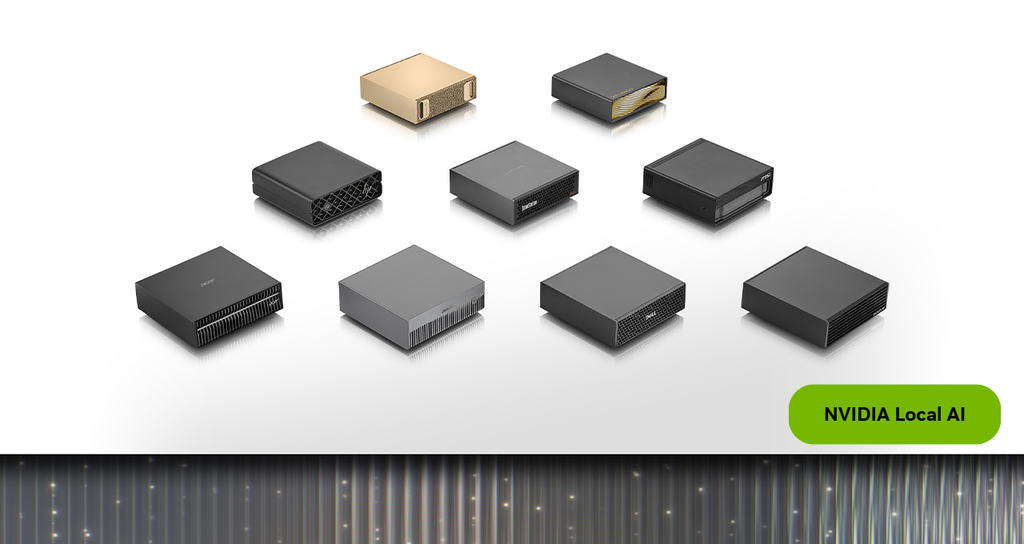
NVIDIA has officially expanded its desktop hardware lineup with a brand-new 64GB configuration of the NVIDIA DGX Spark. Starting Friday, October 23, 2026, this compact AI supercomputer will be available worldwide through major hardware partners including Acer, ASUS, Dell, Gigabyte, HP, and MSI, with prices starting at $4,999.
This launch gives developers, researchers, and tech enthusiasts a brand-new way to build, test, and run powerful local AI models directly on their desks. Instead of relying on expensive cloud subscriptions or sending private data to external servers, users can now run autonomous AI agents right from a device that fits in a small backpack.
Local AI processing has moved rapidly from a fun experiment into an essential daily workflow for software builders. As open-source models become smarter and more compact, the demand for powerful local hardware has exploded. The 64GB version of the DGX Spark bridges the gap between everyday consumer PCs and massive enterprise server racks.
Here is everything you need to know about this new hardware release, how it works, what you can build with it, and why it might be the ultimate addition to your home or office setup.
What Is the NVIDIA DGX Spark 64GB?
The NVIDIA DGX Spark is a micro-sized AI supercomputer designed specifically for desktop use. Despite being roughly the size of a standard lunchbox, it packages serious hardware performance into a small, quiet enclosure.
The $0 Secret To Launching Your Entire Online Empire
Why pay hundreds every month for separate software? Build funnels, send emails, and make sales with Systeme.io completely free.
Get Started For $0Free Forever • No Credit Card Needed • Beginner-Friendly
At the heart of the system is the NVIDIA GB10 Grace Blackwell Superchip. This custom processor combines a 20-core Grace Arm CPU with an advanced Blackwell GPU onto a single unified system. Instead of having separate RAM for the CPU and video memory for the graphics card, the system uses a single unified memory architecture.
The new 64GB version gives the processor full access to 64GB of ultra-fast memory shared seamlessly between central processing and graphics processing. This design eliminates the traditional memory bottleneck that happens when data moves back and forth across motherboard slots in regular desktop computers.
Out of the box, every unit comes pre-installed with DGX OS along with the full NVIDIA AI software stack. That means you can plug the device into power, connect a monitor and keyboard, and start loading local AI models within minutes without spending hours troubleshooting driver installations or setting up Linux environments.
Why Local AI Hardware Is Changing the Game
Building AI applications used to mean renting GPU power in the cloud. Every time you prompted an AI model to write code, analyze data, or generate images, you paid a fee for cloud computing time. Over time, those monthly cloud bills add up quickly for independent developers and small teams.
Running AI models locally completely changes that financial equation. Once you purchase the hardware, your daily running costs drop to basic electricity usage. You can run models continuously for hours or days without worrying about extra token fees or unexpected cloud charges.
Privacy is another massive reason developers are switching to local hardware. Many businesses, legal professionals, and software engineers work with sensitive client information, proprietary codebases, or personal data. Uploading that information to public cloud servers creates privacy risks and compliance headaches.
When you run a local model on a DGX Spark, every piece of data stays entirely on your physical machine. Your prompts, training data, and generated outputs never touch the internet unless you explicitly want them to.
The Problem with Standard AI PCs
Many computer manufacturers market regular laptops and desktops as AI PCs. While these consumer devices work fine for simple tasks like background blur in video calls or basic text generation, they hit a wall when you try to run heavy AI workloads.
Most standard PCs come with 16GB or 32GB of total RAM. A large portion of that memory is immediately used up by the operating system, web browsers, and background software applications. That leaves very little remaining space for AI models, causing systems to slow down to a crawl or crash completely when handling large context windows.
High Power in a Small Footprint
Gaming desktop rigs offer strong graphics power, but they are often bulky, loud, and consume massive amounts of power. The DGX Spark was built from the ground up to offer enterprise-grade AI execution inside an energy-efficient desktop box that runs quietly on a work desk.
It gives builders a dedicated environment for running local agents without draining resources from their primary workstation laptop or desktop PC.
How the 64GB Capacity Fits Your AI Workloads
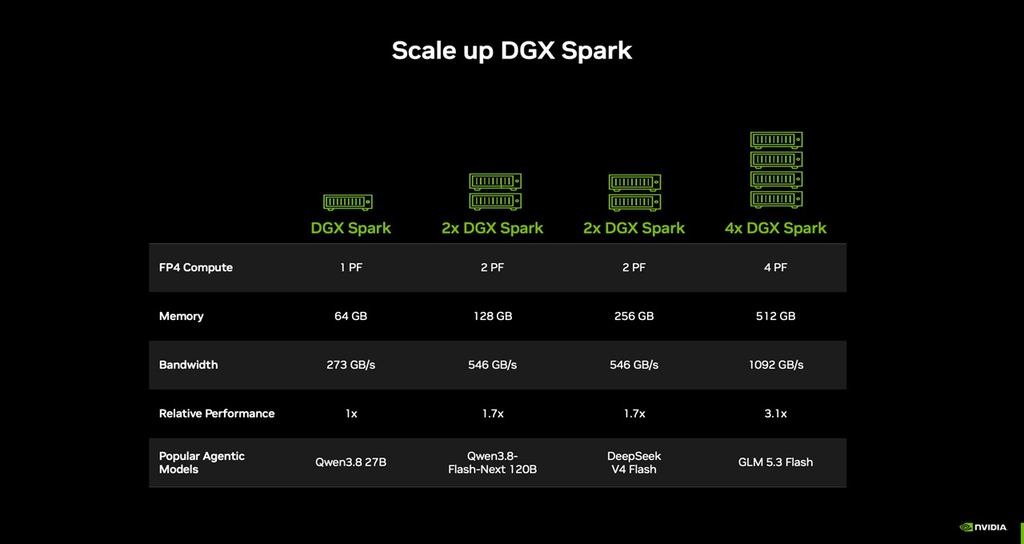
Understanding why 64GB of unified memory is so important comes down to how open-weight AI models are structured. Models are rated by their parameter size, such as 7 billion (7B), 14 billion (14B), 27 billion (27B), or 70 billion (70B) parameters.
To run an AI model smoothly, the entire model must be loaded directly into high-speed graphics memory. A 7B model takes up relatively little space, but modern complex models like 27B or 32B parameters require significantly more memory, especially when handling long chat conversations or complex code bases.
The 64GB memory pool provides the ideal capacity for mid-sized open-weight models. It allows you to run sophisticated 27B parameter models at full speed with plenty of memory left over to maintain large context histories, run local database lookups, and execute background coding tools at the same time.
This system hits the sweet spot for balance between cost and high-level capability. The original 128GB version remains available for heavy-duty researchers who need maximum capacity, but the $4,999 price tag on the 64GB unit makes high-performance local AI accessible to a much wider audience of builders and small business owners.
Send, Spend & Hold Money Worldwide Without Hidden Fees
Transfer money internationally at the real exchange rate and hold 40+ currencies in one account.
Open a Wise AccountMid-market rate • Fast transfers • 40+ currencies
Buying options are widespread because NVIDIA partnered directly with major global manufacturers. Whether you prefer hardware built by Acer, ASUS, Dell, Gigabyte, HP, or MSI, you get the exact same core NVIDIA software stack and superchip performance inside.
Scaling Up with NVIDIA Sync Cluster Assistant
One of the biggest pain points in hardware upgrades is outgrowing your equipment. Normally, when your computing needs expand, you have to sell your old computer and buy a much larger one. NVIDIA solved this problem by introducing a feature called NVIDIA Sync Cluster Assistant alongside the 64GB hardware release.
If your AI projects expand and a single 64GB machine is no longer enough memory for your expanding workloads, you do not need to replace your device. You can simply buy a second DGX Spark unit and connect them together.
Combining Two Machines Into One
Using the built-in high-speed NVIDIA ConnectX-7 networking ports on the back of each unit, two DGX Spark systems can link directly to each other. The NVIDIA Sync Cluster Assistant software automatically detects the second machine and bridges them together into a unified system.
This link combines the memory pools of both devices. Two 64GB units linked together instantly behave like a single machine with 128GB of usable memory. You can read a complete hardware hands-on breakdown over on PCMag to see how local labs perform.
Zero Complex Software Setup
In traditional server clustering, setting up network routing, configuring load balancers, and splitting workloads across two physical computers requires deep network engineering knowledge. NVIDIA Sync Cluster Assistant handles all of that network configuration automatically behind the scenes.
The exact same developer workflow and software scripts that ran on one unit will run on a clustered pair without requiring you to rewrite your software environment or reconfigure your AI models. The software routes model layers and compute tasks across connected units seamlessly.
What Can Developers Build on the DGX Spark 64GB?
Having 64GB of unified memory right on your desk opens up project possibilities that simply are not practical on regular consumer computers or small cloud test instances.
Autonomous Agentic AI Frameworks
AI is shifting away from simple chatbots that just answer questions to autonomous AI agents that can perform multi-step actions on their own. An agent can read through a project request, research information, draft code, run tests, fix bugs, and post the final update automatically.
NVIDIA provides optimized playbooks specifically built for agentic AI frameworks on DGX Spark. Popular open-source frameworks like OpenClaw, NemoClaw, Hermes Agent, and OpenShell run directly on the hardware. These tools let you build autonomous digital assistants that automate daily business operations, monitor code repositories, or summarize research papers in real time.
The $0 Secret To Launching Your Entire Online Empire
Why pay hundreds every month for separate software? Build funnels, send emails, and make sales with Systeme.io completely free.
Get Started For $0Free Forever • No Credit Card Needed • Beginner-Friendly
Offline Browser-Based Coding with Qwen3.8 27B
For software engineers, the new hardware enables a fully private local coding assistant. Through the upcoming NVIDIA Sync Model Launcher, developers can download advanced coding models like Qwen3.8 27B with a single click.
The system automatically configures the model to work directly with OpenCode inside your web browser. This gives you an intelligent code completion tool similar to GitHub Copilot, except every line of code you write stays completely on your local machine with zero latency and no internet connection required.
Local 3D Rendering and Image Generation
The platform is not limited strictly to text and software code. Major digital creation software providers are adding native support for the platform. Blender is releasing a prebuilt downloadable installer built specifically to leverage the unified Grace Blackwell hardware.
Digital artists and game developers can also run lightweight open-weight media models directly on the machine. Models such as Alibaba’s Qwen-Image-2.1 allow creators to perform local image generation and precise image editing without queuing up behind other users on web-based rendering platforms.
How to Set Up Your Local AI Lab
Setting up an AI lab at home or in your workspace used to require purchasing custom parts, installing complex graphic drivers, and configuring complex virtual environments. The DGX Spark simplifies this process down into a few clear steps.
Step 1: Connect Your Hardware
Unbox the machine and place it on your desk. Connect the power adapter, run an HDMI or DisplayPort cable to your external monitor, and plug in a USB keyboard and mouse. Connect an Ethernet cable if you want local network access.
Step 2: Boot DGX OS
Power on the device. The system boots into DGX OS, a specialized Linux distribution created by NVIDIA that comes with CUDA drivers, TensorRT acceleration libraries, and container tools pre-installed and verified.
Step 3: Choose an Inference Framework
Select your preferred software engine for running AI models. Popular open-source options supported on the system include:
- Ollama for simple command-line model management and API setup.
- llama.cpp for ultra-fast, lightweight model execution.
- vLLM for high-throughput model serving across local networks.
- LM Studio for a clean graphical interface to discover and test models.
Step 4: Download and Launch Your Model
Use the NVIDIA Sync Model Launcher or your chosen inference tool to download an open-weight model recommended for your specific task. Once downloaded, launch the model to start building your application or agentic workflow.
Step 5: Expand as Needed
If you find yourself needing more memory down the line, add a second DGX Spark system using a ConnectX-7 cable. Open the NVIDIA Sync Cluster Assistant to instantly pair the machines into a combined system.
Is the DGX Spark 64GB Worth the Investment?
At a starting price of $4,999, the 64GB DGX Spark represents a significant financial investment. Deciding whether it makes sense for your budget depends on how you use AI in your daily work.
If you are a hobbyist who only uses AI occasionally to ask simple questions or generate brief email drafts, standard cloud services or free online tools are still your most cost-effective option. You do not need dedicated hardware for casual light use.
However, if you are a full-time software developer, research student, startup founder, or creative professional who relies on AI continuously, the math changes quickly. Monthly cloud API costs, subscription fees for multiple AI coding tools, and cloud GPU rentals can easily total hundreds of dollars every month.
When you factor in complete data privacy, offline reliability, zero model usage throttling, and the ability to link two machines together over time, the system offers incredible long-term value for serious builders.
Frequently Asked Questions (FAQs)
What is the exact release date for the NVIDIA DGX Spark 64GB?
The 64GB configuration of the NVIDIA DGX Spark officially becomes available to purchase on Friday, October 23, 2026. It will be sold globally through hardware partner manufacturers including Acer, ASUS, Dell, Gigabyte, HP, and MSI.
How much does the DGX Spark 64GB cost?
The starting retail price for the 64GB model is $4,999. Final pricing may vary slightly depending on the specific partner brand, storage options, and regional shipping fees.
What is the difference between the 64GB version and the 128GB version?
The primary difference is total unified system memory. The original 128GB version provides double the RAM capacity for running massive AI models, but comes at a higher price point. The 64GB version lowers the entry cost while delivering the exact same GB10 Grace Blackwell processing power and software features.
Can I connect a 64GB model to a 128GB model?
NVIDIA Sync Cluster Assistant is designed to pair matching hardware units together seamlessly using ConnectX-7 ports. For optimal performance and stable memory pooling, connecting two identical units is the recommended setup.
Do I need internet access to run AI models on the DGX Spark?
No. Once you have downloaded your preferred AI models to the device, the DGX Spark operates completely offline. You can write code, run autonomous agents, and process private documents with zero internet connection required.
What open models run best on the 64GB unit?
The 64GB memory capacity is ideally suited for popular open-weight models ranging from 14B up to 32B parameters. Models like Qwen3.8 27B, Llama variants, and Mistral models run exceptionally fast with plenty of room left over for context memory and agent tools.
Final Thoughts
The release of the NVIDIA DGX Spark 64GB marks an exciting step forward for the local AI movement. By packaging the high-performance GB10 Grace Blackwell Superchip into a accessible desktop format starting at $4,999, NVIDIA is putting enterprise-grade AI execution directly into the hands of independent creators and software engineers.
With effortless scaling options through the NVIDIA Sync Cluster Assistant, rich agentic software playbooks, and total data privacy, this compact machine gives developers everything they need to build the next generation of intelligent software right from their desk.
To learn more about our mission to bring you the latest tech breakthroughs and culture trends, visit our About Us page. Have a tip or a question about local AI hardware? Reach out to our team directly through our Contact Us page.
Stay connected with our latest updates across social media on Instagram, Facebook, and X (formerly Twitter).
