
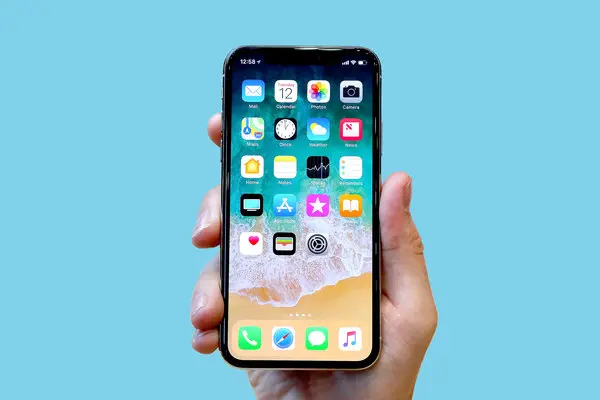
Apple has officially added the legendary iPhone X to its global list of obsolete products. Nine years after its grand reveal in 2017, the phone that completely reshaped modern smartphones has reached the end of its official lifecycle. Along with the iPhone X, Apple also added the 15-inch 2018 MacBook Pro to the same list.
If you still carry an iPhone X in your pocket or have one tucked away in a drawer, do not panic. Your device will not suddenly turn off or stop functioning overnight. However, this shift changes how Apple treats your hardware, how easy it will be to fix broken parts, and how safe your data remains over time.
Understanding what this announcement means will help you decide whether it is time to upgrade, seek independent repairs, or simply keep using your device as a backup.
The End of an Era for Apple’s Game-Changing Phone
When Apple introduced the iPhone X back in late 2017, it was marketed as the future of mobile technology. It was launched to mark ten years since Steve Jobs revealed the original iPhone. To celebrate that decade milestone, Apple took a huge risk by throwing away the traditional phone layout that millions of people had used for years.
Before the iPhone X, every single iPhone had thick borders around the screen and a big round physical button at the bottom known as the Home button. The iPhone X swept all of that away. It gave users an edge-to-edge screen, replaced fingerprint scanning with facial recognition, and asked users to swipe their fingers across the glass to navigate their apps.
The $0 Secret To Launching Your Entire Online Empire
Why pay hundreds every month for separate software? Build funnels, send emails, and make sales with Systeme.io completely free.
Get Started For $0Free Forever • No Credit Card Needed • Beginner-Friendly
Now, nearly a decade later, that future has officially become history. Apple updated its official support listings to move the iPhone X out of its service catalog, ending official hardware support for the device everywhere in the world.
What Does Apple’s Obsolete List Actually Mean?
To understand what this news means for you, it helps to understand how Apple categorizes older products as they age. Apple uses two main labels for older devices: Vintage and Obsolete.
The Difference Between Vintage and Obsolete
- Vintage Products: Apple classifies a product as vintage when it stopped selling it for more than five years but less than seven years. During this stage, you can still bring your device to an Apple Store or an authorized service provider. Apple will repair it as long as they still have the necessary spare parts sitting in their warehouses.
- Obsolete Products: A product becomes obsolete when Apple stopped selling it more than seven years ago. Once a product enters this phase, official support ends completely. Apple Stores and Apple Authorized Service Providers can no longer order official parts, nor can they perform any hardware repairs on the device.
You can read the full list of retired devices directly on Apple’s official vintage and obsolete products page.
Why Apple Sets a Seven-Year Limit
Keeping spare parts in factories for every single phone model ever made is almost impossible. Warehouses would run out of space, and producing microchips for decade-old designs takes resources away from newer technology. Seven years gives most consumers plenty of time to use their devices, pass them down to family members, or transition to newer technology.
Looking Back: How the iPhone X Changed Smartphones Forever
It is hard to overstate just how influential the iPhone X was when it launched. Almost every smartphone sitting on store shelves today looks the way it does because of decisions Apple made with this single model.
The Death of the Home Button and Arrival of Face ID
For seven years, pressing the round Home button was the only way to unlock an iPhone or return to your main screen. The iPhone X removed that button entirely. Instead, Apple introduced Face ID.
Using invisible infrared dots, Face ID scanned the 3D shape of your face to unlock your phone, confirm payments, and sign into apps. While people initially worried that facial recognition would be slow or insecure, it quickly became the industry standard for mobile security.
The Notch and Edge-to-Edge Display
To fit the camera and Face ID sensors on the front without taking up screen real estate, Apple cut out a small black cutout at the top of the display. This design became known worldwide as “the notch”.
At first, internet commentators made fun of the notch, but within months, almost every major smartphone manufacturer adopted a similar design. The iPhone X was also the very first iPhone to use an OLED screen, which delivered deeper blacks, brighter colors, and better energy efficiency than older LCD displays.
Premium Materials and the $1,000 Price Tag
Before late 2017, top-tier smartphones usually cost around $650 to $750. The iPhone X launched with a starting price tag of $999 for the base 64GB version.
Apple justified the higher price tag by using luxury materials, including surgical-grade stainless steel for the outer frame instead of basic aluminum, along with durable glass on both the front and back. Despite skepticism over the price, the phone became a massive global bestseller, pushing the entire tech industry toward premium smartphone pricing.
For readers interested in how mobile hardware and artificial intelligence continue to evolve, explore our latest deep dives in our technology and AI section.
What Happens if You Still Use an iPhone X Today?
If you are currently holding or using an iPhone X as your primary daily phone, you do not need to drop everything and buy a new phone immediately. Your calls will still go through, your messages will still send, and your photos will stay right where they are. However, staying on an obsolete phone presents several real-world challenges.
Hardware and Repair Challenges
The biggest change is what happens when something physically breaks.
- No Official Battery Replacements: Smartphone batteries naturally degrade after a few years of daily charging cycles. If your iPhone X battery health is low, Apple will no longer replace it for you with an original Apple battery.
- No Official Screen Repairs: If you crack your glass or damage your display, an Apple Store cannot replace it.
- No Official Parts for Technicians: Even independent repair shops will no longer be able to buy brand-new, certified parts directly from Apple.
Software Updates and Security Concerns
Software support for the iPhone X ended well before this hardware announcement. The iPhone X did not receive the update for iOS 17, meaning its final major operating system version was iOS 16.
Send, Spend & Hold Money Worldwide Without Hidden Fees
Transfer money internationally at the real exchange rate and hold 40+ currencies in one account.
Open a Wise AccountMid-market rate • Fast transfers • 40+ currencies
While Apple occasionally releases small security patches for older iOS versions, major modern features will never come to the iPhone X. Over time, as software bugs and security flaws are discovered in older operating systems, unpatched phones become more vulnerable to malware and security threats.
App Compatibility Issues
App developers build their software for newer phones and modern operating systems. Over time, popular apps like mobile banking tools, social media platforms, streaming services, and messaging tools will update their minimum requirements. Eventually, these apps will stop working on devices locked to iOS 16, leaving you unable to download critical updates or log into important services.
What Are Your Options Now?
If you still own an iPhone X, here is a practical look at what you can do right now based on your situation.
Option 1: Keep Using It Until It Stops Working
If your iPhone X works fine, has a good screen, and holds enough battery charge for your daily routine, you can keep using it. Just handle it with extra care. Put on a sturdy protective case and a high-quality tempered glass screen protector, because an accidental drop could mean the end of your phone’s usable life.
Option 2: Turn to Independent Repair Shops
If your battery dies or your screen breaks and you want to fix it, third-party repair shops are your best bet. Independent technicians often store high-quality aftermarket parts or salvage original components from broken phones. Just keep in mind that aftermarket screens or batteries might not perform as smoothly as official Apple parts.
Option 3: Trade It In or Recycle Responsibly
Because the device is officially listed as obsolete, major mobile carriers and official Apple stores may offer very little trade-in value—or none at all. However, you can still bring it to an electronics recycling center or drop it off at an Apple Store for free recycling, keeping electronic waste out of landfills.
Option 4: Upgrade to a Newer Smartphone
If you rely heavily on your phone for daily work, photography, or banking, upgrading to a modern phone is the safest long-term choice. Upgrading from an iPhone X to any recent model gives you dramatic improvements in battery life, camera quality, processing speed, and display brightness.
If you use your mobile device to record videos, manage social media channels, or build online income streams, check out our practical content guides in our YouTube automation section to learn how modern creators optimize their tools.
The 2018 MacBook Pro Joins the Obsolete List Too
The iPhone X was not the only device added to Apple’s obsolete list during this update. Apple also officially declared the 15-inch 2018 MacBook Pro as obsolete.
This 2018 laptop was notable for being among the first MacBooks to feature Apple’s T2 security chip for Touch ID and secure boot management. However, it was also built during the era of Apple’s controversial “butterfly” keyboard mechanism, which caused typing issues for many users over the years.
The $0 Secret To Launching Your Entire Online Empire
Why pay hundreds every month for separate software? Build funnels, send emails, and make sales with Systeme.io completely free.
Get Started For $0Free Forever • No Credit Card Needed • Beginner-Friendly
Like the iPhone X, the 2018 MacBook Pro will no longer receive official hardware repairs or replacement screens, logic boards, or keyboards from Apple or certified technicians. However, Mac products sometimes retain battery-only repair eligibility for up to ten years after they were last sold, provided replacement batteries are still available in regional centers.
For more context on tech updates, digital tools, and trends, feel free to visit our main about page to see what we cover every day.
Frequently Asked Questions
Will my iPhone X stop working now that it is obsolete?
No, your phone will not shut down or lock you out. “Obsolete” only means Apple will no longer fix the hardware or supply official repair parts. Your phone will continue to function normally as long as the internal components remain in working order.
Can I still get my iPhone X repaired at an Apple Store?
No. Apple Stores and Apple Authorized Service Providers can no longer perform repairs or order replacement parts for obsolete devices. You will need to rely on independent third-party repair shops.
Is it safe to keep using my iPhone X for mobile banking?
While it still works, using an older phone for sensitive tasks like mobile banking becomes riskier over time. Since the iPhone X cannot update past iOS 16, it will miss out on future security fixes, making it more vulnerable to modern security threats.
How long does Apple usually support iPhones before making them obsolete?
Apple generally supports iPhones for about seven years after it stops selling them new. This usually includes five to six years of major software updates, followed by hardware service support during its vintage phase.
Can I trade in my iPhone X for credit on a new iPhone?
Apple and major carriers may offer minimal trade-in credit or none at all for obsolete models. However, you can still recycle the device through official recycling programs to ensure it is disposed of safely.
Technology moves forward quickly, and while saying goodbye to iconic devices can feel bittersweet, the legacy of the iPhone X lives on in almost every smartphone made today.
If you have questions, feedback, or news suggestions, reach out through our contact page. You can also stay connected with us and join the conversation on social media by following our official pages on Instagram, Facebook, and X.
