
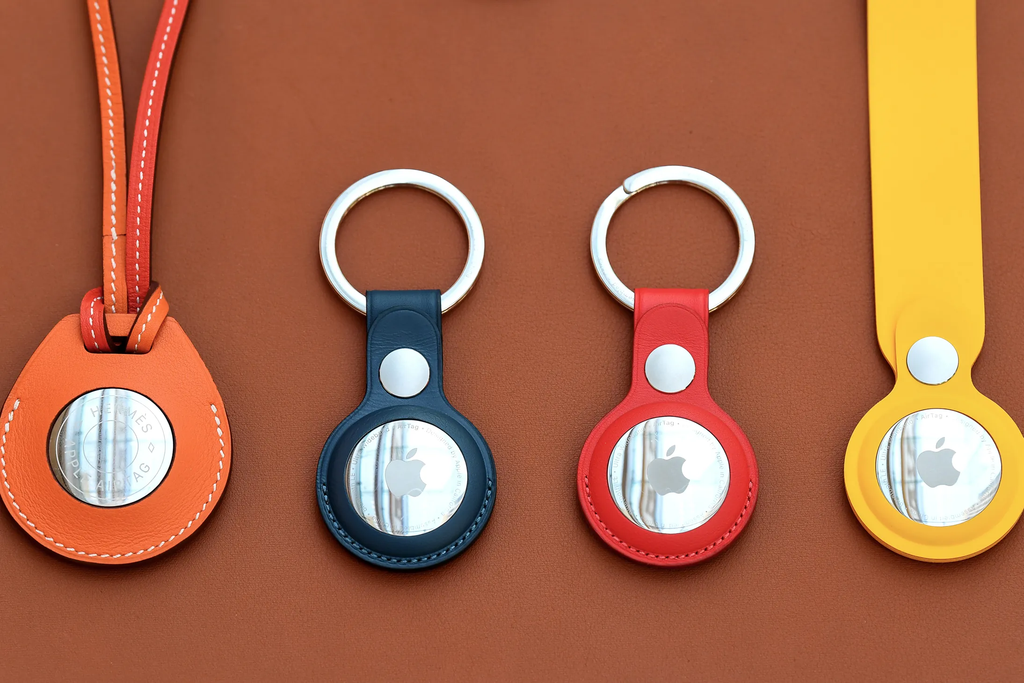
Apple AirTags have become essential tools for keeping track of keys, backpacks, luggage, wallets, and even pets. They are tiny, lightweight, and work seamlessly with the Find My network on Apple devices. But after using an AirTag for several months, a key question comes up when the device stops ringing or pops up a low battery warning on your phone screen: can you recharge an Apple AirTag, or do you have to replace the battery inside?
The short answer is simple. Apple AirTags cannot be recharged. There is no USB port, no Lightning connector, and no built-in wireless charging coil hidden inside the casing. Instead, AirTags use a standard, user-replaceable CR2032 coin cell battery that you can buy at almost any grocery store, pharmacy, or online shop.
When your AirTag battery dies, you do not need to buy a brand new AirTag or throw away your current device. You simply pop off the polished stainless steel cover, remove the old coin battery, drop in a fresh one, and your tracking tag is ready for another full year of service.
Understanding how the battery system works in an AirTag saves you money and prevents unnecessary panic when your device suddenly goes quiet. Here is everything you need to know about AirTag power, battery selection, replacement steps, and maintenance tips to keep your items tracked without interruption.
Why Apple AirTags Are Not Rechargeable
When Apple launched the AirTag, many tech fans expected a small magnetic charging puck similar to the Apple Watch charger or a tiny Lightning charging dock. Apple intentionally avoided a rechargeable design for practical design and lifespan reasons.
The $0 Secret To Launching Your Entire Online Empire
Why pay hundreds every month for separate software? Build funnels, send emails, and make sales with Systeme.io completely free.
Get Started For $0Free Forever • No Credit Card Needed • Beginner-Friendly
1. Water Resistance and Compact Design
AirTags are engineered with an IP67 rating for water and dust resistance. This rating means an AirTag can survive being submerged in water up to one meter deep for up to thirty minutes. Adding a physical charging port like USB-C would require rubber seals or open gaps, increasing the risk of water damage if dropped in puddles or rain.
2. Preventing E-Waste and Extending Device Lifespan
Rechargeable lithium-ion batteries—like the ones inside smartphones, wireless earbuds, and smartwatches—degrade over time. After two or three years of continuous charging cycles, small lithium batteries lose their ability to hold a charge. If Apple built a non-removable rechargeable battery into the AirTag, the entire tracker would become useless electronic waste once the internal battery wore down. By choosing a replaceable CR2032 battery, Apple ensures an AirTag can last for a decade or longer.
3. Convenience for Long-Term Tracking
A tracker attached to your luggage, passport holder, or car trunk needs to run continuously without requiring you to remove it every few weeks to plug it into a wall charger. A single coin battery provides continuous power for approximately twelve months, allowing you to set up your tracker and forget about it for an entire year.
If you enjoy managing and optimizing your Apple ecosystem, learning how to track your lost items with Apple AirTag will help you get the absolute most out of your item trackers across all your devices.
What Type of Battery Does an Apple AirTag Use?
Apple AirTags run on a 3V CR2032 lithium coin battery. These are the flat, button-shaped batteries commonly found in wristwatches, car key fobs, garage door openers, and kitchen scales.
While CR2032 batteries are widely available, buying the wrong type can cause your AirTag to stop working or fail to power on entirely.
The Bitterant Coating Trap You Must Avoid
Many battery manufacturers apply a non-toxic bitter coating (bitterant) to CR2032 coin batteries. Brands like Duracell use this bitter-tasting layer to prevent toddlers and young children from accidentally swallowing small button batteries.
While this safety feature is excellent for homes with small children, the bitterant layer often creates an unintended layer of insulation over the electrical contacts inside the AirTag. If the bitter coating lines up with the internal battery contacts, the AirTag will not receive electrical current and will fail to turn on or pair.
When purchasing replacement batteries for your AirTag:
- Look for packaging explicitly labeled as non-bitter or AirTag compatible.
- If you buy batteries with a bitterant coating, use an alcohol wipe or a cloth dampened with rubbing alcohol to thoroughly clean the metallic surfaces of the battery before inserting it into the AirTag.
- Stick to reputable battery manufacturers such as Energizer, Panasonic, Sony, or Rayovac.
Can You Use Rechargeable CR2032 (LIR2032) Batteries?
You might see rechargeable coin batteries online sold under the name LIR2032. It can be tempting to buy rechargeable versions to avoid buying disposable batteries in the future, but you should avoid using LIR2032 batteries in an AirTag.
Standard CR2032 batteries operate at 3.0 Volts. Rechargeable LIR2032 batteries operate at 3.6 to 3.7 Volts. Placing a higher voltage battery into an AirTag can overheat the internal chip, permanently fry the circuit board, or cause inaccurate battery level reporting in the Find My app. Always stick to standard, single-use 3V CR2032 lithium batteries.
How Long Does an AirTag Battery Actually Last?
Apple estimates that a fresh CR2032 battery inside an AirTag lasts approximately one year under normal daily usage. This benchmark assumes the AirTag plays a sound a few times a day and conducts occasional location checks.
However, battery performance varies based on how you use your tracker and environmental conditions.
Factors That Drain Your AirTag Battery Faster
- Frequent Precision Finding: Precision Finding uses Ultra Wideband technology (via Apple’s U1 chip) to show you exact direction arrows and distance readings on your iPhone screen. This feature uses significantly more power than passive background tracking.
- Playing Frequent Audio Chimes: If you constantly use your iPhone to make your AirTag chime to locate misplaced keys in your couch cushions, the tiny speaker will consume battery power quickly.
- Extreme Temperature Conditions: Leaving an AirTag inside a hot car during summer or in an icy glove compartment during winter causes lithium batteries to discharge faster than normal.
- High-Density Find My Network Areas: An AirTag in a busy airport or city subway station constantly communicates with nearby Apple devices to relay its location. Higher signal transmission activity increases power consumption compared to an AirTag sitting quietly in a residential home.
If you enjoy tracking gadget power performance across your tech gear, you can also look into what is the battery replacement cost for Samsung Galaxy Watch to compare how different wearable and tracking devices handle battery longevity.
How to Check Your AirTag Battery Status on iPhone
Apple makes it easy to monitor your AirTag power level before the battery dies completely. You do not need to guess when it is time for a change.
Send, Spend & Hold Money Worldwide Without Hidden Fees
Transfer money internationally at the real exchange rate and hold 40+ currencies in one account.
Open a Wise AccountMid-market rate • Fast transfers • 40+ currencies
Steps to Check Your Battery Level
- Open the Find My app on your iPhone, iPad, or Mac.
- Tap the Items tab at the bottom of the screen.
- Select the specific AirTag you want to inspect from your list of connected items.
- Look directly under the name of your AirTag.
If the battery is getting low, a clear Low Battery banner with a red battery icon will appear under the item name. Your iPhone will also send you a pop-up push notification warning you that your AirTag battery is low and needs to be replaced soon.
Apple removed the exact battery percentage bar in recent iOS updates to simplify the interface, replacing it with the automated Low Battery warning banner. When you see this warning, you usually have several weeks of operating time remaining, giving you plenty of time to buy a fresh CR2032 battery.
If your battery dies completely before you replace it, the AirTag simply stops sending location signals to the Find My network. It will not damage your settings, and as soon as you pop in a new battery, it automatically reconnects to your Apple ID without requiring a fresh setup process.
Step-by-Step Guide: How to Replace an AirTag Battery
Replacing an AirTag battery requires no tools, screws, or technical skills. The process takes less than sixty seconds.
Step 1: Remove Any Cases or Keyrings
If your AirTag is tucked inside a leather holder, silicone keychain, or hard plastic mount, take the AirTag out of the accessory so you have full access to both sides.
Step 2: Press and Twist the Metal Back
Hold the white plastic body of the AirTag facing down in one hand. Place two fingers onto the polished stainless steel back cover bearing the Apple logo. Press down firmly on the metal cap and rotate it counterclockwise (to the left) until it stops turning.
Step 3: Lift Off the Cover and Remove the Old Battery
Lift the metal cover off the AirTag body. Flip the AirTag over gently or use your fingernail to slide out the old CR2032 coin battery.
Step 4: Insert the New Battery
Take your new 3V CR2032 battery and place it inside the battery cavity with the positive side (+) facing up toward you. You should see the text and plus sign printed on the battery clearly visible.
Press down gently on the battery. If inserted correctly, the AirTag will emit a clear, pleasant chime sound confirming that power is connected. If you do not hear a chime, take the battery out, clean off any bitterant coating with rubbing alcohol, and reinsert it.
Step 5: Replace and Lock the Metal Cover
Place the stainless steel cover back on top of the AirTag. Align the three small metal tabs on the cover with the three slots on the plastic casing. Press down firmly on the cover and rotate it clockwise (to the right) until it clicks securely into place and stops turning.
The $0 Secret To Launching Your Entire Online Empire
Why pay hundreds every month for separate software? Build funnels, send emails, and make sales with Systeme.io completely free.
Get Started For $0Free Forever • No Credit Card Needed • Beginner-Friendly
Once locked, check the Find My app on your iPhone to verify that the Low Battery alert has vanished.
What to Do If Your AirTag Doesn’t Work After Battery Replacement
Occasionally, an AirTag may fail to play a chime or connect to your iPhone after putting in a new battery. If you run into issues, try these simple troubleshooting steps:
Check for Bitterant Coating
As mentioned earlier, bitterant coatings on brands like Duracell block conductivity. Rub both sides of the coin battery thoroughly with a microfiber cloth dipped in rubbing alcohol, let it dry, and insert it again.
Verify Battery Polarity
Ensure the positive (+) side of the battery is facing upward toward the metal cap. If the battery is upside down, the AirTag will not turn on.
Check the Contact Prongs
Look inside the empty AirTag battery cavity. You will see small metallic contact prongs. If these prongs have been bent downward too far by heavy drops or rough battery insertion, gently lift them up slightly using a wooden toothpick so they touch the battery firmly.
Reset Your AirTag
If the AirTag still acts glitchy, perform a hardware reset. Insert the battery, press down until it chimes, then remove the battery. Repeat this process four more times (a total of five times). On the fifth insertion, the AirTag will play a distinctly different confirmation chime, signaling that it has been factory reset. You can then re-pair it with your iPhone.
If you are pairing your AirTag alongside other new Apple products, reviewing guides on how to pair your Apple Watch with a new iPhone makes setting up new gear hassle-free.
AirTag vs Competitors: Battery System Comparison
When deciding which tracking device fits your daily routine, comparing battery designs across popular brands is helpful.
- Apple AirTag: Uses a user-replaceable CR2032 battery. Battery life lasts roughly twelve months. Fully water-resistant design.
- Tile Mate / Tile Slim: Some entry-level Tile models feature sealed, non-replaceable batteries that last three years before requiring you to buy a brand new device through their renewal program. Higher-end models like the Tile Pro use replaceable CR2032 or CR1632 batteries.
- Samsung Galaxy SmartTag2: Uses a user-replaceable CR2032 battery, offering up to 500 days of battery life in normal mode and up to 700 days in power-saving mode.
- Chipolo ONE Spot: Uses a user-replaceable CR2032 battery that lasts up to two years.
Replaceable coin batteries remain the preferred choice across top tracking products because they prevent devices from ending up in landfills every few years while maintaining a small footprint.
Safety Precautions and Proper Battery Recycling
Lithium coin batteries pose serious health risks if swallowed by young children or household pets. When changing your AirTag battery, practice these basic safety rules:
- Keep new and used CR2032 batteries out of reach of children at all times.
- Do not leave open battery multipacks on low tables or countertops during replacement.
- Dispose of used lithium coin batteries immediately. Wrap used batteries in a small piece of tape and take them to a designated battery recycling drop-off point at local electronics retailers or municipal recycling centers. Never toss lithium batteries into household garbage cans where they can cause fires.
Staying informed about general tech updates, from mobile accessories to high-end hardware like Apple’s first foldable iPhone details, helps you make smart purchasing decisions for all your personal devices.
Frequently Asked Questions
Can I charge an AirTag with a Wireless MagSafe Charger?
No. AirTags do not contain wireless charging coils or magnetic induction receivers required for Qi or MagSafe charging. Placing an AirTag on a wireless charging pad will not charge it and could cause heat build-up.
Will I lose my AirTag settings when the battery dies?
No. Your AirTag remains linked to your Apple ID even when the battery is completely drained. Once you insert a fresh CR2032 battery, the AirTag powers back up and resumes normal tracking with all your original name and icon settings intact.
Why is my new battery not working in my AirTag?
The most common culprit is a bitterant safety coating applied to the battery by the manufacturer. Clean the battery surface thoroughly with rubbing alcohol to remove the coating, or double-check that the positive (+) side of the battery faces upward.
How do I know if my AirTag battery is dead?
Your iPhone will display a Low Battery notification in the Find My app when power runs low. If the battery dies completely, the AirTag will fail to play audio chimes when requested, and its location status will stop updating in the Find My network.
Can an AirTag damage my iPhone if left close to it?
No. AirTags use standard Bluetooth Low Energy (BLE) and Ultra Wideband (UWB) signals, which are completely safe and designed specifically to communicate with nearby iPhones and Apple devices without causing interference or battery strain.
Where can I buy replacement CR2032 batteries?
CR2032 coin cell batteries are widely available at grocery stores, pharmacies, home improvement shops, electronics stores, and major online retailers.
Keeping your Apple AirTags powered up with fresh CR2032 coin batteries is simple, affordable, and keeps your valuable belongings protected year-round. Replacing the battery takes less than a minute and extends the life of your tracker for years without needing to buy replacement hardware.
For more tech tips, troubleshooting guides, and trending news updates, visit our Contact Page or connect with our community across social media on Instagram, Facebook, and X (formerly Twitter).
