
I remember the first time I tried connecting Stripe to my all-in-one marketing platform. I was excited but also a little nervous. One wrong click could mean lost sales or confused customers.
But once I figured it out, everything changed. Payments started flowing automatically. Subscriptions renewed without me lifting a finger. And I finally stopped worrying about chasing invoices.
Now, after helping hundreds of entrepreneurs set up their online businesses, connecting Stripe to Systeme.io has become second nature. And I want to show you exactly how to do it.
Here is what we will cover:
- What you need before getting started
- The step-by-step connection process
- What happens after you connect (the automation magic)
- Common mistakes and how to avoid them
- Real talk about fees and limits
What is Systeme.io and Why Does Stripe Matter?
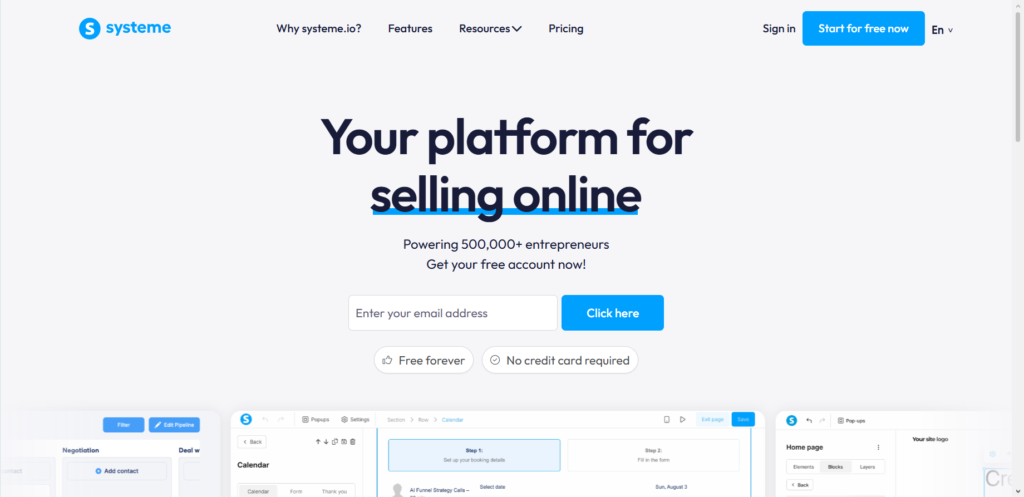
Systeme.io is an all-in-one platform that lets you build sales funnels, send emails, host online courses, run affiliate programs, and manage memberships all from one dashboard. It is powerful for entrepreneurs who want everything in one place without paying for multiple tools.
The $0 Secret To Launching Your Entire Online Empire
Why pay hundreds every month for separate software? Build funnels, send emails, and make sales with Systeme.io completely free.
Get Started For $0Free Forever • No Credit Card Needed • Beginner-Friendly
But Systeme.io cannot hold money or process credit cards on its own. That is where Stripe comes in. Stripe is a payment gateway that securely processes credit cards, debit cards, and digital wallets. When you connect them, your customers pay through Stripe, and the money lands in your bank account.
The best part? Systeme.io does not charge any transaction fees on top of what Stripe already takes. That means more money stays in your pocket.
What You Need Before You Start
Before jumping into the setup, make sure you have these three things ready:
1. A Systeme.io account. If you do not have one yet, sign up for the free plan. It gives you access to payment gateway settings from day one.
2. A Stripe account. Head to stripe.com and create an account. The process takes about 10 minutes. You will need to provide basic information about yourself or your business.
3. Your business details handy. Stripe will ask for your country, business type (individual, company, or nonprofit), and personal information to verify your identity.
Once you have these ready, the actual connection takes less than five minutes.
How do I Connect Stripe to Systeme.io?
Let me walk you through this exactly as I do it for my own businesses and for my clients.
1. Log Into Your Systeme.io Account
Go to Systeme.io and log in. You will land on your dashboard where you can see your stats, funnels, and other tools.
2. Go to Settings
Click on your profile picture in the top right corner of the screen. A dropdown menu will appear. Click on Settings. On some versions of Systeme.io, you might see a gear icon for settings instead.
3. Find Payment Gateways
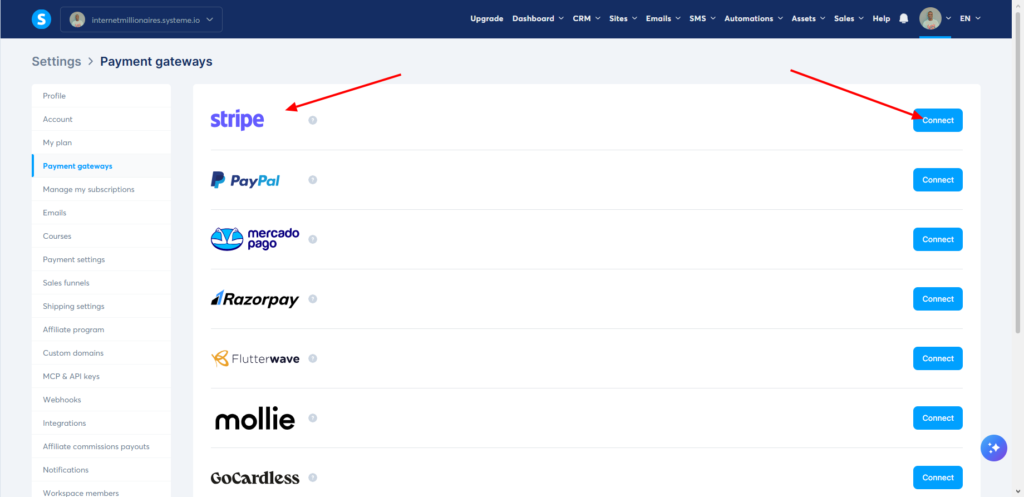
Look at the menu on the left side of your screen. Scroll down until you see Payment Gateways. Click on it.
4. Click Connect for Stripe
You will see a list of payment gateways including Stripe, PayPal, Mercado Pago, and others. Find the Stripe option and click the Connect button next to it.
5. Authorize Access
Systeme.io will redirect you to Stripe’s website. If you are not already logged into Stripe, log in now. Stripe will ask you to confirm that you want to give Systeme.io access to your account. Click Authorize access to this account.
6. Verify Your Information (If Needed)
If this is your first time connecting Stripe to any platform, Stripe may ask you to complete your business profile. Select your country, choose your business type, and verify your personal details.
7. Return to Systeme.io
After authorizing, Stripe will redirect you back to Systeme.io. You should see a success message and your Stripe account will now appear under Connected Gateways.
Send, Spend & Hold Money Worldwide Without Hidden Fees
Transfer money internationally at the real exchange rate and hold 40+ currencies in one account.
Open a Wise AccountMid-market rate • Fast transfers • 40+ currencies
That is it. The connection is complete.
Important Note Before You Start Selling
Here is something many people miss. For Stripe to work correctly on your payment pages, your Systeme.io checkout forms must include two specific fields: Email and First Name. Without these, payments can fail.
I learned this the hard way when a client’s checkout page was missing the first name field. We had ten frustrated customers before we figured out the issue. Save yourself that headache and double-check your forms before going live.
What “Automated Payouts” Actually Means
When people hear “automated payouts,” they sometimes think money flows instantly from customer to bank account. Let me clarify what actually happens.
When a customer buys from you through Systeme.io using Stripe:
- The customer enters their card details on your checkout page
- Stripe processes the payment instantly
- Stripe deducts their processing fee (more on that in a moment)
- The money goes into your Stripe balance
- Stripe automatically sends the funds to your bank account on a schedule
Stripe’s standard payout schedule sends money to your bank account on a rolling basis. For most new businesses, this means daily payouts once you have a history of successful transactions. Some businesses receive payouts every two or three days depending on their industry and risk level.
The point is, you do not have to manually request each payout. Once connected, the system handles everything automatically.
Stripe Fees: The Honest Breakdown
Let me be direct about costs because too many people hide this information.
Stripe charges for each successful transaction. For standard online card payments, the fee is 2.9% plus $0.30 per transaction in the United States. If you are in another country, the percentage may vary slightly.
Here are the other fees you should know about:
The $0 Secret To Launching Your Entire Online Empire
Why pay hundreds every month for separate software? Build funnels, send emails, and make sales with Systeme.io completely free.
Get Started For $0Free Forever • No Credit Card Needed • Beginner-Friendly
- International cards add about 1.5% extra
- Currency conversion costs 1% if you accept payments in a different currency
- Sales tax calculation through Stripe costs 0.5% if you use that feature
Stripe charges no monthly fees, no setup fees, and no hidden fees. You only pay when you make a sale.
Systeme.io adds zero transaction fees on top of this. The free plan includes Stripe integration. The paid plans also include it. No surprises.
For a $100 product, Stripe takes roughly $3.20. You keep $96.80. For a $10 product, Stripe takes about $0.59. You keep $9.41.
Testing Your Connection Before Going Live
Never assume a connection works just because the setup looked successful. Always test.
Here is my testing routine that I use for every new integration:
1. Create a test product in Systeme.io for $1 (or the minimum amount Stripe allows)
2. Create a simple checkout page for that product
3. Use Stripe’s test mode (toggle it on in your Stripe dashboard) and use a test card number like 4242 4242 4242 4242 with any future expiration date and any CVC
4. Complete a purchase yourself
5. Verify that Systeme.io recorded the purchase and that your customer received any automated emails or course access
6. Turn off test mode and run one real transaction for $1 using your own card to confirm everything works with live mode
7. Refund the $1 transaction to yourself
This process takes ten minutes and saves you from discovering a broken checkout after launching to customers.
Common Connection Problems and How to Fix Them
I have helped dozens of people troubleshoot Stripe integration issues. Here are the most common problems and their solutions.
Problem 1: The Connect Button Does Nothing
Sometimes you click Connect but nothing happens. This is usually a browser issue. Try switching to Chrome or Firefox if you are using Safari. Clear your browser cache and cookies. Disable any ad blockers temporarily. If none of that works, try logging into Systeme.io in an incognito or private window.
Problem 2: “Email and First Name Required” Errors on Checkout
I mentioned this earlier but it deserves repeating. If your checkout page is missing the email field or first name field, Stripe will reject the payment. Go to your payment form settings in Systeme.io and make sure both fields are present and marked as required.
Problem 3: Stripe Says “Account Not Activated”
New Stripe accounts are not fully activated until you complete identity verification. Log into Stripe and check if they need additional documents from you. Until verification is complete, you cannot process live payments.
Problem 4: Webhook Issues
Systeme.io automatically sets up webhooks with Stripe during the connection process.
Webhooks are automated messages that tell Systeme.io when a payment succeeds, fails, or gets refunded. If webhooks break, Systeme.io will not know about payments.
To check this, go to your Stripe dashboard, click Developers, then Webhooks. You should see an endpoint from Systeme.io. If it shows any failed delivery attempts, delete the webhook and reconnect Stripe to Systeme.io to generate a fresh one.
Problem 5: Test Mode vs Live Mode Confusion
This happens constantly. People test with test cards while Stripe is in live mode, or they go live but forget to switch Stripe out of test mode. Before launching any real product, double-check that both Systeme.io and Stripe are in live mode.
Can You Use Stripe from Any Country?
Stripe operates in over 40 countries including the United States, Canada, United Kingdom, Australia, and most European Union nations. But not every country is supported.
If Stripe does not operate in your country, you have alternatives. Systeme.io also integrates with PayPal, Mercado Pago, Razorpay, Flutterwave, and Mollie depending on your region. Check the payment gateway list in your Systeme.io settings to see what is available for your account.
What About Subscriptions and Recurring Payments?
This is where Stripe plus Systeme.io becomes truly powerful.
When you set up a membership site or a subscription product in Systeme.io, Stripe automatically handles the recurring billing. Here is how it works:
- A customer signs up for your $29 monthly membership
- Stripe charges their card immediately
- 30 days later, Stripe automatically charges their card again
- If the charge succeeds, Systeme.io keeps their access active
- If the charge fails, Stripe tries again automatically up to three times
- After failed attempts, Systeme.io can revoke their access
I have a client who runs a $47 monthly coaching membership. Every month, Stripe processes over 200 recurring payments automatically. She never thinks about billing. The system just works. That is the beauty of automation.
Advanced Automation Using Zapier
Sometimes you need automation that goes beyond what Systeme.io and Stripe do natively. That is where Zapier comes in.
Zapier connects Stripe and Systeme.io with hundreds of other apps. For example, you can set up an automation that:
- Adds a tag to a contact in Systeme.io whenever someone purchases Stripe
- Grants course access in Systeme.io when a Stripe payment succeeds
- Sends a follow-up email sequence when a payment fails so you can recover the sale
You do not need to be a developer to use Zapier. The interface is visual and straightforward. Zapier offers a free plan that allows up to 100 automations per month, which is plenty for most small businesses.
How Long Until Money Hits Your Bank Account?
This varies based on your business and location, but here is the typical timeline for a new Stripe account:
Day 1: Customer makes a purchase
Day 2: Stripe processes and verifies the transaction
Day 3-5: Stripe initiates the payout to your bank account
Day 5-7: The money appears in your bank account
After you have processed payments for a few months with low dispute rates, Stripe may accelerate your payouts. Some established businesses receive daily payouts where money arrives in their bank account two business days after each sale.
If you need faster access to your funds, Stripe offers an Instant Payouts feature in some countries for a small fee (typically 1% of the payout amount).
Keeping Your Account Secure
Security matters when handling other people’s money. Here is what I recommend for every entrepreneur using Stripe with Systeme.io:
Use two-factor authentication on both accounts.
Stripe offers 2FA. Systeme.io does too. Turn them both on. This single step prevents unauthorized access even if someone guesses your password.
Never share your Stripe API keys.
When you connect through the standard Connect button, Systeme.io never sees your actual API keys. But if you ever need to manually enter them, treat them like passwords. Do not email them. Do not save them in unencrypted documents.
Monitor your Stripe dashboard regularly.
Check for unusual activity, unexpected refunds, or suspicious transactions. Stripe’s fraud detection is excellent, but you should still keep an eye on things.
Use Stripe Radar for fraud prevention.
Stripe includes built-in fraud detection tools that block suspicious transactions before they go through. Enable the basic rules at minimum.
When Things Go Wrong: Payment Failures
Payment failures happen. Cards expire. Banks decline charges. Customers hit their credit limits.
The good news is that Stripe handles retries automatically. When a subscription payment fails, Stripe attempts to charge the card again up to three times over several days. If those retries fail, Systeme.io can automatically revoke access to your courses or membership areas.
You can also set up automations through Zapier that email the customer when a payment fails, asking them to update their card information. This simple follow-up recovers about 20-30% of failed payments in my experience.
Frequently Asked Questions
Can I use multiple Stripe accounts with one Systeme.io account?
No. Systeme.io only allows one Stripe account connection per Systeme.io account. If you run multiple businesses with separate Stripe accounts, you would need separate Systeme.io accounts as well.
Does Systeme.io charge extra for Stripe integration?
No. Stripe integration is included in all Systeme.io plans, including the free plan. You pay nothing extra to Systeme.io for using Stripe.
Can I accept payments in multiple currencies?
Yes. Stripe supports over 135 currencies. When you set up a product in Systeme.io, you can choose which currency to charge. Stripe automatically handles the conversion if the customer’s card uses a different currency.
How do I disconnect Stripe from Systeme.io?
Go to Settings, then Payment Gateways in Systeme.io. Find your connected Stripe account and click Disconnect.
Then go to your Stripe dashboard, click Settings, then Connect, find Systeme.io in the list of connected apps, and revoke access.
What happens to active subscriptions if I disconnect Stripe?
Active subscriptions continue until their next billing date. When the next payment tries to process, it will fail because Stripe is disconnected. Your customers will lose access. Never disconnect Stripe without migrating active subscribers first.
Is Stripe safe for my customers?
Yes. Stripe is a publicly traded company (NASDAQ: STRIPE) and processes billions of dollars in payments annually. They are Level 1 PCI compliant, which is the highest security standard for payment processors.
A Realistic Look at What to Expect
Connecting Stripe to Systeme.io will not magically bring you sales. But it will remove friction from your sales process.
Before I integrated these two platforms properly, I wasted hours manually processing payments, sending invoice reminders, and chasing down expired credit cards. After integration, I reclaimed at least five hours per week that I redirected into creating content and serving my customers better.
One of my students runs a digital product store with about 80 sales per month.
Before connecting Stripe properly, she lost roughly 15% of her potential sales because customers abandoned complicated checkout processes. After integration, her completion rate jumped to over 90% because the checkout experience became smooth and trustworthy.
The results are real but they come from the combination of good integration and good marketing. The tool alone does not sell your products.
Your Next Steps
Open your Systeme.io account right now and navigate to Payment Gateways. Click that Connect button for Stripe. The whole process takes under five minutes.
Once connected, create a low-priced test product and run through a test purchase. Verify everything works before you launch anything real.
Then start selling with confidence, knowing your payment system runs automatically in the background.
What is the first product or service you plan to sell using Stripe with Systeme.io? Drop your answer in the comments below. I personally read every response and would love to hear what you are building.
