
Imagine having a tiny, virtual buddy on your phone that only tells dad jokes. Or a digital pocket guide that helps you identify plants, but speaks like a 1920s detective.
Meta just launched a brand new app called Pocket, and it is making things like this possible for everyone. You do not need to know how to write computer code, and you do not need a degree in technology.
This new app lets you build, play with, and share what Meta calls “interactive gizmos.” It is the tech giant’s latest move to bring artificial intelligence into our everyday lives, and it is a lot of fun.
What Exactly Is Meta Pocket?
Put simply, Pocket is a playground for AI. Instead of just chatting with a standard AI assistant that answers questions like a textbook, Pocket lets you create mini, specialized AI characters or tools. Meta calls these creations “gizmos.”
Think of a gizmo as a single-purpose digital toy. It lives on your phone, it responds to what you type or say, and it has a very specific personality or job.
The $0 Secret To Launching Your Entire Online Empire
Why pay hundreds every month for separate software? Build funnels, send emails, and make sales with Systeme.io completely free.
Get Started For $0Free Forever • No Credit Card Needed • Beginner-Friendly
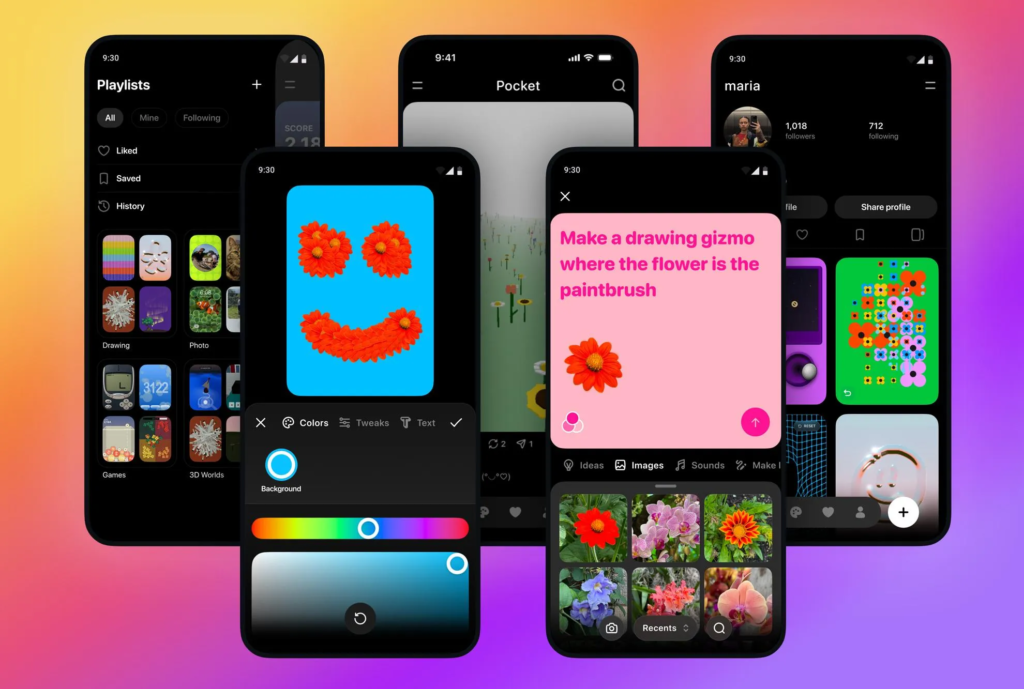
The app is designed to look and feel like a game. When you open it, you see a dashboard of gizmos made by other people around the world. You can tap on any of them to start playing immediately, or you can hit a big plus button to start making your own.
How Do These AI Gizmos Work?
The magic behind Pocket is that it turns plain English into code. You do not have to type a single line of programming language. Instead, you just talk to the app to build your gizmo.
The Building Process
When you want to create a gizmo, the app asks you a few simple questions:
- What do you want it to do? (e.g., “Help me pick what to cook for dinner based on three random ingredients.”)
- How should it talk? (e.g., “Like an enthusiastic TV chef who uses too many exclamation points.”)
- What should it look like? (You can use Meta’s built-in image generator to create a cartoon avatar for your gizmo.)
Once you give it these basic instructions, the app spends a few seconds putting it together. Just like that, your new digital assistant or game is ready to use.
Sharing with the World
You do not have to keep your new creation to yourself. Pocket has a built-in social feed. With one tap, you can publish your gizmo to the public marketplace.
Other users can rate your gizmo, leave comments, and share it with their friends. If you make something truly useful or incredibly funny, it can go viral within the app overnight.
Fun Examples of What You Can Build
Because the app is so open-ended, people are already getting incredibly creative. Here are a few examples of the kinds of gizmos popping up on the platform right now:
The Compliment Machine
This is a simple gizmo designed purely to lift your mood. You type in something bad that happened during your day, and the AI finds a hilarious, over-the-top silver lining to make you smile.
The Trivia Host
You can create a gizmo that tests you on very specific topics, like 90s cartoon trivia or obscure history facts. It keeps score, mocks you gently when you get an answer wrong, and celebrates when you win.
The Travel Local
This gizmo pretends to be a cynical local resident from any city in the world. If you tell it you are visiting New York or Paris, it avoids the tourist traps and tells you the secret spots where real residents actually hang out.
Why Meta Created Pocket
You might wonder why a massive company like Meta is focusing on silly digital toys. The answer is simple: they want to make AI comfortable and familiar for regular people.
Right now, a lot of people find artificial intelligence a bit intimidating. It feels like something meant for scientists, office workers, or tech experts. By putting AI into a colorful, easy-to-use mobile app, Meta is turning it into a casual hobby.
It also helps Meta train their AI models. When millions of people build and interact with these gizmos, Meta learns more about how humans want to talk to computers. It is a massive experiment wrapped in a fun social network.
Is It Safe and Easy for Kids?
Meta has put a lot of guardrails into Pocket. Because the app is aimed at a wide audience, they use strict filters to make sure the gizmos stay friendly and safe.
If you try to create a gizmo that uses bad language, shares mean comments, or talks about inappropriate topics, the app will reject the instructions. It gently asks you to change the prompt. This makes it a great tool for teenagers who want to learn how AI works without stumbling into the darker corners of the internet.
Send, Spend & Hold Money Worldwide Without Hidden Fees
Transfer money internationally at the real exchange rate and hold 40+ currencies in one account.
Open a Wise AccountMid-market rate • Fast transfers • 40+ currencies
The user interface is also incredibly clean. Large buttons, simple text, and helpful tutorials guide you through every single step. If you know how to send a text message, you know how to use Pocket.
The Social Element: A New Kind of Network
Pocket is not just a tool; it is a community. The app features a massive, scrolling feed that looks a bit like TikTok or Instagram, but instead of videos, you are scrolling through interactive experiences.
Remixing Gizmos
One of the coolest features is the ability to “remix” what other people have made. If you find a text-based adventure game gizmo that you love, but you wish it was set in outer space instead of a haunted house, you can hit the remix button.
This copies the backend structure of the gizmo, lets you change the setting instructions, and allows you to republish your own version. It encourages collaboration and stops people from getting stuck with writer’s block.
Following Creators
Just like any social media platform, you can follow your favorite gizmo builders. When a creator drops a new tool or game, you get a notification on your phone so you can try it before anyone else.
How to Get Started
If you want to dive into the world of AI gizmos, getting started takes less than five minutes.
- Download the App: Search for Meta Pocket in your phone’s app store. It is completely free to download.
- Create an Account: You can log in using your existing Meta accounts, or set up a new one with an email address.
- Try Three Gizmos: Before you build anything, browse the trending page. Play a couple of games or talk to a few assistants to see what the AI is capable of doing.
- Build Something Simple: Hit the create button and start with something basic. Do not try to build a massive game on day one. Make a gizmo that writes short poems about your pets, or an AI that helps you pick a movie to watch.
Once you see how the AI responds to your simple commands, you will get a feel for how to write better instructions.
Final Thoughts
Meta Pocket is a big step forward for casual AI. It takes a technology that used to feel complicated and turns it into a digital sandbox. Whether you want to build useful tools to help organize your thoughts, or just want to create a funny digital character to laugh at with your friends, the app makes it incredibly simple.
It is going to be fascinating to see what the community builds as more people get their hands on the app. Download it, start experimenting, and see what kind of gizmo you can come up with.
