
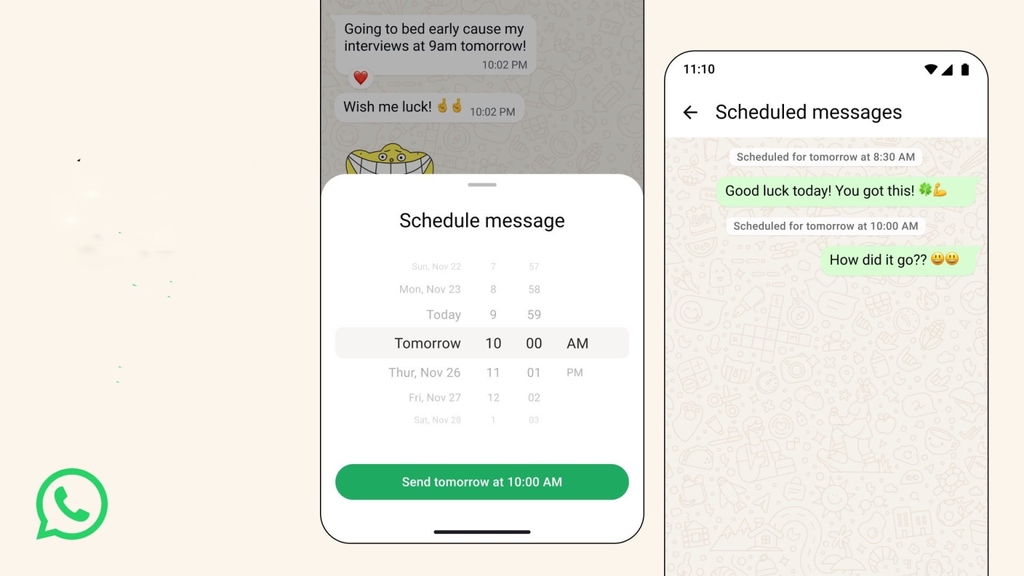
We have all been there. You remember at 9:00 PM that your best friend’s birthday is tomorrow, you promise yourself you will stay awake until midnight to send the first wish, and then you fall asleep at 11:30 PM. Or maybe you get a brilliant work idea at 2:00 AM, type out a long message to your team group chat, and hesitate because you do not want to wake everyone up in the middle of the night.
For years, WhatsApp users have begged Meta for one simple feature to fix these everyday headaches: the ability to write a message now and choose when it actually gets delivered.
That wait is finally over. WhatsApp has officially started rolling out native message scheduling for both individual and group chats. Announced on November 25, 2026, this long-awaited update lets you type out your thoughts whenever they cross your mind and pick the exact date and time you want them to arrive. Even better, your message will still go out right on schedule even if your phone battery dies or you lose internet coverage.
Here is everything you need to know about how the new feature works, who can use it right now, and why it changes the way we chat every day.
What Exactly Is WhatsApp’s New Scheduled Messages Feature?
WhatsApp’s new scheduled messages tool is a built-in “send later” option baked directly into the app. You no longer need to download sketchy third-party apps, set phone alarms to remind yourself to hit send, or write drafts in your notes app and forget about them.
The $0 Secret To Launching Your Entire Online Empire
Why pay hundreds every month for separate software? Build funnels, send emails, and make sales with Systeme.io completely free.
Get Started For $0Free Forever • No Credit Card Needed • Beginner-Friendly
According to TechCrunch, the rollout began globally on Wednesday, November 25, 2026, for both iPhone and Android users. WhatsApp’s global head, Kunal Shah, confirmed the launch on X with a relatable message for forgetful friends everywhere, telling users they can now be the first ones to wish people a happy birthday on time.
The timing window is flexible enough for almost any situation. You can schedule a message to send as early as 10 minutes from now, or as far out as 14 days in advance. That two-week window covers everything from an afternoon meeting reminder to a birthday greeting next weekend.
Unlike some basic scheduling tools that only work with plain text, WhatsApp lets you schedule text messages, photos, and videos. If you want to attach a funny throwback picture to a birthday text or queue up a short video clip for a family group chat, the app handles it smoothly.
How Do You Schedule a Message on WhatsApp Step by Step?
One of the best things about this update is that WhatsApp did not hide it behind complicated menus or confusing settings. If you already know how to send a normal message, you already know 90 percent of the process.
What Are the Exact Steps on Android and iPhone?
Once the update reaches your account, scheduling a message takes just a few seconds:
- Open WhatsApp on your Android phone or iPhone and tap into the chat where you want to send the message.
- Type your text in the message box, or attach the photo or video you want to share.
- Instead of tapping the green send button like you normally do, press and hold your finger down on the send button.
- A scheduling menu will pop up on your screen, asking you to pick a date and time.
- Choose any time between 10 minutes and 14 days ahead, then tap to confirm your choice.
After you confirm, WhatsApp queues up your message and holds onto it until the clock hits your chosen minute. At that exact moment, the app delivers it automatically without you needing to lift a finger.
Can You Use This Feature in Both Private Chats and Group Chats?
Yes, message scheduling works across both one-on-one private conversations and group chats. That makes it useful whether you are texting a single person or coordinating plans with twenty people at once.
In group chats, this feature is especially handy if you are an admin or an organizer. For example, if you run a neighborhood group, a church committee, or a football viewing club, you can write your weekly reminder on Sunday evening and schedule it to land in the group on Wednesday morning. Pairing this with WhatsApp’s recent upgrade that increases the pinned message limit to four makes managing busy group chats much cleaner and far less stressful.
Also, when your scheduled message finally arrives, it looks completely normal to the person or group receiving it. There is no awkward “Scheduled” badge or robot tag attached to your text. To everyone else in the chat, it looks just like you typed it and hit send in real time.
Will Your Scheduled WhatsApp Message Still Send If Your Phone Is Off?
This is the detail that makes WhatsApp’s native feature far better than any workaround app. In the past, people who used third-party automation tools on Android or Shortcuts on iPhone had to keep their phones turned on and connected to the internet for the message to go out. If your battery died overnight or your data ran out, your message failed.
WhatsApp solved that problem completely. According to the company’s announcement, your scheduled messages will still be delivered at the exact time you selected even if your phone is switched off, out of battery, or completely outside network coverage.
Think about what that means in real life. If you live somewhere with unpredictable power or you like turning your phone onto airplane mode before bed so you can sleep peacefully, you can queue up your morning messages at night. Even if your phone dies at 3:00 AM, WhatsApp’s servers will still deliver your message at 7:00 AM sharp.
If you are trying to build healthier screen habits and use your phone less without feeling like you are missing out, this offline delivery feature is a huge win. You can finish all your important replies in one sitting, schedule them for later, and put your phone away for the rest of the evening.
Are Scheduled Messages on WhatsApp Safe and Private?
Whenever a messaging app holds onto your texts to send them later, privacy-minded users naturally ask one big question: can the company read my messages while they are waiting in line?
WhatsApp confirmed that scheduled messages are protected by the exact same end-to-end encryption as regular personal chats. That means your text, photos, and videos stay scrambled and locked from the moment you schedule them until they reach the recipient’s device. Neither WhatsApp nor parent company Meta can read what you wrote while the message is waiting to be sent.
Send, Spend & Hold Money Worldwide Without Hidden Fees
Transfer money internationally at the real exchange rate and hold 40+ currencies in one account.
Open a Wise AccountMid-market rate • Fast transfers • 40+ currencies
Privacy has been a major focus for WhatsApp throughout 2026. Over the past few months, the platform has rolled out stronger passwords and multiple passkeys to lock down accounts against hackers, alongside username keys to protect your phone number from strangers. Keeping scheduled messages end-to-end encrypted fits right into that promise.
How Can You View, Manage, or Cancel a Scheduled Message?
Plans change all the time. You might schedule a reminder for a Friday team meeting on Tuesday, only for the meeting to get moved to next week on Thursday afternoon. You definitely do not want an outdated message popping up in a busy group chat.
Where Do You Find Your Lined-Up Messages?
WhatsApp gives you a clear view of every message you have queued up for future delivery. Inside the app, you can check your pending scheduled messages so you always know what is waiting to go out and when it is set to arrive.
Having a visible list keeps you in control. Before going to bed or heading into the weekend, you can quickly scan your scheduled queue to make sure everything still makes sense.
Can You Edit a Scheduled Message After Setting It?
Right now, WhatsApp lets you view and delete a scheduled message before its send time arrives. However, early rollout details show there is no direct “edit” button to change the wording or adjust the delivery time once a message is queued.
If you notice a typo or decide you want the message to go out an hour later, the fix is still easy. Simply delete the pending message from your scheduled list before it sends, and then type and schedule a fresh one. It takes less than ten seconds and saves you from sending an embarrassing mistake.
Why Did It Take WhatsApp So Long to Add Message Scheduling?
If you use other messaging apps, you might be wondering why WhatsApp is only introducing this feature in late 2026. Competitors like Telegram and Signal have offered built-in message scheduling for years. Even Meta’s own sibling app, Instagram, added scheduled direct messages back in 2024.
The main reason WhatsApp moves slower than some rivals is scale and encryption. With billions of active users sending messages every second across every type of smartphone imaginable, WhatsApp has to build features that work reliably on low-end phones, slow mobile networks, and strict end-to-end encryption rules all at the same time.
In 2026, though, WhatsApp has been shipping upgrades at a rapid pace. Earlier this year, the app introduced voice and video calls directly from web browsers, rolled out standalone iPad support and music sharing on Status, and even launched a free cloud backup feature so users can stop paying extra for Google Drive and iCloud storage. Adding scheduled messages checks off one of the final big items on the community’s wishlist.
How Can Everyday Users and Small Businesses Use Scheduled Messages?
You might think scheduling texts is just a neat little bonus, but once you start using it, you will find dozens of practical ways it makes life easier.
The $0 Secret To Launching Your Entire Online Empire
Why pay hundreds every month for separate software? Build funnels, send emails, and make sales with Systeme.io completely free.
Get Started For $0Free Forever • No Credit Card Needed • Beginner-Friendly
How Does It Help With Birthdays, Time Zones, and Late-Night Thoughts?
For personal chats, this tool removes the stress of timing. Here are a few everyday ways people are already putting it to work:
- Never missing midnight birthdays: You can write a thoughtful birthday message at 6:00 PM, attach a great photo, schedule it for 12:00 AM, and go to sleep knowing you will be the very first person to celebrate them.
- Respecting international time zones: If you have family, friends, or a partner living in another country, doing mental math to figure out if they are awake gets exhausting. Write your message whenever you have a free minute and schedule it to land during their morning coffee instead of 3:00 AM.
- Protecting your sleep and boundaries: When you remember something at midnight, you do not have to hold onto that mental clutter until morning. Type it out right away, schedule it for 8:30 AM, and clear your head.
- Sending timely travel and event check-ins: If a friend has an early flight or a big job interview tomorrow morning, you can queue up a good-luck text the night before so it pops up right before they walk in.
How Can Remote Workers and Business Owners Benefit?
If you work remotely or run a small business, WhatsApp is probably where half of your daily communication happens. If you are working from home on one of the best laptops for remote work, keeping your work and personal hours separate is key to avoiding burnout.
Scheduled messages give small business owners and remote teams a simple way to stay organized without paying for expensive marketing software:
- Polite work-life boundaries: If you finish a project at 10:00 PM, scheduling your update for 9:00 AM the next morning shows respect for your coworkers’ personal time while making sure your update is at the top of their chat list when the workday begins.
- Gentle payment and invoice reminders: Freelancers, vendors, and small shop owners can queue up polite reminders for clients ahead of due dates without feeling awkward or forgetting to follow up.
- Appointment and delivery confirmations: Hair stylists, clinics, logistics riders, and online sellers can schedule morning reminders for customers who booked a slot for that afternoon.
- Team standup prompts: Managers can schedule a recurring morning check-in question in the team group chat so everyone is ready before a call.
Combined with recent updates like joining WhatsApp calls without an account or phone number and new parental controls for teen accounts, WhatsApp is steadily becoming an all-in-one communication hub for both families and businesses.
What Are the Most Common Questions About Scheduled WhatsApp Messages?
Because this feature is rolling out right now, plenty of users have questions about its limits and rules. Here are clear answers to the most common things people are asking.
How Far in Advance Can I Schedule a WhatsApp Message?
You can schedule a message anywhere from 10 minutes to 14 days in advance. You cannot schedule a message for two minutes from now, and you cannot queue something up for next month. Within that 10-minute to two-week window, you can pick any exact date and time you want.
What Types of Files Can I Schedule on WhatsApp?
WhatsApp supports scheduled text messages, photos, and videos. You can write a plain text note, send a single picture with a caption, or queue up a video clip in both private chats and group conversations.
Will the Other Person Know My Message Was Scheduled?
No. When your message is delivered at the scheduled time, it shows up in the recipient’s chat looking identical to a normal, live WhatsApp message. There is no label, icon, or notification telling them that you wrote it hours or days earlier.
Why Do I Not See the Schedule Option on My WhatsApp Yet?
WhatsApp rolls out major features in waves over several weeks rather than flipping a switch for everyone at the exact same second. First, head to the Google Play Store or Apple App Store and make sure your WhatsApp app is updated to the latest version. If it is already up to date and pressing and holding the send button does not bring up the schedule menu yet, give it a few days—your account will receive the server-side update soon.
Can I Schedule Messages on WhatsApp Web or Desktop?
The current global rollout announced by WhatsApp focuses on the iOS and Android mobile apps. While desktop and browser users have relied on third-party browser extensions in the past, native scheduling is rolling out to mobile phones first.
Ready to Stop Forgetting Important Texts?
WhatsApp’s new scheduled messages feature might seem simple on the surface, but it solves a real problem that billions of people deal with every single week. Being able to write a message when the thought hits you, schedule it up to two weeks ahead, and trust that it will deliver even if your phone is turned off makes daily communication much smoother.
Update your app, try pressing and holding that send button on your next message, and let us know what you think. Have a tech tip, news tip, or story idea you want us to cover next?
