
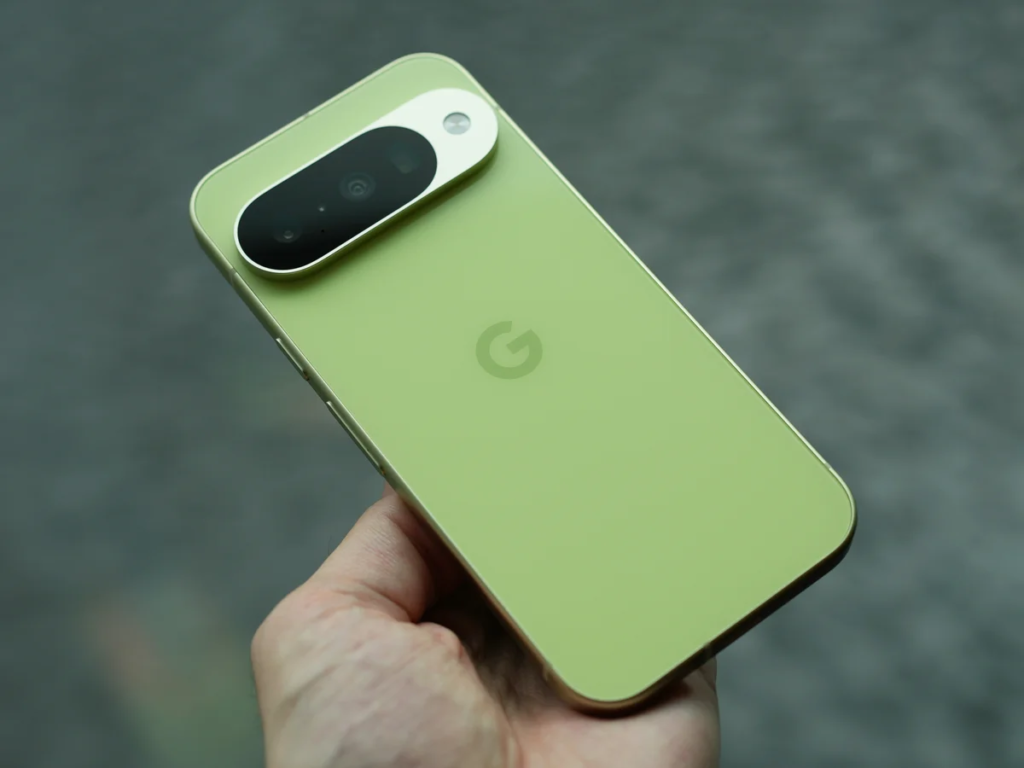
Google Pixel phones have built a loyal following over the years. People love them for their crisp camera quality, clean Android software, and handy artificial intelligence features. When you hold a Pixel, you get the exact smartphone experience Google designed from top to bottom.
At WhatsBuzzn, we keep a close eye on everything happening across the tech world. Our goal is to break down complex tech news into plain English so you can make smart decisions before spending your hard-earned cash. You can always check out our technology and AI section for fresh reviews and viral news updates.
While Pixel devices get plenty of praise from reviewers, buying one is not a guaranteed home run for every user. Every phone brand has weak spots, and Google is no exception. Before you click the buy button or head to the store, you need to look at the full picture.
Here are four major drawbacks of buying a Google Pixel phone that you should keep in mind before upgrading.
1. Raw Performance and Gaming Take a Backseat
Most high-end Android phones use processors made by Qualcomm, like the Snapdragon series. Apple uses its own A-series chips. These processors focus heavily on raw computing power, fast graphics rendering, and sheer speed.
The $0 Secret To Launching Your Entire Online Empire
Why pay hundreds every month for separate software? Build funnels, send emails, and make sales with Systeme.io completely free.
Get Started For $0Free Forever • No Credit Card Needed • Beginner-Friendly
Google took a different route starting with the Pixel 6 series. They introduced their custom processor line, called Google Tensor. Instead of chasing high benchmark scores, Google designed Tensor to handle smart tasks. It powers real-time speech translation, smart call screening, offline voice typing, and instant photo processing.
While those AI features are impressive, raw performance suffers as a result. If you enjoy playing graphic-heavy mobile games like Genshin Impact or Call of Duty, a Google Pixel might disappoint you.
What Makes the Chip Struggle?
When you push a Pixel phone hard with heavy gaming or intense video processing, the phone generates noticeable heat. To protect internal parts from damage, the processor automatically slows itself down. Tech reviewers call this thermal throttling.
When thermal throttling kicks in, your game frame rate drops. You might notice sudden stuttering, laggy animations, or the phone screen dimming on its own.
For content creators who manage video editing or run digital projects—like those exploring YouTube automation on mobile devices—slow rendering speeds can slow down your workflow.
Independent tech tests on platforms like Android Authority regularly show that Tensor chips lag behind equivalent chips from Qualcomm and Apple in raw GPU performance. If maximum power and smooth high-frame-rate gaming are top priorities for you, a flagship from Samsung, OnePlus, or Apple will offer a much smoother experience.
2. Battery Drain Inconsistencies and Slow Charging Speeds
A smartphone is only as useful as its battery life. You want a device that comfortably lasts through a long day of work, travel, and social media scrolling without making you hunt for a wall socket before dinner.
Battery life on Google Pixel phones has been a mixed bag for several generations. While some users report decent battery life, many others experience rapid battery drain, especially when using mobile data instead of Wi-Fi.
Why Pixel Batteries Drain Faster
There are two main reasons Pixel devices struggle with power efficiency: processor efficiency and cellular modems.
First, older and current Tensor chips tend to draw more power from the battery when handling basic background tasks compared to more efficient chips. Second, the cellular modems built into Pixel phones historically consume more energy when searching for a signal or switching between 4G and 5G networks.
Reporting from tech publications like PhoneArena points out ongoing software glitches where background processes keep the phone processor awake when it should be sleeping. That means even when your phone is sitting idle on your desk, the battery meter might drop significantly over a few hours.
Subpar Charging Speeds
Compounding the battery drain problem is slow charging speed. Many competing Android brands now ship with 65W, 80W, or even 100W fast chargers. These phones can go from zero to full in under 30 minutes.
Google Pixels top out at much lower charging rates, usually between 27W and 37W depending on the specific model. A full charge on a Pixel can easily take an hour and a half or longer. If you forget to plug your phone in overnight and need a quick power boost before running out the door, a Pixel will give you far fewer percentage points in fifteen minutes than rival devices.
3. Hardware Bugs, Connectivity Issues, and Limited Support
Software is Google’s strength, but physical hardware manufacturing requires decades of supply chain perfection. While Google has improved build quality significantly over recent years, Pixel owners still report more unexpected hardware and connectivity quirks than owners of established brands.
Network Signal and Call Quality Dropping
One of the most common complaints among Pixel owners relates to mobile signal strength. Pixel devices sometimes struggle to maintain strong cellular connections in areas with weak coverage.
Send, Spend & Hold Money Worldwide Without Hidden Fees
Transfer money internationally at the real exchange rate and hold 40+ currencies in one account.
Open a Wise AccountMid-market rate • Fast transfers • 40+ currencies
When riding on a train, walking inside large concrete buildings, or traveling through rural regions, a Pixel phone might drop calls or lose internet connectivity where another phone stays connected. This issue stems back to the physical modem hardware choices made inside the device. While software patches help improve performance over time, software cannot completely overcome physical hardware limitations.
Software Updates Can Bring New Bugs
Google releases monthly software security updates and feature drops for Pixel phones. On paper, getting fast updates directly from Google is a huge benefit. You get new features before anyone else on Android.
However, these rapid update schedules mean Pixel users sometimes act as unpaid testers for Google. It is not uncommon for a monthly update to fix one problem while accidentally introducing a new bug. Users have reported issues ranging from broken screen auto-brightness to Bluetooth dropouts, broken touch sensors, and broken camera apps following minor software updates.
Limited Global Repair Network
If your iPhone screen cracks or your Samsung battery degrades, you can easily find an authorized repair shop or official store in almost any city.
Google’s physical repair footprint is much smaller. Depending on where you live, getting an official repair for a Google Pixel can involve mailing your phone away for weeks or dealing with third-party repair shops that lack genuine replacement parts. Official customer support through the Google Pixel Support center can involve long back-and-forth emails or phone calls before reaching a resolution.
4. Premium Price Tag Without Premium Resale Value
When Google first launched the Pixel series, part of the appeal was competitive pricing. Early models offered flagship camera quality at prices lower than Apple and Samsung.
Over the last few years, Google shifted its pricing strategy. Premium Pixel Pro models now cost near or above $1,000 at launch. When you pay top-dollar prices, you expect top-of-the-line components across every single hardware category.
The Gap Between Price and Specs
When you buy a $1,000 flagship from Apple or Samsung, you get the fastest mobile processor on the planet, bleeding-edge display technology, ultra-fast charging speeds, and rock-solid build quality.
With a Pixel at that same price point, you get industry-leading camera software and AI tools, but you compromise on processing power, battery endurance, and charging speeds. You are paying premium flagship prices for hardware specs that sometimes match mid-range phones from competitors.
Depreciation and Trade-In Values
Another financial factor to consider is trade-in and resale value. iPhones hold their value better than almost any consumer technology product. Samsung Galaxy flagships also hold reasonable trade-in values through official trade-in programs.
The $0 Secret To Launching Your Entire Online Empire
Why pay hundreds every month for separate software? Build funnels, send emails, and make sales with Systeme.io completely free.
Get Started For $0Free Forever • No Credit Card Needed • Beginner-Friendly
Google Pixel phones tend to drop in value rapidly on the secondary market within the first six to twelve months after release. If you like to upgrade your smartphone every year or two by selling your old phone, a Pixel will yield significantly less return on investment than an iPhone or Galaxy device.
Who Should and Shouldn’t Buy a Google Pixel?
Understanding these four drawbacks does not mean Google Pixel phones are terrible choices for everyone. It simply means you should match your buying decision to your personal habits and needs.
A Google Pixel is Great For You If:
- You prioritize point-and-shoot camera quality above all else, especially for taking photos of people, pets, and dynamic scenes.
- You love clean, clutter-free Android software without pre-installed third-party apps or unwanted bloatware.
- You rely heavily on smart AI tools like live voice translation, automated call screening, and smart voice dictation.
- You want software updates delivered directly from Google as soon as they are ready.
You Should Reconsider Buying a Pixel If:
- You spend hours playing high-end 3D games or editing heavy high-resolution videos on your phone.
- You need ultra-fast charging to top up your battery in ten or fifteen minutes.
- You live or work in areas with poor cellular reception where maximum signal stability is required.
- You want a device that holds high resale value when you decide to trade it in later.
Frequently Asked Questions
Do Google Pixel phones still overheat?
While Google made progress with cooling systems in recent models, Pixel phones can still get warmer than competitors during extended 4K video recording, heavy mobile gaming, or prolonged navigation in direct sunlight.
Is the Google Pixel camera still good despite these drawbacks?
Yes, the camera remains one of the strongest reasons to buy a Pixel. Google’s computational photography produces realistic skin tones, sharp details, and excellent dynamic range in low light or daylight.
How many years of software updates do Google Pixel phones get?
Newer Google Pixel models come with up to seven years of official Android operating system updates, security patches, and feature drops. This provides long-term software support if you plan to hold onto your phone for years.
Why do Google Pixels charge slower than rival Android phones?
Google prioritizes long-term battery health and thermal management over extreme charging speeds. Fast charging generates heat, which degrades lithium-ion batteries over time. Competitors use dual-cell battery designs to achieve higher wattage safely, whereas Google sticks to traditional single-cell charging speeds.
Can software updates fix Pixel battery drain issues?
Software updates often help resolve specific background app bugs that cause battery drain. However, software updates cannot fully fix underlying hardware inefficiencies in cellular modems or processor power consumption.
Where can I ask more tech questions or stay updated on smartphone news?
You can always reach out to us directly through our contact page or leave your thoughts on our articles. We love hearing from our readers!
Buying a smartphone is a personal decision that comes down to what features matter most in your daily life. Google Pixel phones offer incredible photography tools, smart software features, and a clean Android interface that many users love. However, performance bottlenecks, battery quirks, slower charging, and pricing trade-offs are real factors that every buyer should evaluate.
If you value camera performance and smart AI features above raw processing power and lightning-fast charging, a Pixel can still be a fantastic companion. If gaming, battery endurance, and top-tier cellular hardware are your top priorities, checking out competing options before spending your money is a smart move.
Want to stay in the loop with the latest viral tech news, helpful guides, and industry updates? Join our growing community across social media! Follow us on Instagram, like our official page on Facebook, and join the discussion on X (formerly Twitter). We bring you daily updates on what’s buzzing around the tech world!
